


Question
언어변경, Changing the langauge
영어버전으로 다운받고 싶어서 컴퓨터 환경설정도 영어로 바꾸고 영문 홈페이지로 들어가서 다운받았는데 자동적으로 한글버전으로 다운이 됬습니다.
(계정역시 영어계정입니다.)
홈페이지에 보니 cloud cloud로 들어가서 환경설정에 들어가면 APPS라는 탭이 있고 이걸 누르면 언어설정이 된다고 되있는데
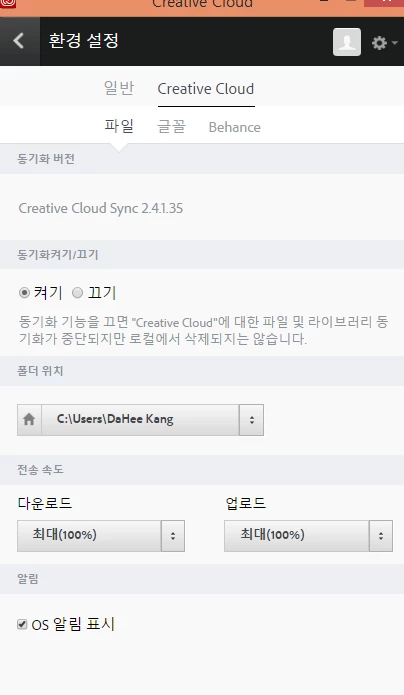
저는 APPS가 없고 파일, 글꼴, Behance 탭밖에 없습니다.
어떻게 바꾸나요?
그리고 한국인이어도 영어버전 일러를 쓰는 사람이 많은데 처음 다운받을 때 언어 설정을 할 수 있게 하는 것이 좋을 것 같습니다.
감사합니다.
Hi,
I want to change my language setting but the option does not shown in my computer.
There should be an option which is called Apps in Creative Cloud followed the instruction of Adobe homepage but I cannot see that thing.
Please let me know the solution. My current language is Korean and I want to change it to English.
Thanks,
 AdChoices