Participant
November 10, 2021
Question

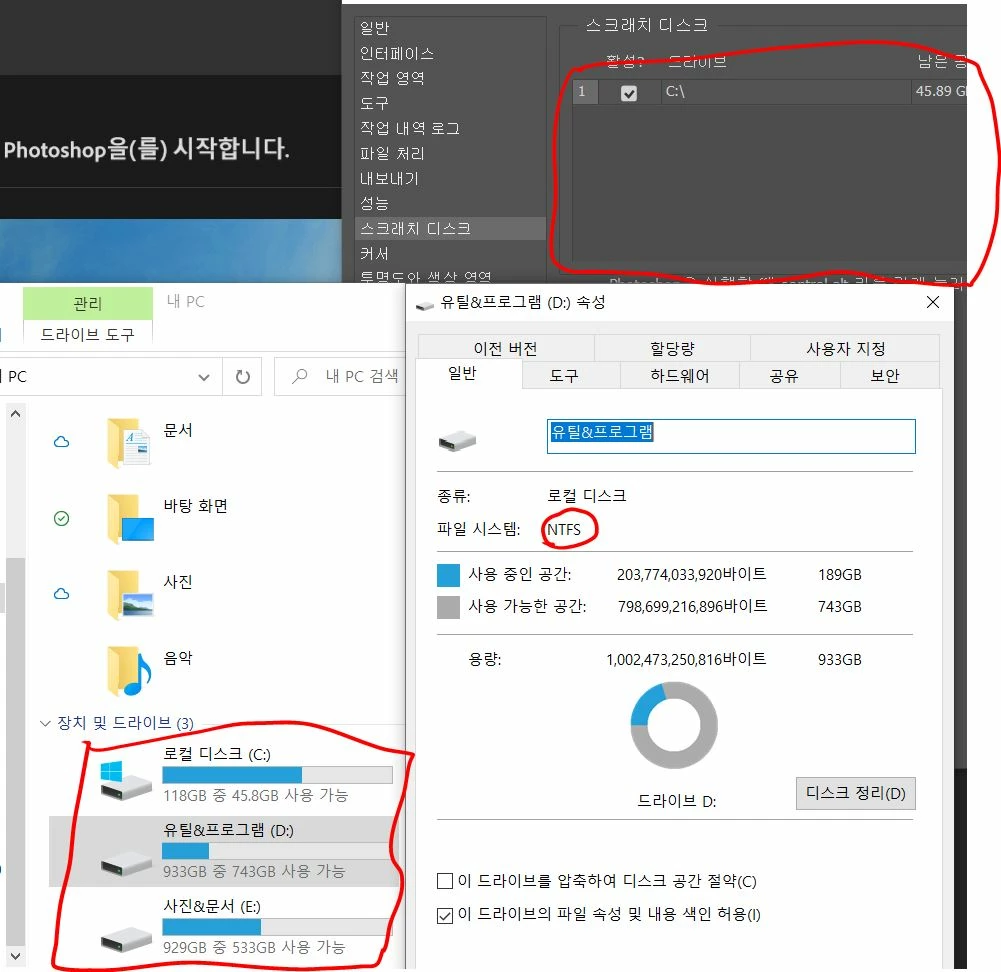
스크레치 디스크에 D 드라이브가 안 뜨네요ㅠ

  • November 10, 2021
  • 1 reply
  • 2564 views

안녕하세요!! 포토샵 스크레치 디스크 설정 하려고 보니 D 드라이브가 안 뜹니다ㅠ

드라이브는 노트북에 내장 되어있고 NTFS 형식입니다!! 

이거 왜 이럴까요??


사진 첨부 드립니다!!
1 reply

nikunj.m
Community Manager
Community Manager
November 11, 2021

Hi,


We're sorry about the trouble with Photoshop due to the scratch disk issue. Would you mind sharing the version of Photoshop you're using along with the version of Windows you're working on? Did you recently install a new drive on the machine or have you used this drive as a scratch disk in the past?


If the drive has been on the computer for a while & you were able to use it as a scratch disk in Photoshop previously, you can try to reset the preferences of Photoshop manually using the steps mentioned here: Reset Photoshop preferences

Please backup your settings prior to resetting the preferences. You can check: Backup Photoshop preferences


Let us know how it goes!

Regards,

Nikunj

Participant
November 13, 2021

윈도우 10 

포토샵 2022

드라이브는 설치한지 1년 정도 됬고 포토샵을 이번에 설치해서 스크래치 디스크로 활용한 적은 없는거 같네요ㅠ


포토샵 재설정 했는데도 안되네요ㅠ

Adobe Employee
July 1, 2024

포토샵 재설정을 어떤식으로 하신 걸까요?
아래 절차에 따라 다시 한 번 진행해보세요.


※ 주의! 

기존 설치된 플러그인이 소실되거나 액션(포토샵), 작업영역 및 환경설정 값이 초기화 됩니다.

작업영역, 설정 등의 저장 및 플러그인 재설치 방법 강구 등 사전 준비가 완료된 상태에서 진행해주세요 


1. 환경설정 초기화

C:\USER\USER NAME\APP DATA\ROAMING\ADOBE\[Program Name]


위 경로의 문제가 되는 프로그램 폴더 이름 뒤에 Old를 붙여 변경해주세요

 ex) Adobe Photoshop 2024 폴더를 Adobe Photoshop 2024 Old 로


2. UXP CEP 초기화

- c:\user\user name\app data\roaming\Adobe\uxp
- c:\program files\common files\ adobe\cep
- c:\program files\common files\ adobe\uxp
- c:\program files(x86)\common files\ adobe\cep


위 경로의 uxp, cep폴더 이름을 uxp old, cep Old로 변경해주세요

ex) uxp 폴더를 uxp Old로
