Participant
December 21, 2016
Question

원격지원을 요청합니다

  • December 21, 2016
  • 1 reply
  • 760 views

원격지원을 요청합니다

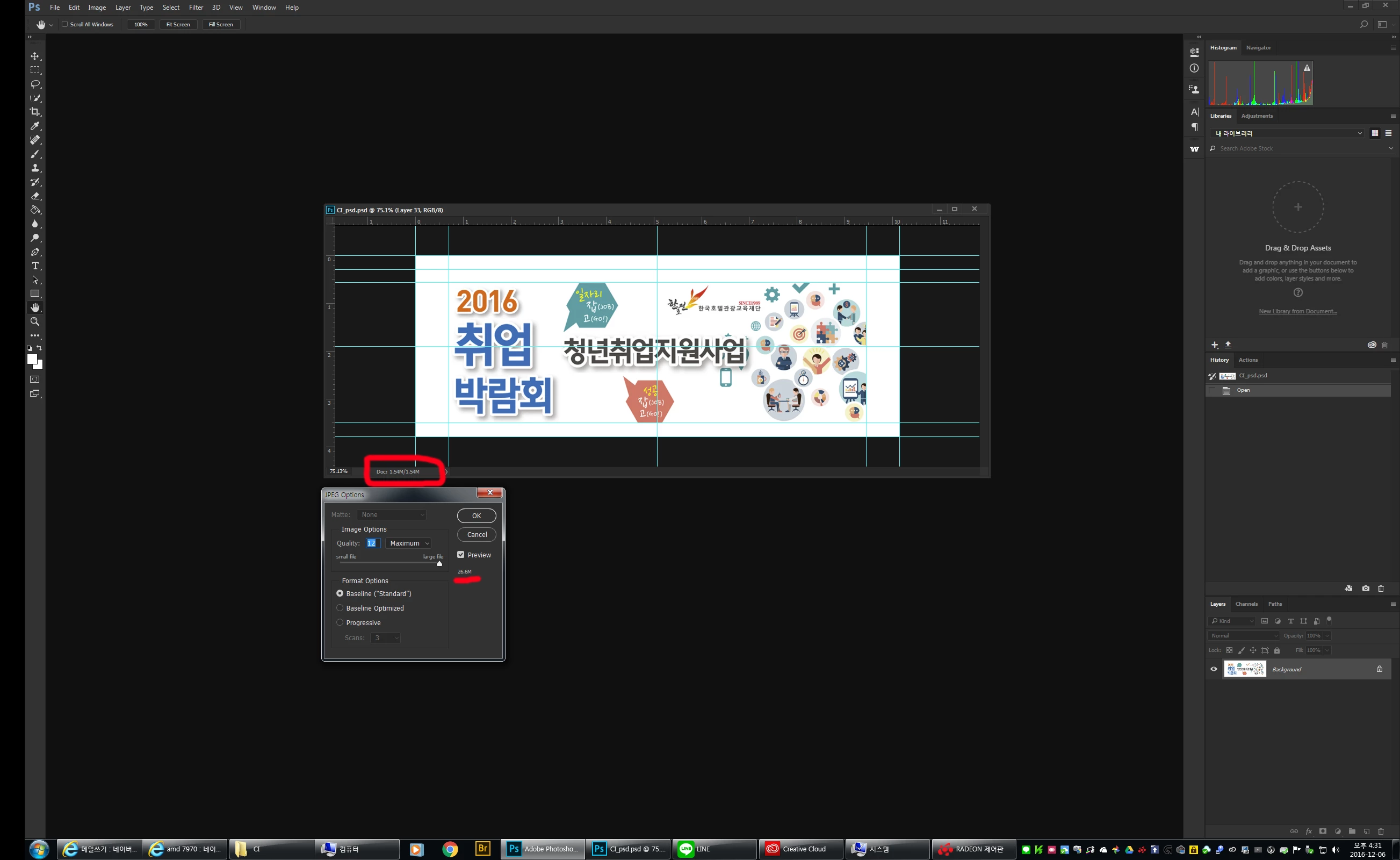
save as로 저장시

용량이 너무 많이 커져서 원격지원 요청함

500kb 저장될야 정상적이지만 20M가 넘는건 말도 안된다

클린설치후 다시 해봐도 동일하고 한국어도비에 문의하고 답변받은것이 저장시에 퀄리티를 낮춰라

황당한 답변을 받았음

그런정도의 에러가 아님

YH Jung 님이 메시지를 편집했습니다.

    This topic has been closed for replies.

    1 reply

    PECourtejoie
    Community Expert
    Community Expert
    December 21, 2016

    Hello, the document size is the number of pixels in the image (left number), or the total amount of pixels including the layers (right number), it is not directly related to the file size when saved as a jpeg...

    Did you get different numbers with the very same size on a previous version?

    What is the file size when saved? (the file size you get in the jpeg dialog is an estimate)

    Participant
    December 21, 2016

    답변감사합니다.
    이전버전에서는 102kb 입니다
    jpeg로 가로1200px 세로450px 에서 20M로 저장되는것이 오류입니다.
    jpeg로 압축이 안되는 오류같습니다.
    현재 저장시 21M로 저장됩니다.
    다른 컴퓨터의 포토샵도 동일한 현상

    제발 원격으로 한번 봐주세요

    Thank you for answer.
    In previous versions it was 138kb
    It is an error to store jpeg as 1200px wide and 450px 20m wide.
    This is an error that can not be compressed into jpeg.
    It is saved as 21M when it is saved.
    The same phenomenon in Photoshop on another computer

    Please take a look at it remotely

    gener7
    Community Expert
    Community Expert
    December 21, 2016

    Just a guess, but if he is getting a 21 MB jpeg from a 1.5 MB open file, I would think it is "document ancestors".

    Inflated JPG File Size - Photoshop Document:Ancestors Metadata

    (No we cannot remote view your computer, we are not allowed to.)