



작업창 너비가 이미지에 맞춰서 자동으로 바뀝니다
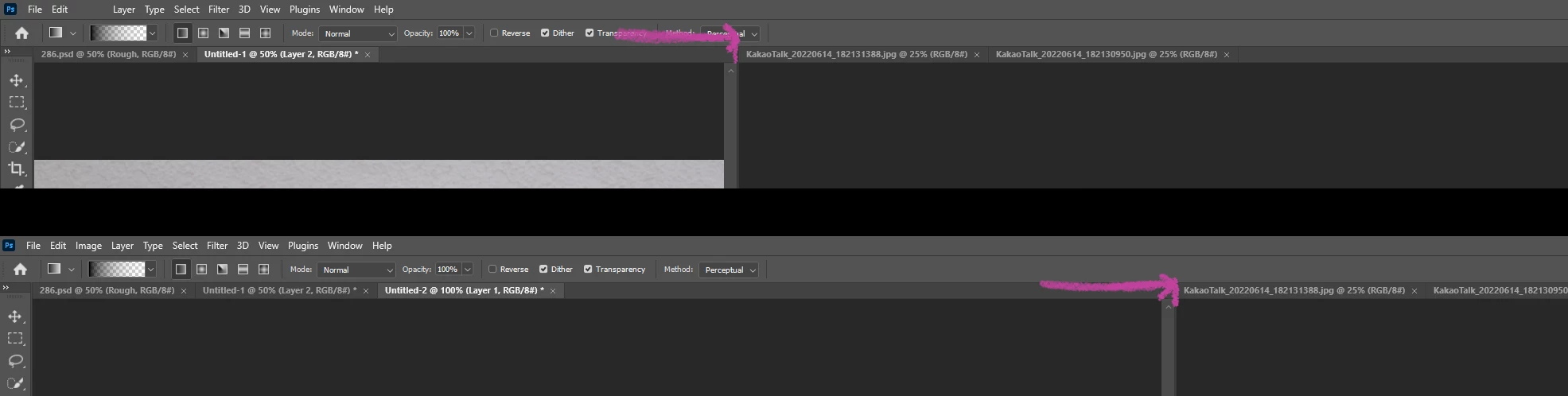
작업창을 플로팅해서 사용하지 않고, '창 > 정돈' 기능에 있는 타일 뷰로 나누어서 사용하고 있습니다.
언제부턴가 포토샵에서 이미지 창 크기에 맞춰서 창 너비가 바뀌네요.
스크린샷의 분홍색 선처럼 이미지 크기에 따라, 창 너비가 자동으로 바뀝니다.
옵션에서 이미지 조정 관련을 비활성화해도 변화가 없습니다.
워크스페이스 작업창 너비를 고정할 수 있는 방법이 있습니까?
Photoshop's workspace split size adjustment (canvas window resize)
I use 'Windows > Arrange > 2-up, 3-up....' window menu workspace (not floating windows)
Opening an image file adjusts the width of the window to match the image size.
In the 'Preferences' option, the Resize Image check applies only to floating windows.
It does not apply when using a screen in a work space without floating a window like me.
When open the image, like the pink arrow in the screenshot, the tile screen width changes.
I work with a narrow screen on the left and a zoom in on the right, which is cumbersome because the Workspace tile window (Canvas Tap Window) width changes depending on the image size.
Please let me know how to use the size of the split screen(Tile)to be fixed. (Not Floating window)


 AdChoices