

Participant
July 4, 2021
Answered

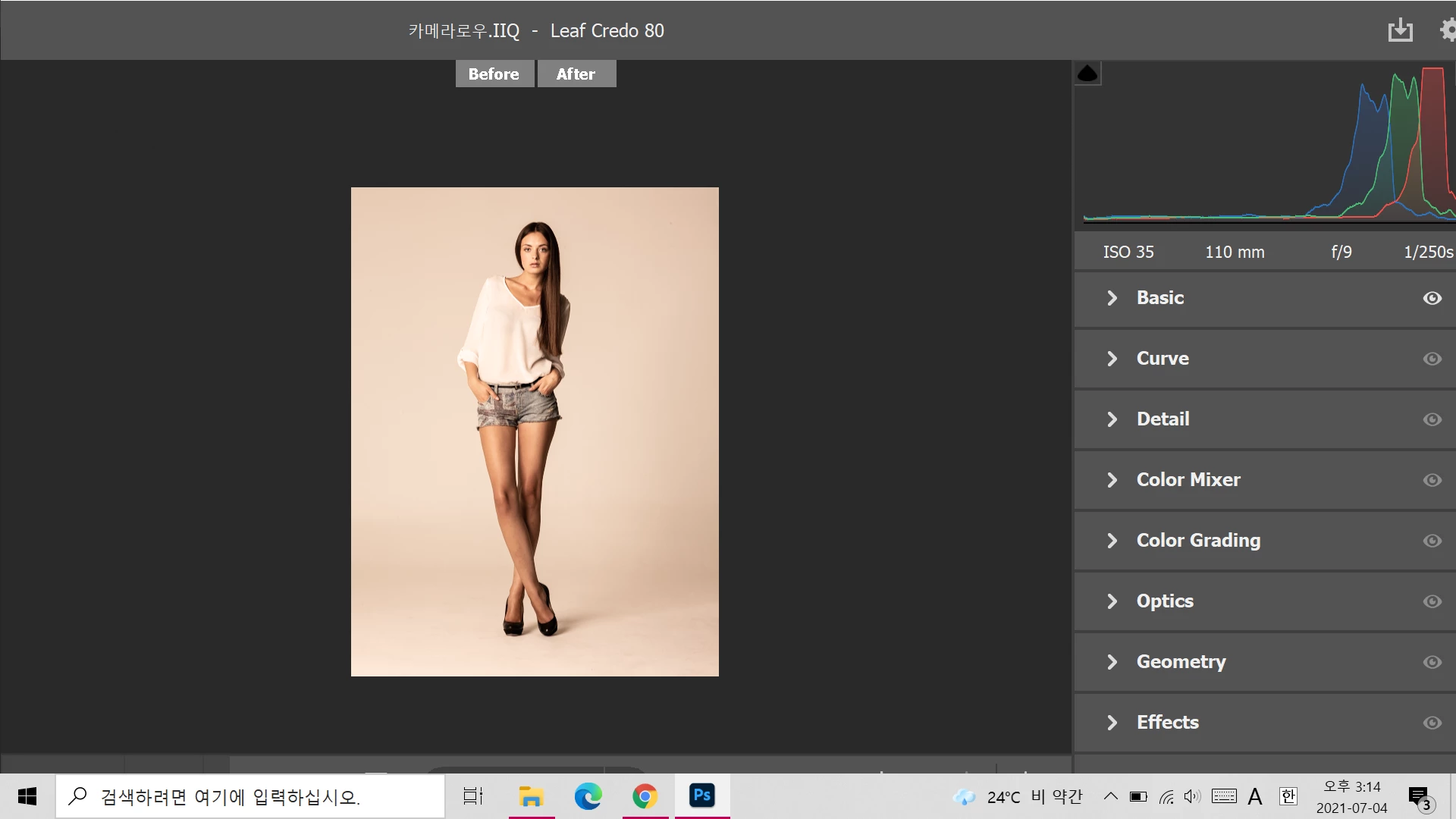
camera raw 화면이 전부 나오지 않습니다.
  • July 4, 2021
  • 1 reply
  • 142 views


옆에 스크롤이랑 밑의 save/done 버튼이 보이지 않습니다. 화면크기 조정 하려면 어떻게 하나요?

    This topic has been closed for replies.
    Correct answer Bojan Živković11378569

    Try to press F key or navigate mouse over edge of window and when it turns into double sided arrow, click and drag to resize window if that can help you anything.


    Another problem can be your Windows configuration. If you set to auto-hide taskbar in Desktop mode that can cause problem, at least from my experience.

    1 reply

    Bojan Živković11378569
    Community Expert
    Community Expert
    July 7, 2021

    Try to press F key or navigate mouse over edge of window and when it turns into double sided arrow, click and drag to resize window if that can help you anything.


    Another problem can be your Windows configuration. If you set to auto-hide taskbar in Desktop mode that can cause problem, at least from my experience.

    Participant
    July 11, 2021

    Thank you for your good reply. When I checked, my laptop display screen was the problem.
