Participant
April 5, 2024
Answered

HELP(the home screen does not appear)

  • April 5, 2024
  • 2 replies
  • 802 views

Hello, everyone. I have a question.
When the program runs, the home screen does not appear and the previously run project opens. How do you control this feature?

    This topic has been closed for replies.
    Correct answer Dolor Sit Amet

    Hello


    You can change status with following settings.


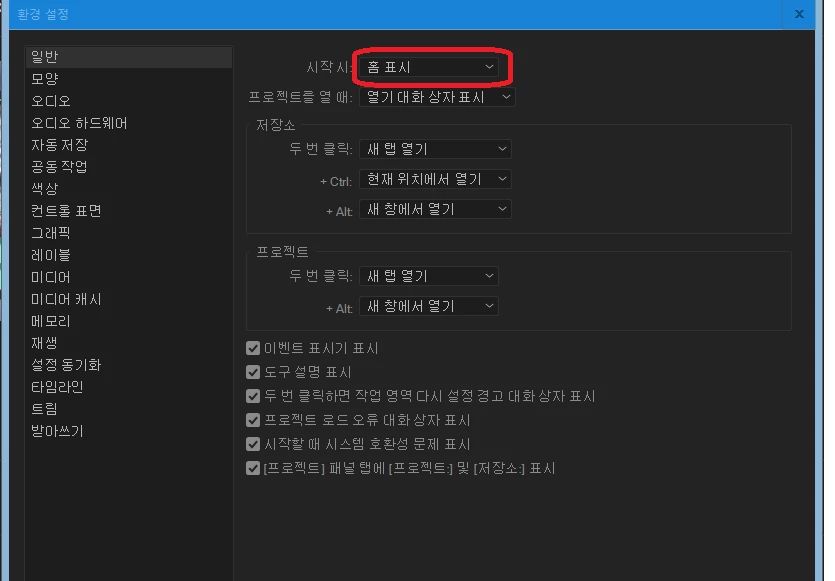
    Edit > Preferences > General > At Start up > Show home


    안녕하세요

    다음 설정 변경을 통해 실행 시 화면을 설정할 수 있습니다.

    편집 > 환경설정 > 일반 > 시작시 > 홈표시


    2 replies

    Participant
    June 4, 2024

    이미지를 수정하려면 이 명령을 따르십시오 arigato dayetoba😍😘😘😘

    Dolor Sit AmetCorrect answer
    Adobe Employee
    April 5, 2024

    Hello


    You can change status with following settings.


    Edit > Preferences > General > At Start up > Show home


    안녕하세요

    다음 설정 변경을 통해 실행 시 화면을 설정할 수 있습니다.

    편집 > 환경설정 > 일반 > 시작시 > 홈표시


    donglemonAuthor
    Participant
    April 5, 2024

    Hello!

    Thank you for your answer.
    The problem was solved by following the method you told me.
    However, the home screen does not appear immediately and only the top tab is visible.
    How can I modify the display?


    Adobe Employee
    April 5, 2024

    hello!


    It seems problem.

    I think it would be fixed with following renaming


    Rename the CEP and UXP folder to "CEP.old" and "UXP old" from the following location:
    - mac Hd\users\user name\libruary\Application support\adobe\uxp
    - mac HD\Libruary\Aplication Support\Adobe\uxp
    - mac HD\Libruary\Aplication Support\Adobe\cep