




Updates for the new Adobe Express as of September'23

Latest Release: Fixes & Enhancements
Your feedback is important to us, and we've been listening. Following are recent changes to the new Adobe Express.
Latest Updates
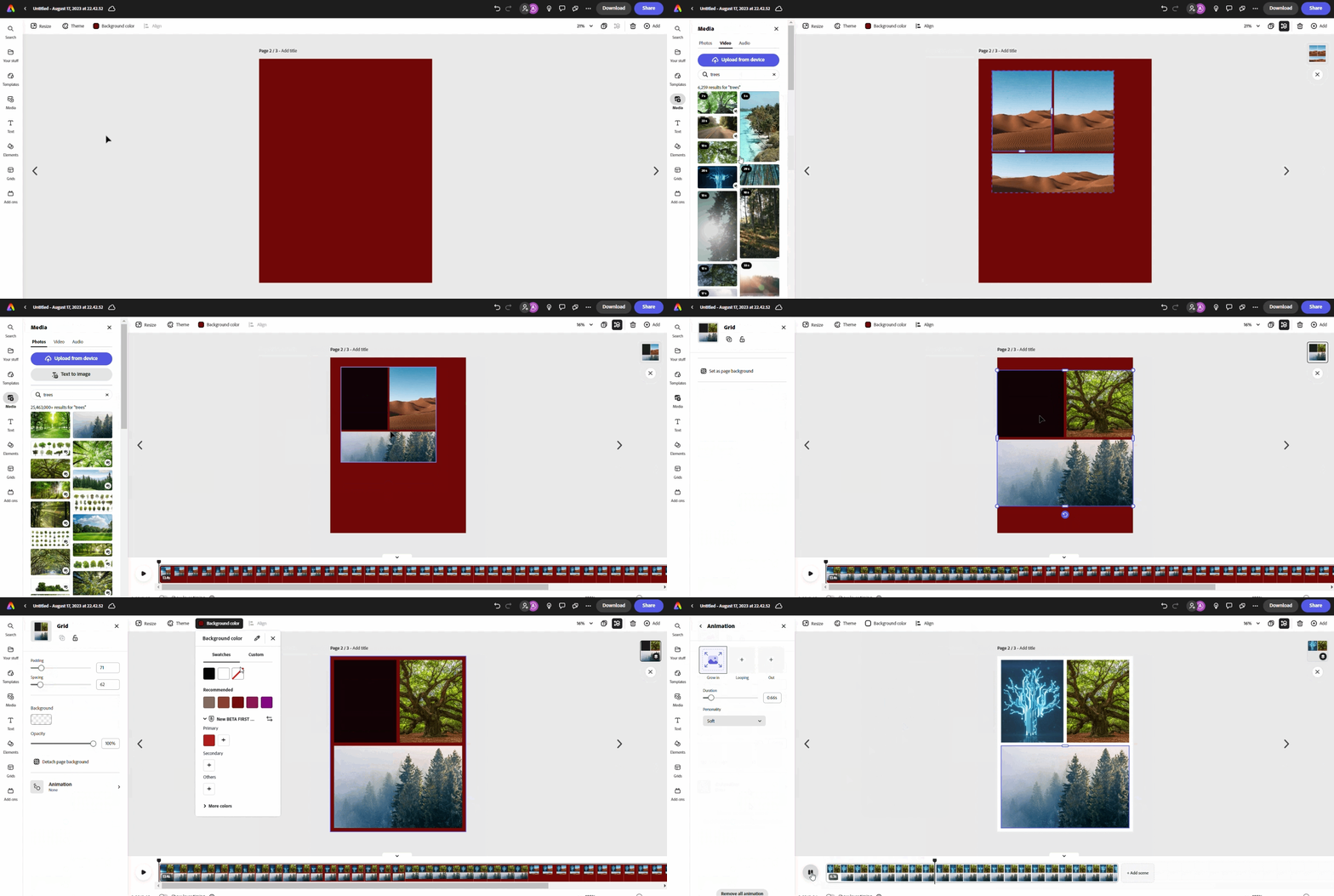
Add Grids to projects
Grids are now available in Adobe Express! Create quick and easy collages with photos and videos by adding Grids to your design. Create custom looks using multiple grids in one design, adjust the size and scale of images in your grid, or customize your grid to fit your content. More Grid features are coming soon, including drag & drop to swap the placement of media within a grid and the ability to change grid layouts while keeping your content intact.
Tip: Grids may be used to create quick and easy collages with photographs & videos. Add multiple grids and modify picture size & scale within a single design to get unique styles.
Webpage Conversion Issues
Did your webpage not convert properly to the new Adobe Express? Issues with webpage conversions, such as font style changes, incorrect headers, footers, and layouts, have been fixed. Here are the steps to reconvert webpage files.
- Go to Your Stuff, then select & delete webpage files that didn't convert properly. Do not delete files in the [Originals] folder.
- Navigate to the [Originals] folder and select the original webpage file you want to reconvert.
- Select "Open converted file" from the "File already converted" message.
The reconverted files will be saved in the [Originals] folder.
Inline Text Editing
Adobe Express supports inline text editing within the design canvas. To edit text, you must first enter text editing mode using one of several methods. Below are two common ways to enter text editing mode.
1. For a text object that is neither grouped nor overlaid with others:
- Double-click the text or
- Single-click the text twice
2. For text objects that are grouped or overlaid with other objects:
- Select the text object from the Layers panel
- Press Enter on the keyboard
Known Issues & Workarounds
Can't embed Spark Video links within a webpage.
To embed a Spark video into a webpage, download the Spark Video file, upload it to Youtube or Vimeo, and then use the link to embed.
Old web projects get a new URL when published post-conversion.
We've identified this issue and are working on getting it resolved. Please stay tuned.
Can't find files after migration.
Please contact Adobe Virtual Assistant so we can help you find your files.
Organized folders are missing.
To restore the old folder structure, visit https://new.express.adobe.com/restore-folders from a new browser.
If files & folders have already been migrated, the 'Folders' hierarchy will remain as it was in the previous version.
Useful links
- FAQ: Get answers to common questions about Adobe Express.
- Known Issues: Stay up-to-date with Adobe Express's known issues and workarounds.
- Report abuse: Report offensive content or abuse within Adobe Express.
- System requirements: Find the minimum technical specifications to use Adobe Express.
- Discord: Join the Adobe Express Discord server to connect with others, get creative feedback, and share resources!
- UserVoice: How can we improve Adobe Express? Share your thoughts and ideas in UserVoice.

 AdChoices