



Anubhav M
Community Manager
Community Manager
October 22, 2024

Adobe Creative Cloud Diagnostic Tool for Illustrator

  • October 22, 2024
  • 3 replies
  • 3090 views

The Adobe Creative Cloud Diagnostic Tool is designed to help identify and troubleshoot issues that may arise while using Adobe Illustrator. Whether you’re experiencing crashes or encountering performance issues, this tool can help detect and resolve common problems by gathering important system and application data. After a crash, the Creative Cloud Diagnostics tool will automatically appear once you submit the crash report.


Follow the steps outlined below to run the diagnostic tool, review the logs, and take appropriate actions to resolve any identified issues.


  1. To run the tool, simply click on Check System.
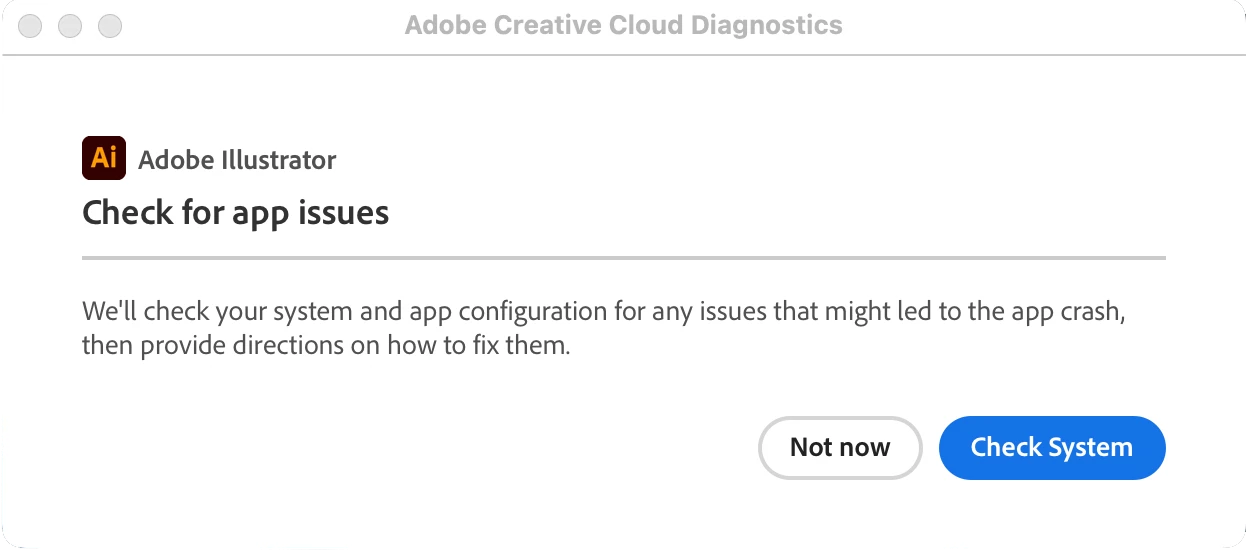

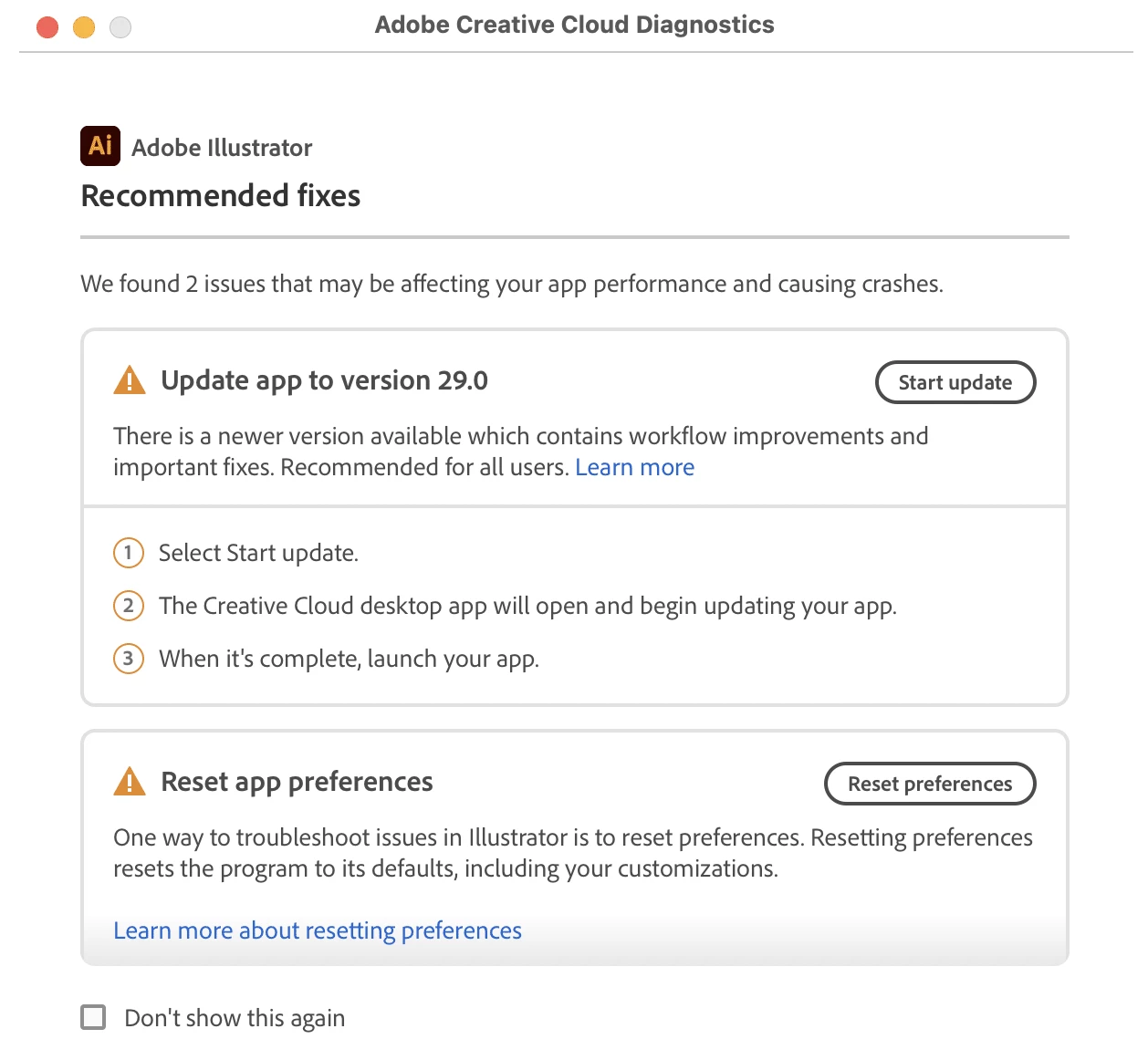
  2. The utility will display recommendations Once the system check is complete. For instance, it might suggest upgrading your GPU driver if incompatible, updating the Illustrator app, or resetting your preferences.

  3. Click on Reset Preferences to proceed with resetting your preferences. If you choose to update, the diagnostic tool will open the Creative Cloud desktop app and begin updating the app. Once the update is complete, it will launch Illustrator.

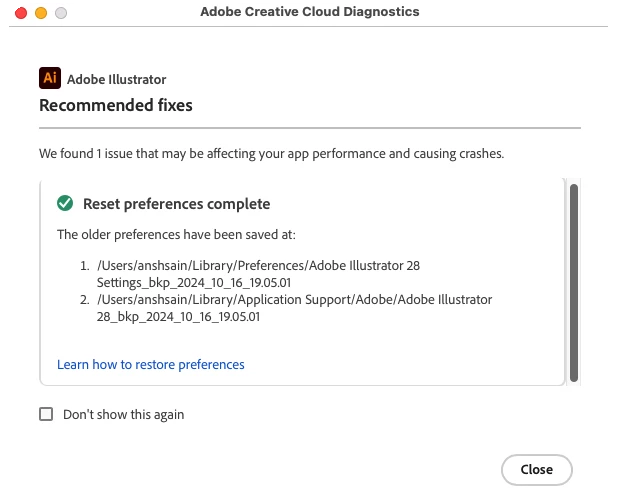
  4. Once done, you will see the action complete screen.

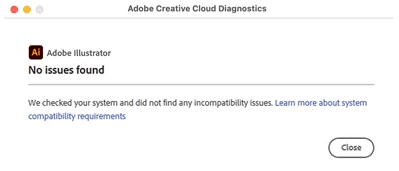
  5. You will see the following screen if no issues are found.
 

We’d love to hear from you!

We hope this helps ensure a smoother experience when encountering issues with Illustrator. If you have any questions about using this tool, please don't hesitate to reach out.

If this was helpful, please click the Upvote icon in the top left corner of this post. Your feedback helps us improve the experience. Thank you!


Have questions? Click 'Reply' below to ask.

Click 'Follow' below to bookmark this post for easy reference.

    This topic has been closed for replies.

    3 replies

    Participant
    December 3, 2024

    Where do I find the download for Adobe Creative Cloud Diagnostic Tool for Illustrator for mac?

    Participant
    December 3, 2024

    Ohhh, I found it, macOS: /Applications/Utilities/Adobe Creative Cloud Diagnostics, but it won't open 🙊

    Participant
    November 1, 2024

    Hello,

    My Adobe Illustrator gradually begins to lag as I use it. Before I posted about the issue, I thought I might use this tool but I can't figure out how to access it. Is it only available after a crash?

    Thank you!

    Anubhav M
    Community Manager
    Anubhav MCommunity ManagerAuthor
    Community Manager
    November 1, 2024

    Hello @Kevin24069301cice,

    I am sorry to hear about the trouble you're having when using Illustrator. Would you mind trying the suggestions shared in this help article (https://adobe.ly/3UA1x1P) and letting us know if it helps?

    Looking forward to hearing from you.

    Anubhav

    Participant
    November 1, 2024

    Hello Anubhav,


    Thank you, I've already looked over that page and don't think those are the issues. I wanted to run this diagnostic tool before I got into too much detail since I think that would fit better on a new post. Is there a way to access the diagnostic tool for Adobe Illustrator without a crash first?


    Thanks!

    Kevin

    LucasFonts
    Participating Frequently
    October 31, 2024

    It does not run, Adobe Creative Cloud Diagnostics version 1.4.0.7.
    It appears for less than a second in the Task Manager (win11) and poof its gone.

    Inspiring
    October 31, 2024

    Hi @LucasFonts,


    Sorry to hear you're having trouble with the Creative Cloud Diagnostics tool! Could you please share a screen recording of the workflow you followed when trying to use the tool? This will help us better understand the issue and assist you more effectively.


    Thank you!

    Abhishek Rao

    LucasFonts
    Participating Frequently
    October 31, 2024

    I just doubleclick C:\Program Files\Adobe\Adobe Creative Cloud\Diagnostics\Adobe Creative Cloud Diagnostics.exe and then nothing happens, just a blue circle rotation shortly, Windows telling me to hold on a second. A screen recording will not provide additional information. Anything else I can do to help?