Anshul_Saini
Community Manager
Community Manager
May 3, 2024

Illustrator v28.5 | Enhanced File Management and Seamless Linking!

  • May 3, 2024
  • 22 replies
  • 8179 views

Hello everyone, 


We're thrilled to announce the April 2024 release of Illustrator version 28.5. Dive into new features and enhancements inspired by your feedback that are designed to streamline the workflow and improve efficiency.



See a comprehensive list of the latest feature updates, along with other enhancements and bug fixes.

Automatically Relink
Missing Files

When you relink a missing file to your Illustrator document, Illustrator now streamlines your workflow by automatically searching for and relinking other missing linked files in the same folder. Learn more about this feature and how to utilize it effectively.

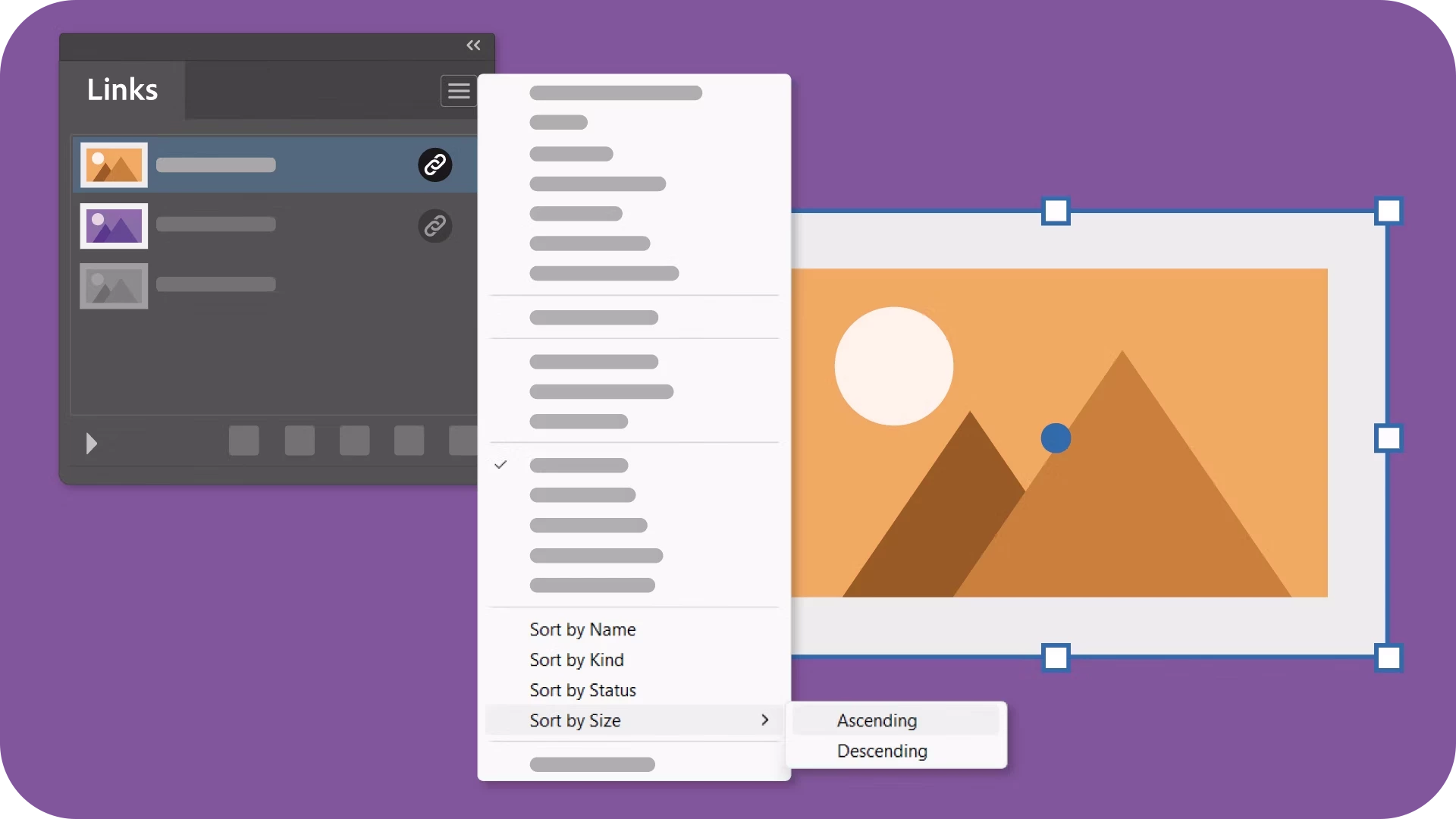
Sort links by Size

With the ability to sort linked & embedded files by size in ascending or descending order, organizing your assets has never been easier. Learn more about this feature and elevate your link management.


Seamless Transfer of Illustrator Files with Links Across Platforms

Illustrator now ensures an uninterrupted workflow by preserving the relative locations of linked files when moving documents between folders or systems. Experience hassle-free migration, keeping everything intact without any broken links. Learn more about this feature and simplify your file management process effortlessly.

Fixed Issues

Our team has addressed several issues in Illustrator v28.5:

  • Scale Strokes & Effects in the Transform panel is grayed out when nothing is selected. (UserVoice)

  • Mouse pointer disappears in Illustrator while working on the Windows 11 Insider Preview build. (UserVoice)


  • Artwork appears pixelated while zooming or panning an image (UserVoice)


  • Filled area text boxes can't be exported as SVG files (UserVoice)


  • Unable to drag and drop JPEG and PNG files from Photoshop (v25.5.1) to Illustrator (v28.3) (UserVoice)


  • Partially Fixed - Artboard edges disappear while panning or scrolling a document (UserVoice)
    (Grids & guides are still under investigation)

We would love to hear your feedback on the improvements in the Illustrator UserVoice.


See What's New for more information on the latest features. To help us have focused discussions, create separate posts for feedback on features related to this update.


Thanks,
Anshul Saini

If you've found value in this post, a friendly upvote would be fantastic. Your thoughts are even more precious – share them with us in the discussion!
    This topic has been closed for replies.

    22 replies

    Participant
    July 10, 2024

    In this version, the links cannot be replaced all at once, when opening a file with multiple copies of a link, and wanting to change it for a different one, you have to go one by one, and that generates a lot of work time. In previous versions it was possible to choose another file and have it replace all of them.

    Ton Frederiks
    Community Expert
    Community Expert
    July 10, 2024

    According to this UserVoice topic, they are working on a fix:

    https://illustrator.uservoice.com/forums/333657/suggestions/48498587

    Participant
    June 9, 2024

    It's nice. But can you guys please do something about mesh tool. When we do something with this tool it becomes hard to use in others option. Can you do something so that we can convert a object ,which is edited by mesh tool, into a vector shape?


    jane-e
    Community Expert
    Community Expert
    June 9, 2024
    quote

    But can you guys please do something about...

    By @Chainless_Slave


    Adobe Illustrator still continues to use the UserVoice website for bug reports and feature requests. Please comment at this site so the product developers will see it: https://illustrator.uservoice.com/


    Jane


    Participating Frequently
    May 28, 2024

    Great features from the Adobe Design Team! 

    Participant
    May 23, 2024

    Not sure if anyone else is having an issue with this, but after I updated I suddenly can't place bitmap images without a white background

    Ton Frederiks
    Community Expert
    Community Expert
    May 23, 2024

    See the previous page in this thread, there are more users having that problem.

    dacreativegenius
    Community Expert
    Community Expert
    May 22, 2024

    This is a big deal when working with a team and lots of assets.  Great Feature!

    Participant
    May 20, 2024

    You guys messed up how Illustrator handles BMP imags.  Illustrator now treats them like JPGs.  The white background is no longer transparent and you can't change the color.  BOO!!! walked it back to 28.3 until you fix this.  This took some very frustrating time to figure out so once again, BOO!!!

    Participant
    May 20, 2024

    Illustrator 28.5 keeps crashing. It crashed 3 times on Friday and once now again Monday. Have never had this issue before - have resorted to rolling back to 28.4.1 to be able to work without it crashing. 


    Windows 11 Pro 23H2, Intel Core i7, Nvidia GeForce GTX 1060

    Participant
    May 15, 2024

    We lost the link all button. Can we get that back

    Anubhav M
    Community Manager
    Community Manager
    May 15, 2024

    Hello @tderuyter,

    Thanks for reaching out. Kindly allow me some time while I check this with the team.

    Thanks,
    Anubhav

    Inspiring
    May 15, 2024

    okay fun but is the why when I go to replace links in my file the "replace all" feature has disappeared and when I do relink, it doesn't find all the linked files in the same folder like it used to? I have to relink each one or use the links palette? 

    WHile this new fearture is helpful when the file is already open not very useful when opening a file. 

    Participating Frequently
    May 20, 2024

    Interesting update! While the new linking feature works well, I miss the "Replace All" function. Relinking only finds some files, forcing manual relinking or using the Links palette. This is less efficient, especially for pre-existing files.

    happie_97
    Community Expert
    Community Expert
    May 14, 2024

    This is a very useful feature and update!