Anshul_Saini
Community Manager
Community Manager
March 28, 2025

Illustrator v29.4 | Faster, smarter, and more intuitive!

  • March 28, 2025
  • 8 replies
  • 2681 views

Hey everyone!

Illustrator v29.4 is here with exciting performance upgrades, Retype enhancements, and features inspired by your feedback.

Update now to experience these improvements and elevate your creativity!

 

Update the App

Try out the latest Features and Enhancements in Illustrator.


Enjoy a smoother experience!

Menus and menu items now open faster and respond more seamlessly, allowing you to access features effortlessly and complete your workflows more efficiently.


Easily identify all instances of a font with Retype

Now, when using Retype to detect fonts in rasterized or outlined text, words with the same font are highlighted together—whether adjacent or not. Selecting one word instantly highlights all matching fonts, saving you from manual scanning.

Plus, in the Retype panel, you can filter by your favorite fonts and adjust the sample text size (small, medium, or large) for a more customized experience


Enhancements inspired by your feedback

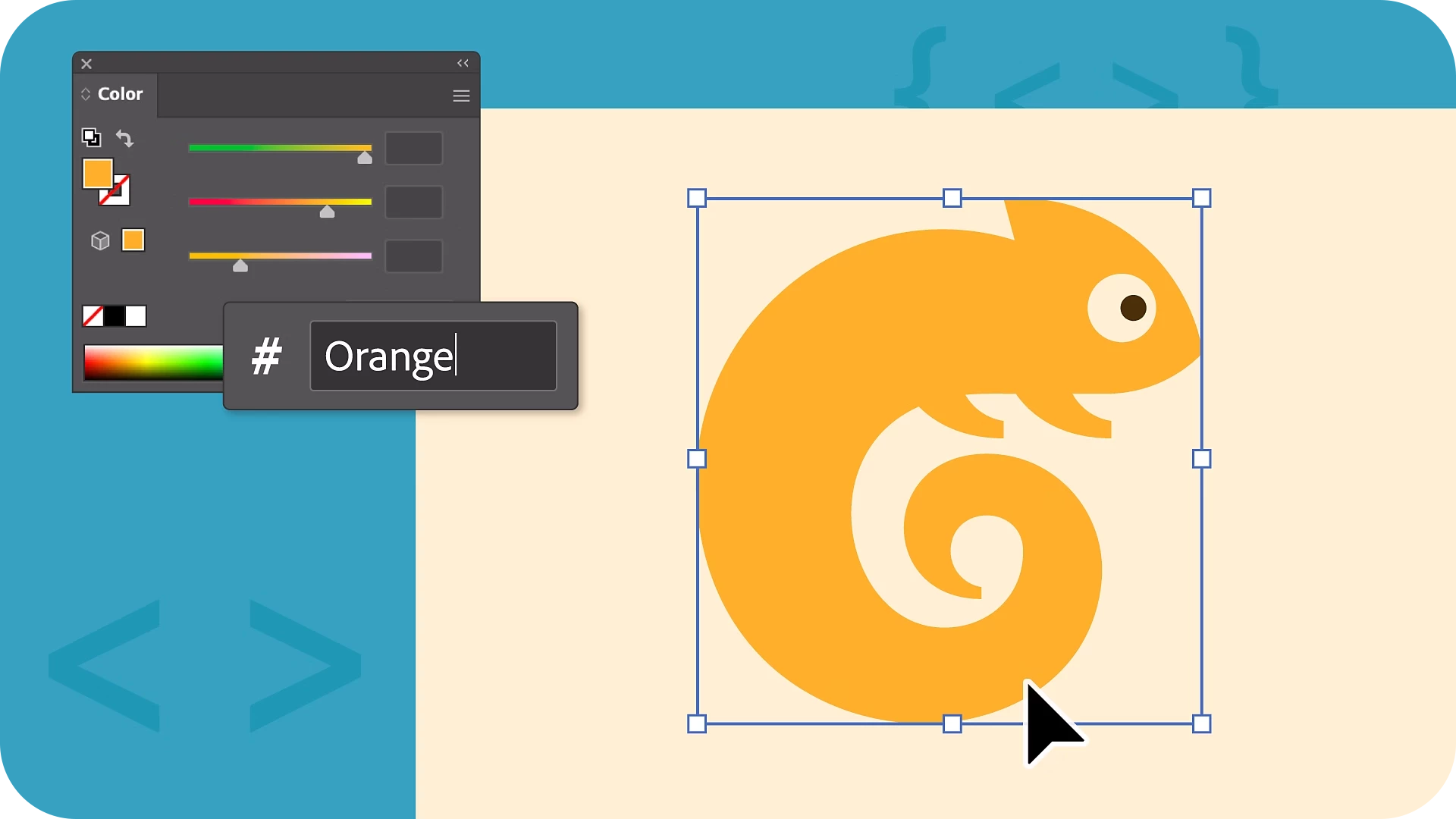
Instant Color Selection with Enhanced Hex Code Input

Flexible Hex Input: Enter colors in single-digit (1 → 111111), double-digit (12 → 121212), or three-digit (123 → 112233) formats for quick selection.


Flexible Hex Input: Enter colors in single-digit (1 → 111111), double-digit (12 → 121212), or three-digit (123 → 112233) formats for quick selection.


CSS Color Names: Enter standard color names (e.g., Red → FF0000, Blue → 0000FF) or even partial names like ‘Ye’ to get suggestions (Yellow → FFFF00).


Try these enhancements today and make color selection smoother than ever!


Fixed Issues

Illustrator v29.4 also includes several bug fixes. Take a look here.

We’d love to hear from you!

Try out the v29.4 and let us know your thoughts. Feel free to reach out if you have any questions or need more tips!

If this was helpful, please click the Upvote icon in the top left corner of this post. Your feedback helps us improve the experience. Thank you!


Have questions? Click 'Reply' below to ask.

Click 'Follow' below to bookmark this post for easy reference.

    8 replies

    Community Expert
    April 21, 2025

    Unless it's multi threaded I'm sure it's about the same but I'll let you all know from what I run on.

    Illustrator is open almost 24/7 and just about the same for Bridge and Photoshop
    Anubhav M
    Community Manager
    Community Manager
    April 18, 2025

    Hello @Multipasser@melon1@mlsgvrc,

    I hope the problem is resolved by now. If not, kindly try the suggestions shared in this help article (https://helpx.adobe.com/illustrator/kb/optimize-illustrator-performance.html) and let us know if they help.

    Also, try running Illustrator under a different administrator account (Windows / macOS) and share your observations.


    Looking forward to hearing from you.

    Anubhav

    Participant
    April 19, 2025

    Hi @Anubhav M , thanks for reaching out. 
    Unfortunately, none of the suggestions in the help article make a noticeable difference. 


    Here are some additional observations I've made. All of this is on a fresh install of Illustrator, independent of admin account:


    Settings that have a positive influence:

    • Hide Grid (Grid is need in my case, so not an option.).
    • Density of Gird (I'm working on 10 mm with 10 subdivisions = 1 mm grid. Larger grids seem to work better.).
    • Snap to Grid: OFF (Snapping to grid is need in my case, so not an option.).
    • Grids In Back: OFF (small note: “In” shoud probably be spelled “in” in the settings).
    • Real-Time Drawing and Editing: OFF.
    • Canvas Color: Match Brightness (even though I much prefer working on white).


    The most noticable performance drops happen when:

    • Performance suffers most if there are text frames in the document.
    • Duplicating an artboard.
    • Moving an artboard with the arrow keys.
    • Duplicating multiple shapes and text frames.
    • Moving multiple shapes and text frames with the arrow keys.
    • Editing text.


    Participant
    April 14, 2025

    Unfortunately, it's incredibly slow on my end too, with constant spinning balls or waiting 3–4 seconds for the most simple operations like copying multiple shapes, moving objects on the canvas, or moving artboards etc. Copying sometimes doesn't happen at all (see attached screen recording). As usual, it's made worse with the document grid on.


    • AI 29.4
    • macOS 15.4
    • Apple M1 Pro
    • 32 GB
    • nothing else running
    • tried restarting AI & restarting the mac


    Multipasser
    Inspiring
    April 15, 2025

    damn, that's not usable anymore!


    I dont have it that way. it's just simpel tasks have 1/2 sec delays.. mostly not spinning ball. But the cursor is doing something.

    Participant
    April 14, 2025

    Illustrator is too slow. Many users are losing valuable time due to Adobe developers' poor choices in algorithms and data structures.

    Participant
    April 9, 2025

    Bonjour

    Ma question est simple je voudrais installer les logiciels de  Adobe sur le D pas sur la partition C, comment faire svp

    Inspiring
    April 11, 2025

    To install Adobe Illustrator on partition D, first open the Creative Cloud desktop app and navigate to preferences. Then, in the Apps section, change the "Install location" to the desired D drive path. Finally, uninstall any existing Illustrator installations and install it to the new location. 
    https://helpx.adobe.com/download-install/using/change-install-location.html#:~:text=Open%20the%20Creative%20Cloud%20desktop,right%2C%20and%20then%20select%20Preferences.&text=Select%20Apps%20in%20the%20sidebar,Done%20to%20apply%20the%20changes.

    adamthewiz
    Participant
    April 3, 2025

    My Illustrator updated today, to 29.4 and it's incredibly laggy — and some basic functions like turning on and off grid (Show Grid / Hide Grid) do not work. I've restarted my system, relaunched it, same problem. I'm on a deadline and it's so slow it's hard to work.

    Anubhav M
    Community Manager
    Community Manager
    April 18, 2025

    Hello @adamthewiz,

    I hope the problem is resolved. If not, kindly try the suggestions shared in this help article (https://helpx.adobe.com/illustrator/kb/optimize-illustrator-performance.html) and let us know if they help.

    Looking forward to hearing from you.


    Anubhav

    Participating Frequently
    March 31, 2025

    This version seems to have broken the Share for Review feature. I shared a link with a client, but after saving the type edits they asked for, the "update content" option was gone with the old link and only the option to "create link" was available. Having to resend the link after every edit feels like the feature is less professional. 

    Anubhav M
    Community Manager
    Community Manager
    April 18, 2025

    Hi Mitchell,

    Would you mind checking if Illustrator behaves this way with specific files? If yes, please share a link to the file here or via DM (https://helpx.adobe.com/in/creative-cloud/help/share.html), so I can check it on my end.

    Looking forward to hearing from you.

    Anubhav

    Multipasser
    Inspiring
    March 30, 2025

    Faster? 


    I don't know what you guys did starting from v29 but it has so much delays lately!

    Everytime you do a 'outline' of a text or a 'ungroup' it is 'busy' for 1 or 2 seconds.

    It ads up if you do these things 200x a day! It seems like illustrator is 'selecting' all the objects first when you ungroup them. You see a little selection cross 'x' moving and then your mouse is free to use again. It is so annoying!


    And I was on a imac Pro (intel) but since last week i'm on a new Mac Studio Ultra M3! 

    Fresh install of all adobe products and I have the same issue! V28 did not have that!  it was flying!

    Anubhav M
    Community Manager
    Community Manager
    March 31, 2025

    Hello @Multipasser,

    Would you mind checking if Illustrator behaves this way with all files and sharing a small screen recording of the problem, so I can better assist you?

    Also, try the suggestions shared in this help article (https://adobe.ly/3YdnwNR) and share your observations.

    Looking forward to hearing from you.


    Anubhav

    Multipasser
    Inspiring
    March 31, 2025

    I'll try when I find the time.

    I noticed yesterday in a .ai with over 100 layers, if you 'ungroup' something it seems to go though all the 'layers' quickly to sort things out.


    It's new since v29!  Never ever had this problem on mac, Illustrator was lightning fast.

    But now with ungrouping or and even Sending layers to Front or BACK, there is a delay!

    1 to 2 seconds you cannot use the mouse! very annoying.