




Faster PSD/PSB Save is now in Photoshop beta!
Faster PSD/PSB Save — Now in Photoshop Beta
by the Photoshop Team
Since around July we've had multithreaded PSD/PSB opening, so hopefully you've already noticed files opening faster.
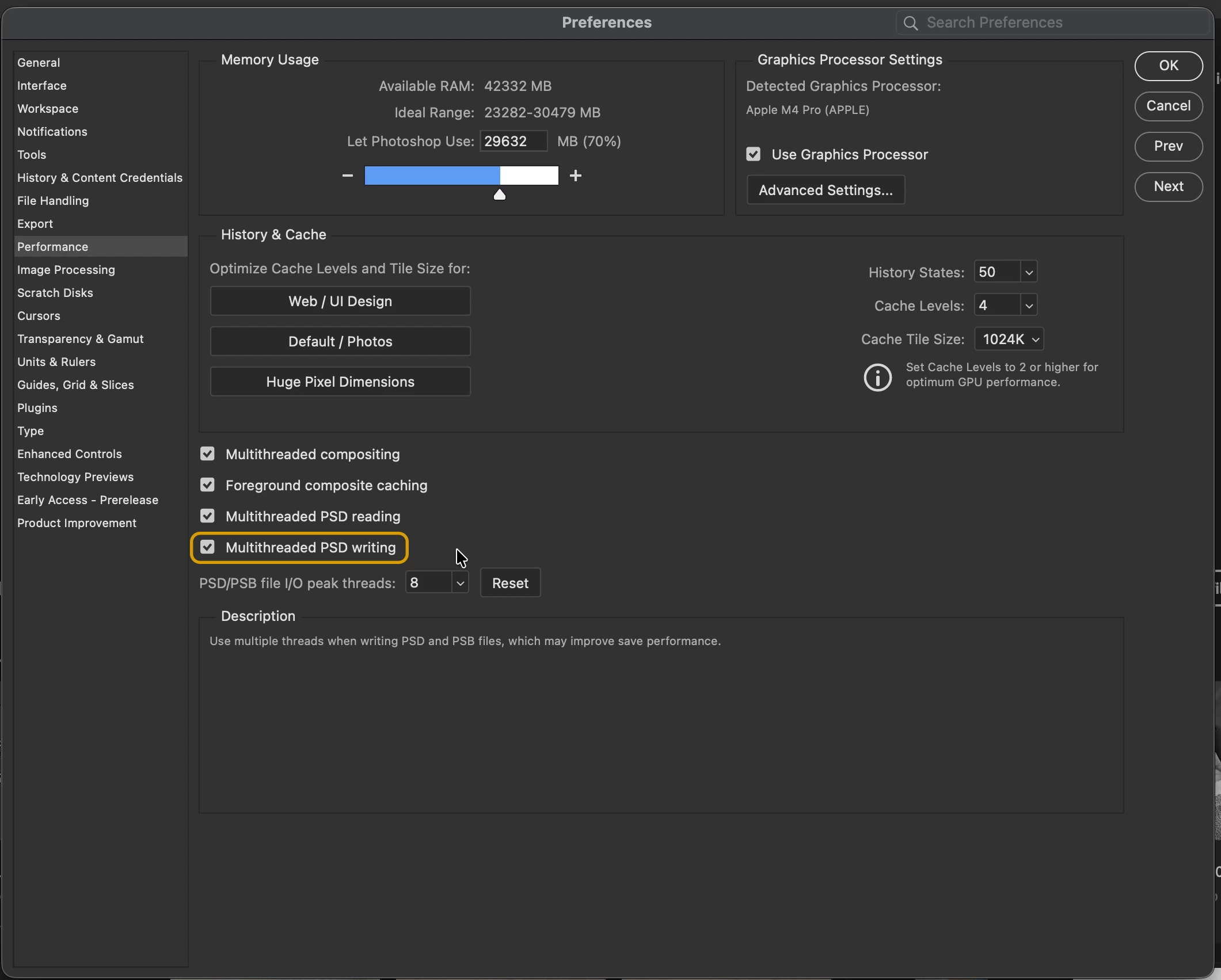
Today's beta build (Oct 1, m.3694) adds the other half: multithreaded PSD/PSB saving, which is ON by default and speeds up saving for PSD and PSB files.
With this enabled, PSD/PSB files that meet certain complexity criteria may be written in parallel (multi-threaded) when saving. In those cases, you should see faster save times, particularly for large files where there is enough work to benefit from parallel processing.
⚠️ Avoid Data Loss
Use Save As when saving so you're working with a copy while you're testing this. If anything goes wrong, better it happens to a copy than your original file.
What changed
- Significant reduction in save time for many PSD and PSB files. Speed gains depend on file complexity (compression type, bit depth, layers/channels, document content) and hardware (lower end machines with 16GB or less of RAM may not benefit).
How to try it
- Install the latest Photoshop Beta from the Creative Cloud desktop app.
- Open large PSD/PSB files.
- Use File → Save As or Save a Copy and compare write times with the Photoshop general (not beta) release.
Need to turn it off?
You can disable the multi threaded reading or writing within the Performance pane of Photoshop Preferences.
🛠️ Seeing issues? Please let us know!
-
If you run into any problems (performance regressions, unexpected behavior, file corruption, differences after save/reopen, etc.), please do the following:
- Add PSDPerformanceLog=1 to pslogSettings.txt file in:
-
Mac: ~/Library/Preferences/Adobe Photoshop (Beta) Settings/
-
Windows: \Users\[User Name]\AppData\Roaming\Adobe\Adobe Photoshop (Beta)\Adobe Photoshop (Beta) Settings\
-
- Save the image again with logging enabled
- Send me (petgreen at adobe.com) the original image, the saved image (if relevant), and the generated pslog file which is output in:
-
Mac: ~/Library/Logs/Adobe/Adobe Photoshop (Beta)/
-
Windows: \Users\[User Name]\AppData\Roaming\Adobe\Adobe Photoshop (Beta)\Logs\
-
- Add PSDPerformanceLog=1 to pslogSettings.txt file in:
How you can help
- Test a variety of files (small to very large) and share timed before/after results in this thread.
- Flag any functional regressions or save errors right away.
- Share screen recordings or logs when possible to help us reproduce edge cases faster.
Thanks for testing the Photoshop beta and sending feedback — your reports help us make Photoshop faster and more reliable for everyone.
 AdChoices