kritagyan
Community Manager
Community Manager
June 19, 2026

New Light Adjustment Layer in Photoshop Beta
  • June 19, 2026
  • 3 replies
  • 131 views

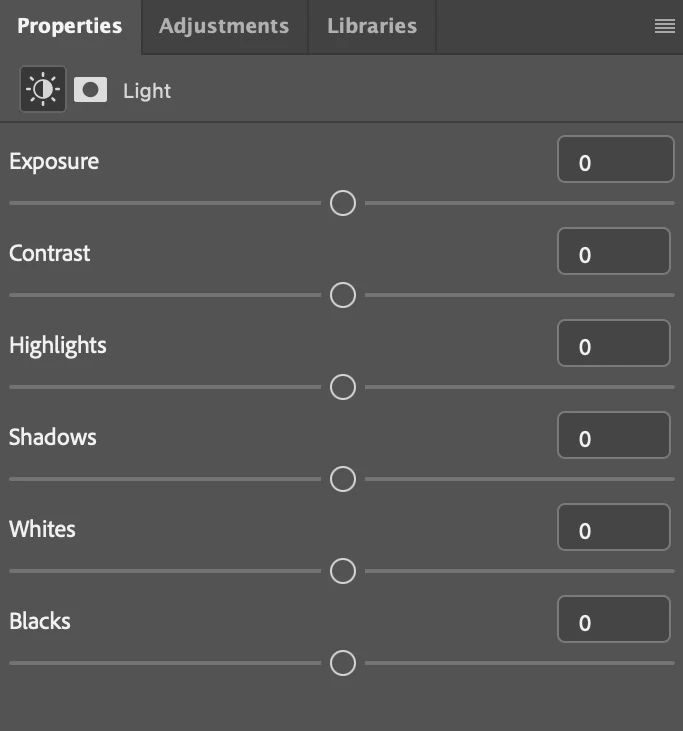
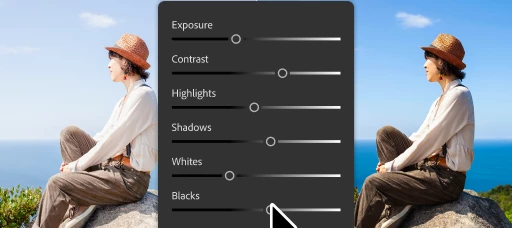
We've upgraded the classic Brightness/Contrast adjustment layer into Light, bringing more powerful, non-destructive lighting controls directly into your layer-based workflow. With the new Light adjustment layer, you get:

  • Exposure
  • Contrast
  • Highlights
  • Shadows
  • Whites
  • Blacks

A few important notes:
• Brightness/Contrast has NOT gone away. It's now part of the Light adjustment layer and remains available through the Legacy controls menu.
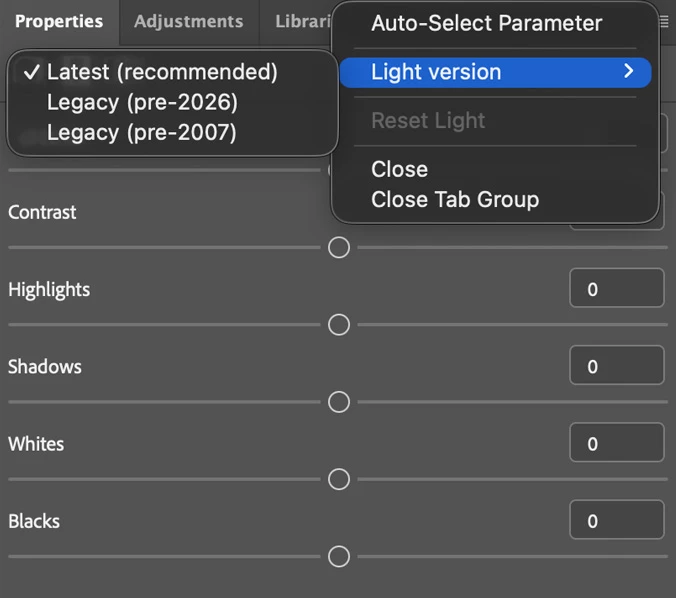
Existing actions & plugins that use Brightness/Contrast will continue to work as expected. You can update them at any time to take advantage of the latest high-quality controls.
• It is available for 8-bit and 16-bit RGB images. For all other color modes, Brightness/Contrast continues to work exactly as it does today.

The goal is to give you more precise control over all lighting adjustments while preserving compatibility with your existing workflows.

We'd love to hear your feedback as you try it out in Photoshop Beta.

    3 replies

    Known Participant
    June 21, 2026

    There is no real need to add a Legacy option here. If a separate Brightness control had been included, it would have been much more useful. Since Exposure, Contrast, Blacks, Whites, Highlights, and Shadows are already available, Brightness should have been included as well.

    kritagyan
    Community Manager
    kritagyanCommunity ManagerAuthor
    Community Manager
    June 22, 2026

    The primary reason for retaining the legacy options is to ensure backward compatibility for all our users and existing workflows.

    Though Brightness and Exposure might produce similar adjustments, but the newer Exposure control is designed to deliver higher-quality results, particularly in terms of tonal accuracy. I’d encourage you to try both and see which best fits your workflow but would love to hear any additional feedback or thoughts you may have.

    Known Participant
    June 22, 2026

    I understand that there is a difference between the two. However, adjusting Brightness changes the overall brightness of the image uniformly, whereas Exposure tends to have a stronger effect on brighter areas and a comparatively smaller effect on darker areas.

    What I meant was that since the new panel already includes so many adjustment sliders, it would have been nice to include a dedicated Brightness slider as well. That said, the new options that have been added are really good, and I appreciate the improvements.

    onazole
    Inspiring
    June 20, 2026

    In Spanish they have the date wrong, instead of 2026 it says 2006.


    kritagyan
    Community Manager
    kritagyanCommunity ManagerAuthor
    Community Manager
    June 22, 2026

    Thanks for sharing this. This shouldn't be happening & we'll work on a fix for this ASAP.

    Trevor.Dennis
    Community Expert
    Community Expert
    June 20, 2026

    I think a lot of us use Filter > Camera RAW as a more powerful option, but I can see that this Adjustment layer would be more direct and flexible.  I’d love to see Clarity added to the adjustments though.

    kritagyan
    Community Manager
    kritagyanCommunity ManagerAuthor
    Community Manager
    June 22, 2026

    Alongside the new lighting controls, we've had also added Temperature and Tint to the Color and vibrance adjustment layer in October 2025 + Clarity, Dehaze and Grain as adjustment layers in January 2026 to Photoshop release version. Feel free to explore these too & we'd love to hear what you think and how they're working for you.