


Srishti Bali
Community Manager
Community Manager
April 8, 2026

Elevate Your Edits with Layer Styles in Photoshop Mobile
  • April 8, 2026
  • 13 replies
  • 2214 views

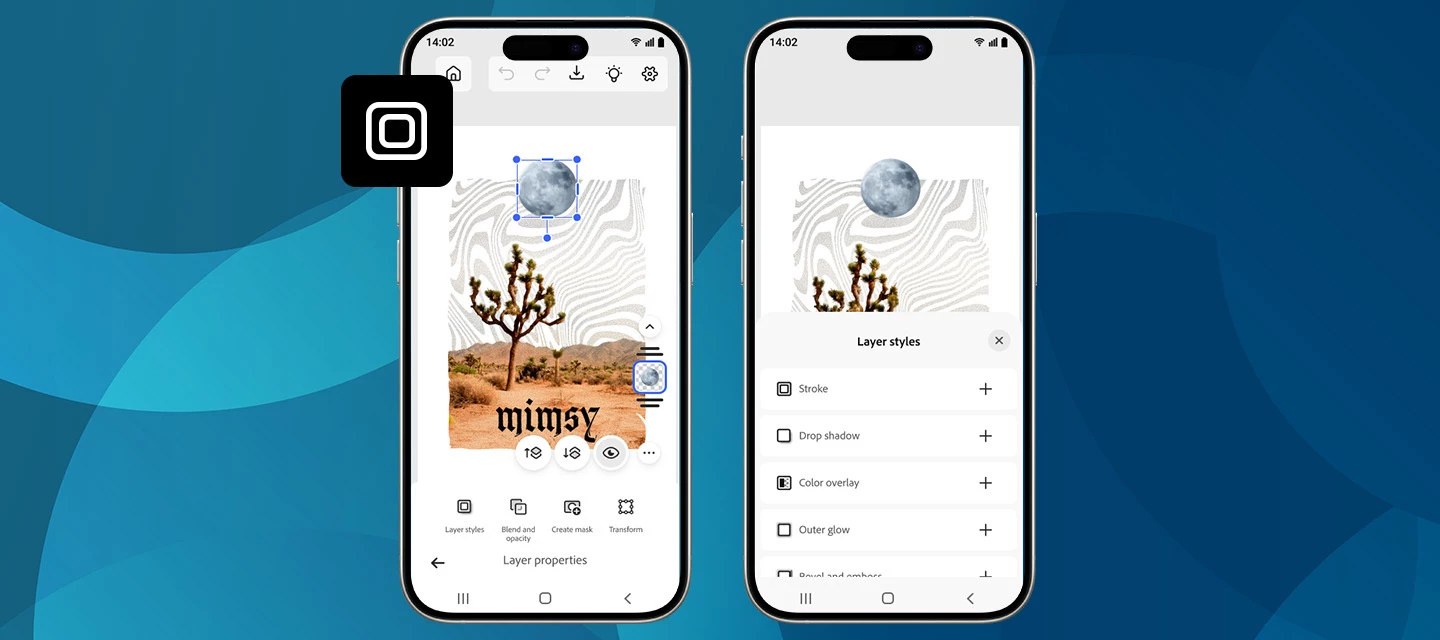
We’re excited to roll out a new creative boost in the April release of Photoshop on mobile! You can now apply Layer styles directly on your phone, making it easier than ever to add polish, depth, and personality to your designs, right from your pocket.


What’s New

With the latest update on Photoshop for iPhone and Android, you can apply a range of Layer styles to elevate your edits. From subtle shadows to bold outlines and glowing accents, layer styles help your objects stand out without extra steps.


Getting started

Create a new project or open a photo, switch to the Tools workspace, and go to Layer properties > Layer styles. From there, choose the look you want and fine-tune it with intuitive controls.

New styles are now available, including Stroke, Drop Shadow, and a lot more. Want to explore what these and other styles can do? Each one comes with adjustable settings like Size, Color, and Opacity, giving you full creative control. Simply tap the checkmark to apply and continue creating. Read more here.


How to Update

Get the latest version of Photoshop on your iPhone or Android by updating or downloading it from the Apple App Store or Google Play Store. 


Show Us What You Create 💬

We’d love to see how you’re using layer styles in your mobile workflows! Share your creations, tips, or feedback with the community and let us know which style you’re reaching for first.

Happy creating! 🎨📱

    13 replies

    Amelia Jack
    Participating Frequently
    April 28, 2026

    It seems a great and useful feature 

    Horton1
    Participant
    April 27, 2026

    Great update! this makes mobile editing feel way more powerful and close to desktop workflows.
    Layer styles on phone is a game changer for quick, polished creative work on the go.
     

    francesnadeau
    Participant
    April 26, 2026

    Using layer styles in Photoshop Mobile helps make your edits look more clean and professional. Features like shadows, gradients, and overlays can turn simple images into something more attractive. I’ve used Photoshop to design all the images on my site, so I know how much these small details improve the overall look. When visuals are neat and well-organized, users find it easier to engage with the content, similar to a cookout allergen menu, where clear information helps people quickly understand ingredients and make the right choice without confusion.
    https://cookoutmenu.net/cookout-allergen-menu/

    fatii9898
    Participant
    April 24, 2026

    This is a great update! Being able to use Layer Styles directly on mobile makes editing much more flexible and efficient.

    The addition of Stroke and Drop Shadow with adjustable controls is especially useful for quick design work on the go. Definitely going to try this in my next project.

    Looking forward to exploring more creative possibilities with this feature!

    zohaib hassan381
    Participant
    April 23, 2026

    This is a great addition for mobile workflows, especially for quick edits on the go. One thing I’m curious about—how does performance hold up when stacking multiple layer styles on higher-resolution files? Also, are these styles non-destructive and fully editable later like on desktop, or are there limitations users should be aware of?

    francesnadeau
    Participant
    April 22, 2026

    Using layer styles in Photoshop Mobile is a great way to give your edits a more polished and professional look, things like shadows, gradients, and overlays can completely transform simple images into something eye-catching. I’ve actually designed all the images on my site using Photoshop, so I’ve seen how much of a difference these small details can make in overall presentation. When visuals are clean and well-structured, it becomes easier for users to engage with the content—just like a cookout allergen menu, where everything is clearly presented so people can quickly understand ingredients and make the right choice without confusion.

    fatii9898
    Participant
    April 22, 2026

    This is a great update, especially for users who prefer editing on mobile. Layer styles like drop shadow and stroke can really improve the overall look without adding complexity.

    It’s good to see more advanced features becoming accessible on mobile, making design workflows faster and more flexible.

    poppyplaytimeapk3
    Participant
    April 21, 2026

    Here are some engaging questions you can ask them:

    • Which Layer styles do you think will be most useful for mobile creators—Drop Shadow, Stroke, or Glow effects?
    • Are these new features in Adobe Photoshop mobile comparable to the desktop version, or are there still limitations?
    • How well do Layer styles perform on lower-end smartphones—any lag or performance issues?
    • Can we combine multiple Layer styles on a single layer like we can on desktop?
    • Are there any plans to introduce advanced effects like Bevel & Emboss or Gradient Overlay in future updates?
    • How does this update improve workflow for social media creators using apps like Instagram or TikTok?
    • Is there an option to save custom Layer style presets for reuse across projects?
    • How intuitive is the UI for beginners who are new to Photoshop on mobile?

    If you want, I can also make these questions more casual or more technical depending on where you're posting 👍

    poppyplaytimeapk3
    Participant
    April 20, 2026

    Which Layer style update in Adobe Photoshop mobile do you find most useful, and does it match the desktop experience?

    holykailashtours
    Participant
    April 20, 2026

    Here's a very helpful and practical topic for the creative community. Using Adobe Photoshop on mobile and having the capability of layer styles can truly enhance the quality of your edits while also becoming a great time saver. Holly Kailash Tours, simple tools that effortlessly lead to making better visuals, are our constant companions.

    Best Travel Consultant In Nepal