


Preran
Community Manager
Community Manager
January 26, 2026

Welcome to the new Adobe community
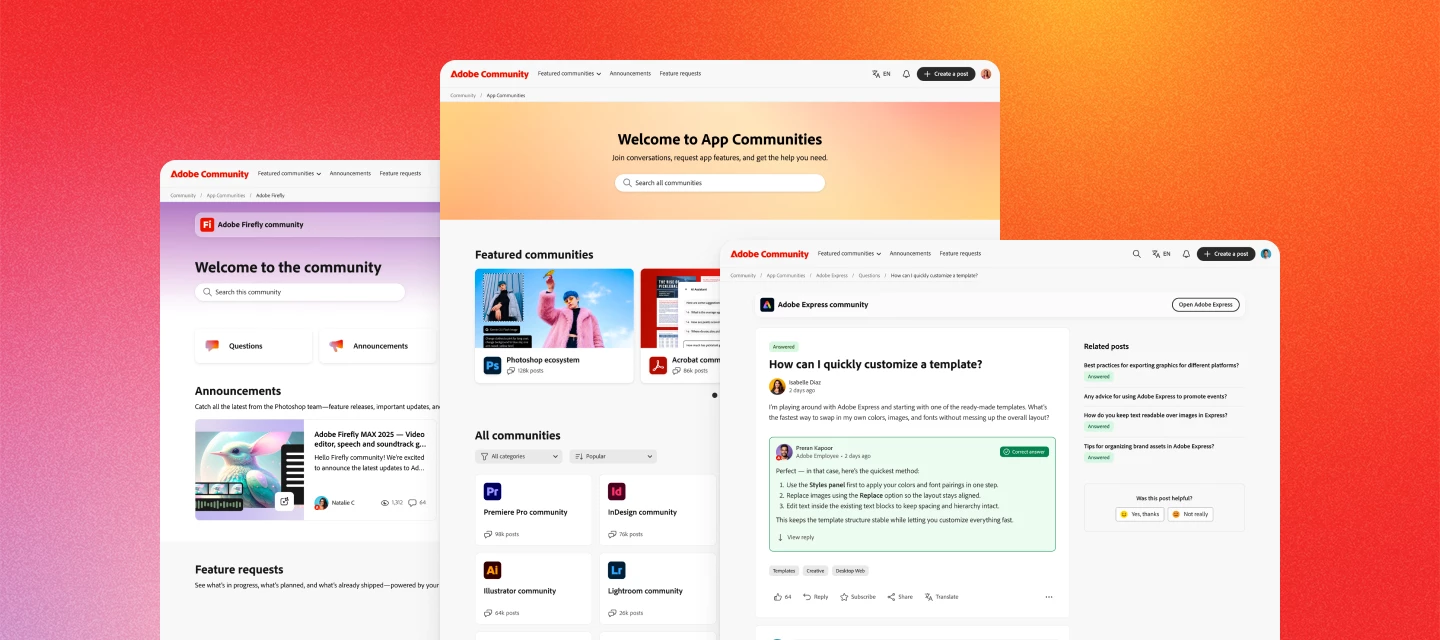
  • January 26, 2026
  • 67 replies
  • 12587 views


Hi everyone. The new Adobe Community experience is officially live! You’re now looking at a reimagined space designed to make it easier to connect, share feedback, and see how your ideas help shape Adobe products.


What’s new


A clearer way to share ideas and feedback

Feature requests and bug reports now have dedicated spaces, clearer status indicators, and voting—so it’s easier to see what’s gaining traction and what’s already in progress.


Better visibility into what’s happening

You can now track the status of feature requests and bugs as they move from idea → in development → released. When something you’ve voted on changes status, you’ll be notified.


Cleaner navigation, less noise

Discussions, announcements, and product feedback each have their own place—making it easier to find answers, discover what’s new, and focus on what matters most to you.


Richer posts and conversations

Create posts with images, videos, code blocks, and file attachments to share context, examples, and workflows more easily.


Stronger connections with Adobe teams and peers

Your community activity now connects to your Adobe ID, helping us better understand feedback and engage more meaningfully with the people using our products every day.


Your content is still here


All posts, replies, solutions, feature requests, and bug reports created on or before November 16 are already available. Content created between November 17 and launch day will be added soon—no data will be lost, and you won’t need to recreate anything.


Jump in


Explore your product communities, upvote ideas you care about, ask questions, and share what you’d like to see next. This community works best when your voice is part of the conversation.


Thank you for helping make Adobe Community what it is. We’re excited to keep building it with you.


— The Adobe Community Team


    This topic has been closed for replies.

    67 replies

    Charlie Arehart
    Community Expert
    Community Expert
    January 27, 2026

    If anyone may wonder “why is this announcement, found in the Photoshop ecosystem announcements section, getting feedback and comments/complaints about the new system from people referring to OTHER Adobe communities”, it’s that folks may understandably be following the following breadcrumbs to end up here…

    At the very top of all communities is an “announcements” link, and that goes to a page listing announcements which have somehow been chosen to be listed there (across various products), and this ONE (“welcome to the new adobe community”) is the first one that seems related to the new system. (To be clear, while each community has its own “announcements” link also, some like mine still have no content more recent than two months ago, either discussions or announcements.)

    And so people are picking that top link, finding this post, reading it and the replies, and adding their own.

    I saw one reply where it was asserted that folks should be commenting “elsewhere”. I offer this simply to explain why the average user will end up here. They won’t likely see my note, so expect more comments from different communities as time passes today and in coming days.

    /Charlie (troubleshooter, carehart. org)
    johnrellis
    Legend
    January 27, 2026

    [This post contains formatting and embedded images that don't appear in email. View the post in your Web browser.] 


    Adobe Community Manager ​@Preran explains why this topic is in the Photoshop Ecosystem:

    We had to choose this option because of limitations in the current platform. We will continue to refine the experience in the future as we make changes to these features. 

    Charlie Arehart
    Community Expert
    Community Expert
    January 28, 2026

    John, FWIW, I had seen that (somewhere, but didn’t have the link so didn’t share it). My reason for writing my note was because again there had been mention in another reply of some suggesting we comment elsewhere. I was explaining why most people will probably post here without ever seeing that note, or the one you point to, or mine here. Ah, life in a community. :-)

    /Charlie (troubleshooter, carehart. org)
    johnrellis
    Legend
    January 27, 2026

    I’m not receiving email notifications for my own posts.  In the past two generations of Adobe forum platforms, searching my email archive for my own posts was often the most efficient way to find them (since the platforms’ search functions were poor).  The search function for the new Gainsight platform looks equally poor, but now I won’t have the option of searching my email.

    Nancy OShea
    Community Expert
    Community Expert
    February 1, 2026

    Forgive my ignorance but what exactly is Gainsight? 

    I can’t log-in with my Adobe email & password. It doesn’t recognize me.


    Click the Bell icon for Notifications.

    To find recent Posts you created, go to forum Avatar ⇒ Posts. 


    Nancy O'Shea— Product User & Community Expert
    johnrellis
    Legend
    January 27, 2026

    [This post contains formatting and embedded images that don't appear in email. View the post in your Web browser.] 


    The email notifications are even worse than in the old Khoros platform, completely disrespecting the reader:


    - The subject line is useless.

    - Formatting and images are stripped.

    - The first many inches of the body are wasted on a superflous “Adobe Community” banner and  “Your post has a new reply, johnrellis” in 128-point baby fonts.

    - The text body is centered rather than left-justified.


    Compare today’s notifications from the new platform versus the old platform:


    New platform:


     Old platform:

    Known Participant
    January 27, 2026

    Inconsistent menu design

    Each section has a different design menu, the post filter button, comment options, the text editor, the login menu, etc.


    Non-responsive design

    The width of the posts is not responsive and looks very narrow on large screens.


    Missing search filters

    There should at least be an option to filter by most recent posts

    johnrellis
    Legend
    January 27, 2026

    The text box for composing replies displays only 7 lines at most (while the panel for new messages appears to get arbitrarily large as needed).  This limitation will needlessly degrade the quality of replies for complicated products like Lightroom Classic -- please remove the limit.


    See the attached screen recording.


    R Neil Haugen
    Legend
    January 27, 2026

    This is a terrible DOWNGRADE for those of us used to helping other via this forum. There is no way to simply view all threads one has been active in recently as a THREAD. You can only get a list of your own posts, which is totally bonkers USELESS.


    You cannot quickly find which threads you have a response in to check.


    Very ANGRY here.

    Everyone's mileage always varies ...
    johnrellis
    Legend
    January 27, 2026

    There’s no way to search/filter by the author of the post?  That’s a significant drop in productivity and quality for those of us who use the past 15 years of posts to find authoritative information  (Lightroom Classic in my case).  I filter most often by my own user id (22K posts!) and by ​@Rikk Flohr_Photography.


    The forums appear to be hosted by Gainsight.com, and their “AI Answers” says:

    At this time, searching by post author is a requested feature but not yet available. 


    GoldingD
    Legend
    January 27, 2026

    I am having trouble articulating just how bad this change in the community is. 

    Issues? Examples? That may take some time. Some members have stated a few, probably as they run into them.


    Some, I see right now as I start to compose this screed.


    • Heck, in the tool bar at the bottom of this post screen, apparently no spell check. Oh the paper clip might be attended to be that, but it brings up insert photo, just like the insert photo button does.
    • No Filter/sort button in at least two topics pages (questions, announcements) just a week recently active pull-down.
    • No indication if already visited. Either from before today, or from today
    • Notifications empty.
    • Just received email that this post got a reply, I click on that, but the reply does not show up directly. Also, no button to view latest.


    Highly recommend a link to a new article on how to use the community. Make the link obvious. Note that it appears some changes in syntax has occured, those need to be spelled out. For example, Subscribe vs Follow

    .

    GoldingD
    Legend
    January 27, 2026

    Interesting, all of a sudden, I cannot edit my own post/reply to the above. New rule??


    Of note, an oddity noticed. If I log back in, to say, look at this posting, well Ok, but then if I click on my bookmark to bring up the LrC community, instead of the Community page, I am then not logged in (at first). Once I start to attempt to sign in, when I click on the ID prompt, the page refreshes, and Iam signed in. This is not how it used to function.


    But, this behavior is not consistent, may or may not be repeatable. Browser in use is Safari on an iPad.


    R Neil Haugen
    Legend
    January 27, 2026

    I always used my Profile to check for responses to posts I’ve been in. How do you do that now? There doesn’t seem to be the option anymore.

    Everyone's mileage always varies ...
    GoldingD
    Legend
    January 27, 2026

    Perhaps upper right, your account button for settings. Notice the changed options, like Posts.

    R Neil Haugen
    Legend
    January 27, 2026

    You can get a list of your posts, nearly useless for me. The old list available was all the threads one was active in, listing replies, so you could rapidly check anything that needed a follow on response.

    Everyone's mileage always varies ...
    dj_paige
    Legend
    January 27, 2026

    I just received an e-mail saying “Your post has new reply” but it wasn’t my post (although I have posted elsewhere in the Thread). The reply is at the link below, but as you can see it is not my post that is being replied to.


    Also, when I looked at the thread, I set it to show “Oldest First”. After making this post, the thread reverts to “Newest First”. Come on, this shouldn’t be so difficult, it  feels like zero user input was used to set up this new forum.

    jane-e
    Community Expert
    Community Expert
    January 27, 2026

    @dj_paige 

    That happened to me too.
    Jane