



Srishti Bali
Community Manager
Community Manager
April 8, 2026
Sticky

Elevate Your Edits with Layer Styles in Photoshop Mobile
  • April 8, 2026
  • 20 replies
  • 2470 views

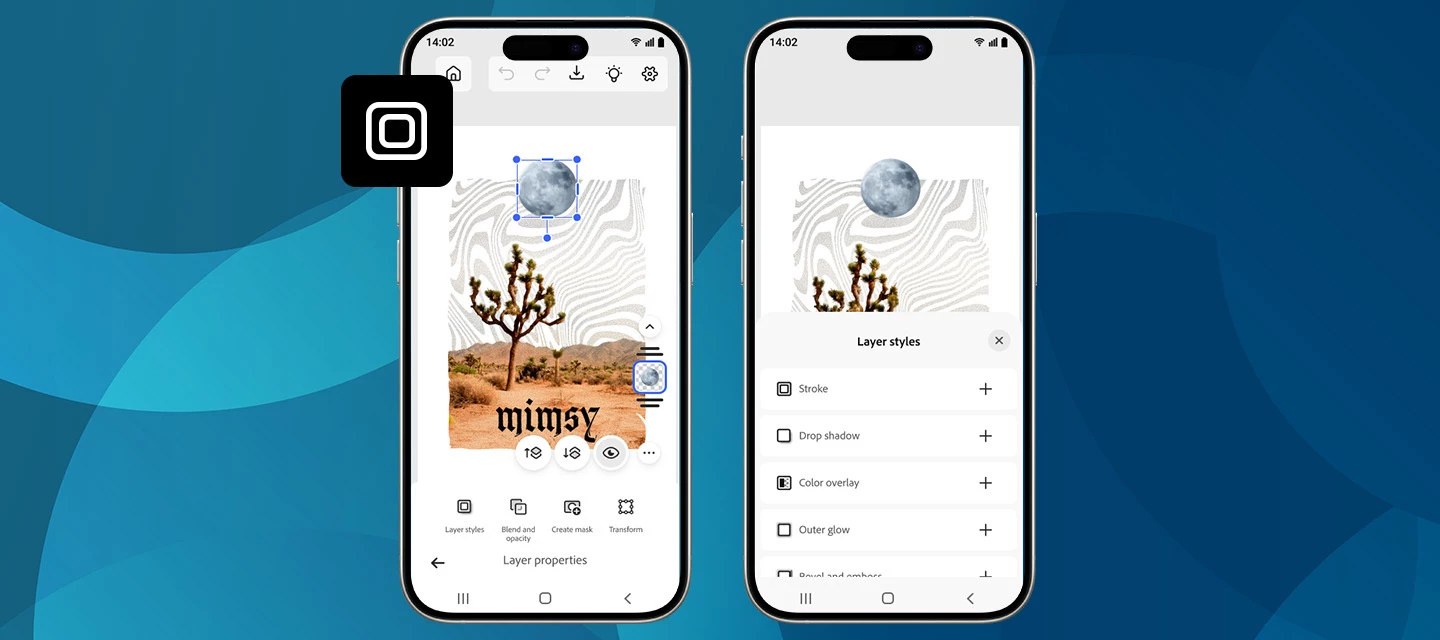
We’re excited to roll out a new creative boost in the April release of Photoshop on mobile! You can now apply Layer styles directly on your phone, making it easier than ever to add polish, depth, and personality to your designs, right from your pocket.


What’s New

With the latest update on Photoshop for iPhone and Android, you can apply a range of Layer styles to elevate your edits. From subtle shadows to bold outlines and glowing accents, layer styles help your objects stand out without extra steps.


Getting started

Create a new project or open a photo, switch to the Tools workspace, and go to Layer properties > Layer styles. From there, choose the look you want and fine-tune it with intuitive controls.

New styles are now available, including Stroke, Drop Shadow, and a lot more. Want to explore what these and other styles can do? Each one comes with adjustable settings like Size, Color, and Opacity, giving you full creative control. Simply tap the checkmark to apply and continue creating. Read more here.


How to Update

Get the latest version of Photoshop on your iPhone or Android by updating or downloading it from the Apple App Store or Google Play Store. 


Show Us What You Create 💬

We’d love to see how you’re using layer styles in your mobile workflows! Share your creations, tips, or feedback with the community and let us know which style you’re reaching for first.

Happy creating! 🎨📱

    20 replies

    abonnement+premiumiptv
    Participant
    July 22, 2026

    Layer Styles in Photoshop Mobile make it easy to create professional-looking edits with effects like shadows, glows, and overlays in just a few taps. Just as the right editing tools enhance your photos, choosing a reliable IPTV Smart TV service can elevate your home entertainment experience with high-quality streaming, live channels, and on-demand content on compatible Smart TVs.

    abonnement+premiumiptv
    Participant
    July 13, 2026

    Great tips! Layer Styles in Photoshop Mobile are a fantastic way to make designs look more polished without spending too much time. The same idea of using the right tools for better results applies to other creative and tech workflows as well. For anyone interested in exploring more useful tools and resources, you can also Visit website. I found it to be a helpful resource that's worth checking out.

    Participant
    July 3, 2026

    This is exactly the kind of feature mobile creators have been waiting for. Applying shadows, strokes, and effects without switching to desktop is a game changer.
    useful resource here

    Participant
    July 3, 2026

    Great update! Adding Layer Styles directly on mobile is a huge productivity boost for creators who edit on the go. Clean UI improvements like this make mobile workflows much more practical. I've also been exploring how modern streaming app interfaces are designed for mobile and TV experiences, and this guide has some interesting examples: Smarters pro officiel . Looking forward to seeing what Adobe adds next!

    Participant
    June 28, 2026

    This is a really welcome update! Layer Styles are something I use all the time on desktop, so having Stroke, Drop Shadow, and the other effects available directly on mobile will make quick edits much more efficient. I'm especially looking forward to using them for social media graphics and UI mockups when I'm away from my computer. Thanks to the team for continuing to bring more desktop-level features to the mobile app!
    checkout this guide for more tips : https://iptvsmarters-officiel.com/smarters-2026/iptv-smarters-pro-ne-fonctionne-pas-solutions-aux-problemes-courants/

    poppyplaytimeapk3
    Participating Frequently
    June 27, 2026

    It looks like you’ve shared an announcement about the April release of Photoshop Mobile, specifically highlighting the introduction of Layer Styles (like Stroke and Drop Shadow) to the iOS and Android apps.

    Depending on what you need this answer for, here is a breakdown of how you can respond to or use this information.

    Option 1: A Quick Summary (If you need to bullet the key facts)

    • What’s New: Photoshop Mobile (iPhone & Android) now supports Layer Styles as of the April release.

    • Available Styles: Includes Stroke, Drop Shadow, and various others with adjustable settings (Size, Color, Opacity).

    • How to Access: Open a project $\rightarrow$ Switch to the Tools workspace $\rightarrow$ Go to Layer properties $\rightarrow$ Layer styles.

    • The Goal: Allows users to add depth, polish, and outlines on the go without needing the desktop version.

    Option 2: A Marketing/Social Media Reply (If you are replying to Adobe)

    "This is a game-changer for on-the-go editing! Bringing Layer Styles like Drop Shadow and Stroke to mobile makes it so much easier to create polished designs without needing to jump onto the desktop app. Can’t wait to try it out!"

    Option 3: A Quick How-To Guide (If you are sharing this with a team)

    If you want to explain to someone else how to use this new feature, you can frame it like this:

    1. Update your App: Ensure you have the April release (or newer) of Photoshop on your iPhone or Android device.

    2. Select your Layer: Open your project and select the specific layer you want to enhance.

    3. Navigate to Styles: Switch to the Tools workspace, tap on Layer properties, and select Layer styles.

    4. Customize: Choose a style (e.g., Stroke or Drop Shadow) and use the sliders to adjust Size, Color, and Opacity.

    5. Apply: Tap the checkmark to save your changes.

    What exactly are you looking to do with this text? I can draft a specific announcement, a tutorial, or a review based on what you need!

    https://helpx.adobe.com/photoshop/mobile/edit-images/manage-layers/apply-layer-styles.html/Laptop Repair/

    D6601782
    Participant
    June 22, 2026

    👻🤖💩


    abonnement+premiumiptv
    Participant
    June 10, 2026

    Great tips! Layer Styles can really make mobile Photoshop edits look more professional and eye-catching. I always enjoy learning simple design tricks like these. By the way, for anyone looking for quality streaming solutions, check out abonnement iptv 12 mois smart tv.

    poppyplaytimeapk3
    Participating Frequently
    June 4, 2026
     

    This is a great update for mobile creators 👍!

    Adding Layer Styles directly in the Photoshop mobile app makes editing much faster and more flexible. Being able to apply shadows, outlines, glows, and other effects without switching to desktop really helps in creating polished designs on the go.

    It’s especially useful for quick social media graphics or edits when you don’t have access to a full setup. Overall, this update makes the mobile version feel much closer to a complete editing tool.

    Amelia Jack
    Participating Frequently
    April 28, 2026

    It seems a great and useful feature