







Photoshop for Android, iPhone and iPad
Recently active
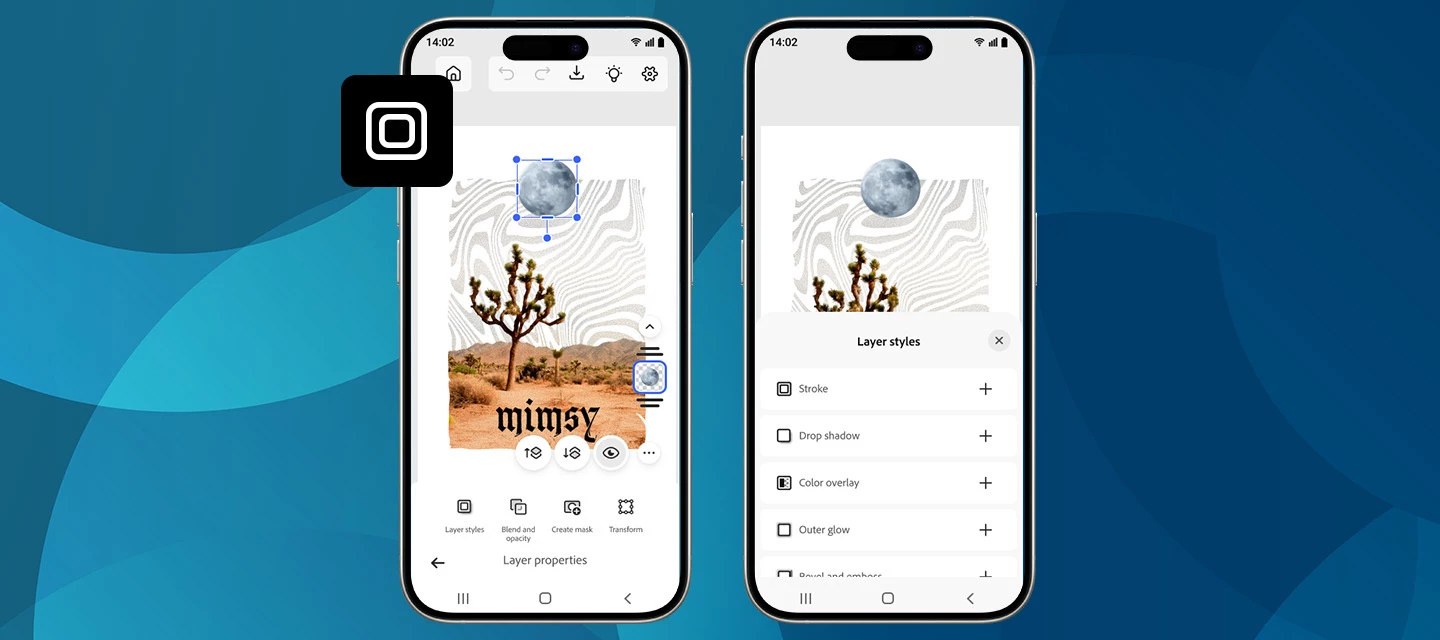
We’re excited to roll out a new creative boost in the April release of Photoshop on mobile! You can now apply Layer styles directly on your phone, making it easier than ever to add polish, depth, and personality to your designs, right from your pocket. What’s NewWith the latest update on Photoshop for iPhone and Android, you can apply a range of Layer styles to elevate your edits. From subtle shadows to bold outlines and glowing accents, layer styles help your objects stand out without extra steps. Getting startedCreate a new project or open a photo, switch to the Tools workspace, and go to Layer properties > Layer styles. From there, choose the look you want and fine-tune it with intuitive controls.New styles are now available, including Stroke, Drop Shadow, and a lot more. Want to explore what these and other styles can do? Each one comes with adjustable settings like Size, Color, and Opacity, giving you full creative control. Simply tap the checkmark to apply and continue creatin
We've split the Photoshop community into two dedicated spaces so you can find the conversations, tips, and apps that fit how you actually work:🖥️ Photoshop (Desktop & Web)📱 Photoshop Mobile Two focused communities mean more relevant content, better discussions, and an easier way to connect with creators and experts who work the way you do. Welcome to your new home for mobile editing. This is the place to find mobile-first techniques and inspiration, ask questions, share your creations, and swap tips with fellow mobile creators. Work on desktop or web, too? You'll find all those conversations over in the Photoshop (Desktop & Web) community. We'd love to hear from you. Does separating Desktop & Web from Mobile make it easier to find what you need? Explore your new community and let us know how it's working for you in the comments.
¿En la versión Photoshop será gratuito? y porque yo no teniendo una suscripción tengo acceso "gratis" a Harmonize , quitar fondo y asistencia ia
nao consigo utilizar o adobe fresco por conta deste problema que nao consegui resolver
오직 캔버스 안에서만 애플펜슬의 인식이 이상함. 브러시와 지우개 크기가 전혀 적용되지 않고 일정 크기로만작동. 손가락을 이용한 터치로만 브러시 크기가 적용됨. 1. 환경 설정에서 펜슬로만 그리기 켜져있음, 손쉬운 사용 터치 전부 끔.앱 삭제 후 재설치 해보았으나 여전히 동일 다른 드로잉 앱에서는 잘 작동됨
Can photoshop for iOS run actions in the new iPads?
Comprei esse Acrobat Premium - Mensal (Adobe Acrobat Reader: Ler PDF)Acrobat Premium - Mensal (Adobe Acrobat Reader:
I am posting to express my frustration regarding the state of Photoshop on the iPad, specifically concerning the "Upcoming Features" / "What's Coming" roadmaps displayed inside the app interface.As a paying subscriber contributing $100 annually to the mobile ecosystem, my investment is based on the expectation of active development and the timely delivery of advertised roadmap features. Instead, the features listed as "upcoming" have remained stagnant for a long time, while core development focus seems to have shifted away from foundational desktop-grade functionality.Displaying a continuous pipeline of upcoming tools to paying users, without delivering on those promises, gives a misleading impression of active app support to justify a recurring subscription fee. The current iPad hardware is more than capable of running these advanced tools, making the lack of updates a strategic choice rather than a technical limitation.I would like a transparent update from the Product Management te
What is this? For a year they have told us this would be equivalent to a desktop version of Photoshop. Not at all. Where is the shape tool??? I’m so sad 😞
We need to have the grids and the guides in Photoshop for iPad ! I can’t work without them. Thank you !
Is there a way to align layers in photoshop on the iPad? Seems like there should be as it is impossible to Center anything.
Canvas keeps jumping off screen every time I’m using the text tool and switch switch from one text layer to another.First time I select a text layer it’s fine. It’s when I move to the next text layer to edit is when it happens. Have to zoom out and drag the canvas back down to where I can see it. Makes the app basically unusable. I have videos of this happening but unable to post here. Working on an iPad Pro 12.9” 5th Generation. OS 26.4.2
File changes do not sync between files edited in Fresco and Photoshop for IOS iPad A file created in photoshop for iPad then edited in fresco and saved do not sync changes. The file appears in the photoshop file manager dialogue window but the file changes have not synced and the blue sync indicator appears but the app is frozen. Additionally, under the help area when “save support logs” is selected the app freezes. IOS Version 26.5 (current)iPad Pro 13-inch (M4)Latest photoshop and Fresco installs.
the ability to create, edit, and organize brushes is completely missing from the iPad version of photoshop. The pencil tool is entirely missing as well which I use more than the brush tool for clean line art, and is also necessary for any kind of pixel art. These tools are basic essentials included in every other digital painting app. why would they be left out in the iPad version when the best use case for iPad photoshop is for digital painting?
Indeed, this is absolutely not “Photoshop on iPad” as stated and promised in the lead up to launch! You must quickly include the Pen tool to create paths as this is a basic essential of compositing! Please do this quickly. Thank you.
Hello, maybe this topic has been approached before maybe i am doing something wrong, looking for answers, maybe it's still under work, maybe it's not working for my iPad 9.Many of uss i think praised the moment when Adobe included the liquify tool on ipad but it has a flaw, and this one creates a very difficult WorkFlow. If i open a photograph in Photoshop on iPad, simply from the iPad, the Liquify tool works, but if i need things done in Lightroom for iPad and need a quick Liquify from Photoshop and return in iPad the Liquify tool is disabled, it can't be used at all. This forces me to do two things, either i open from Lightroom CC the photo in Photoshop on the Desktop, when i get home if i have the time to do it, or i have to export the photo onto the iPad and open it in Photoshop for iPad, Liquify and then import the photo back to Lightroom. Doing this is literaly a torture, i understand that the Liquify tool is disabled for certain situations i read about that, but why di
We're excited to announce the launch of Photoshop on iPhone version 2.0, packed with amazing new features we're sure you'll love exploring.What’s new Editing just got a lot more intuitive and creative with Photoshop on iPhone. With Harmonize, you can drop people or objects into your images and have lighting and color automatically blend for a clean, natural result that feels like it was always there. Portrait editing is just as seamless, with Photoshop automatically recognizing facial features so you can easily refine expressions, adjust details, or enhance your photos with precision. And when you want a quick refresh, one-click effects let you instantly apply effects to style, color, and texture of your images for a new look in seconds—all right from your phone. Read more about the October release here. Update Photoshop on iPhone to the latest version through the Apple App Store and explore the new tools for faster, more intelligent editing. To check if Photoshop on iPhone is compat
I would like for the Warp function in Free Transform to be available on mobile devices as well
It would be great to have the ability to create and work with artboards in Photoshop on iPad.
Hi. I'm working on an iPad Pro M4 with the Apple Pencil Pro. I set Photoshop for iPad to switch to last tool when I double-tap the pencil. When I double-tap, it will switch to the previous tool. But when I double-tap again, it stays on that tool. For example, I use the brush tool, then use the dodge tool. Double-tapping switches back to the brush tool, but a second double-tap doesn't switch to the dodge tool. I've tried this with other combinations of tools too, with the same result. I would expect it to work like it does in Freeform, where repeated double-taps on the pencil switches back and forth between the current and previous tools. Is this the expected behavior in Ps for iPad? Or am I missing something? Thanks!
Hi Adobe Community, I’m running into an issue when using Generative AI on the iPad versions of Lightroom and Photoshop. I’m working on portrait photos where the model only has exposed shoulders—absolutely no nudity or explicit content; the model is draped with a sheet and nothing private is visible. When I try to use AI tools to extend her hair or make small edits, the software gives me an error or says the content violates Adobe’s guidelines. I also cannot edit the background, like adding a vase of flowers. Has anyone else encountered this with non-nude portrait photography? Are there any workarounds to allow edits like extending hair or adding background elements while staying within Adobe’s guidelines? Thanks in advance for any advice!
I want to create a repeat tile image in the mobile version of PS, for a repeat print however this tool is only available on desktop.
Tomo foto con cámara Sony formato raw, la edito en Lightroom the iPad, la paso a photoshop y no me permite usar la opción licuar
I have a brush asset from Adobe in my CC library. I can use it in desktop photoshop. I see it in the cc library on my iPad. But in iPad photoshop, there is only a set name, but any brushes inside. My other assets are here and can be used. What can I do to see and use a brush set in iPad photoshop?
It may not be feasible (at least for now) to add Liquify to Photoshop on the iPad, but how about Transform> Warp as a workaround? (Being able to manipulate an image using Liquify — or Warp — is a basic image editing feature.)
Already have an account? Login
No account yet? Create an account
Enter your E-mail address. We'll send you an e-mail with instructions to reset your password.