

Preran
Legend
January 26, 2026

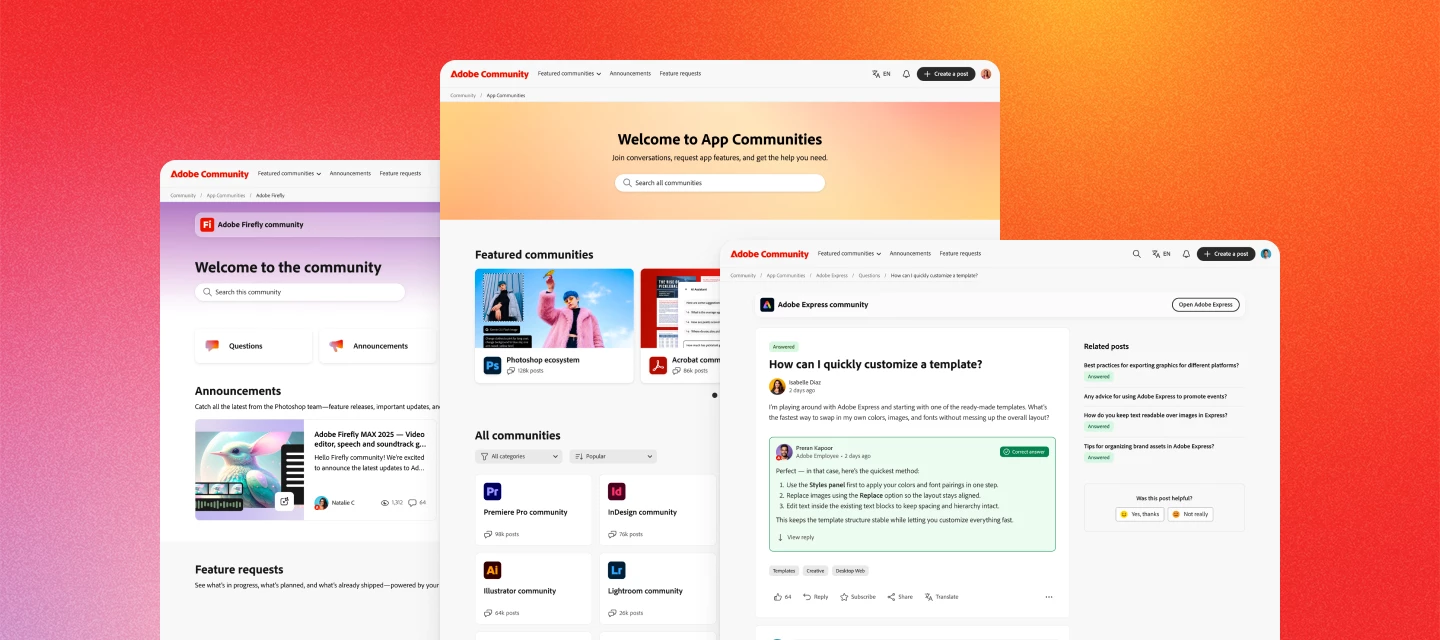
Welcome to the new Adobe community
  • January 26, 2026
  • 73 replies
  • 15325 views


Hi everyone. The new Adobe Community experience is officially live! You’re now looking at a reimagined space designed to make it easier to connect, share feedback, and see how your ideas help shape Adobe products.


What’s new


A clearer way to share ideas and feedback

Feature requests and bug reports now have dedicated spaces, clearer status indicators, and voting—so it’s easier to see what’s gaining traction and what’s already in progress.


Better visibility into what’s happening

You can now track the status of feature requests and bugs as they move from idea → in development → released. When something you’ve voted on changes status, you’ll be notified.


Cleaner navigation, less noise

Discussions, announcements, and product feedback each have their own place—making it easier to find answers, discover what’s new, and focus on what matters most to you.


Richer posts and conversations

Create posts with images, videos, code blocks, and file attachments to share context, examples, and workflows more easily.


Stronger connections with Adobe teams and peers

Your community activity now connects to your Adobe ID, helping us better understand feedback and engage more meaningfully with the people using our products every day.


Your content is still here


All posts, replies, solutions, feature requests, and bug reports created on or before November 16 are already available. Content created between November 17 and launch day will be added soon—no data will be lost, and you won’t need to recreate anything.


Jump in


Explore your product communities, upvote ideas you care about, ask questions, and share what you’d like to see next. This community works best when your voice is part of the conversation.


Thank you for helping make Adobe Community what it is. We’re excited to keep building it with you.


— The Adobe Community Team


    73 replies

    Legend
    January 27, 2026

    My list of direct messages is empty.

    Is that still on the todo list or shall we consider it a total loss?

    AshimG
    Community Manager
    Community Manager
    January 27, 2026

    Hi Dirk — thanks for the question. Our approach was privacy-first. Direct messages are private by nature and governed by platform-specific permissions and historical access rules. During a migration, even small differences in how platforms model identity and access can unintentionally change who can see private conversations. And more broadly, we also recognize that some members may not be comfortable with their private messages being transferred to a new platform. To protect members’ privacy expectations, we intentionally did not migrate private messages — so an empty DM inbox in the new community is expected.

    Charlie Arehart
    Community Expert
    Community Expert
    January 27, 2026

    Wait, what? The transition to the new system has lost all previous DMs? I don’t recall any warning that we should take note to preserve any. Did I miss it, or was that overlooked?


    I expect howls of dismay and derision over this one, if it’s as you say. Of course, it will take time (perhaps days or weeks) for some to notice it, and even then most end users won’t even know where to raise the concern.

    /Charlie (troubleshooter, carehart. org)
    Ged_Traynor
    Community Expert
    Community Expert
    January 27, 2026

    @Preran also, Is there any way to show all, instead of having to click on show more repeatedly 


    johnrellis
    Legend
    January 27, 2026

    ...and is there a way to see all the replies without having to expand them?

    jackthegiantkiller
    Inspiring
    January 30, 2026

    This part is truly frustrating, every single comment thread I’m interested in forces me to click a dozen times just to see the following responses. Thank goodness we only have to wait 8-10 weeks, well, maybe months….heck, based on past experience it could be years for said improvements.

    Ged_Traynor
    Community Expert
    Community Expert
    January 27, 2026

    @Preran for notifications, is black on or off


    mrspieri
    Community Manager
    Community Manager
    January 27, 2026

    Hi ​@Ged_Traynor - thanks for asking. Slider to the right side/black background means that these email notifications are on. I’m noting it on our side to improve the coloring.

    Ged_Traynor
    Community Expert
    Community Expert
    January 27, 2026

    @mrspieri Is there any way to show all, instead of having to click on show more repeatedly