


Participating Frequently
June 2, 2025

Adobe Express - download error

  • June 2, 2025
  • 5 replies
  • 1003 views

Hi all,


I keep getting the download error from Adobe Express when I try and download the poster/flyer I created.


I've tried downloading it as a PNG and a printable PDF and both generate the same error:
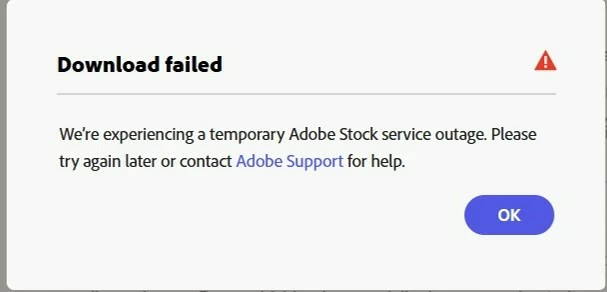
How do we fix this?


5 replies

Community Manager
June 6, 2025

Hi @dc_work ,


Please confirm if you are signing into Adobe Express using your Enterprise account, and if you have an active contract for Express under that account.

If so, please open a support ticket for this issue through your Enterprise Admin Console. You can find detailed instructions here:
https://helpx.adobe.com/enterprise/using/support-and-expert-services.html

Thank you!


ˆMM

dc_workAuthor
Participating Frequently
June 5, 2025

Hi @mahmoud_5524 

Another update.

The download errors only happen if I use Generative AI stock and Premium stock.

If I use Free stock, I do not get the Download error messages.

Community Manager
June 5, 2025

Hi @dc_work,

Thank you again for the detailed updates and for narrowing down the issue — that’s incredibly helpful. We're truly sorry for the disruption this has caused.

The issue seems to be related specifically to Generative AI and Premium Adobe Stock assets, and our engineering team is actively working on a fix. In the meantime, as you mentioned, using Free stock assets allows the download to work correctly.

We’ll keep monitoring and let you know as soon as a permanent solution is rolled out. We appreciate your patience and understanding while we work to resolve this.

Let me know if you’d be open to sharing the specific file that’s failing — it could help our team debug faster.


^MM

dc_workAuthor
Participating Frequently
June 4, 2025

@mahmoud_5524 


Hi MM,


I tried again today and get a slightly different error message:I tried downloading as a PNG and PDF Print. Same error.


dc_workAuthor
Participating Frequently
June 2, 2025

Still the same error today.

Tried firefox and chrome via incognito mode and the same issue occurs.

The error comes up straight away as soon as I click the Download button.

Community Manager
June 3, 2025

Hi @dc_work,


Thank you for your feedback and the screenshot.

We are aware of the issue with the Adobe Stock service, and our team is actively working on a fix. We will keep you updated and appreciate your patience!


^MM

dc_workAuthor
Participating Frequently
June 2, 2025

Adobe. Please fix your this. I just tested making a new poster and I still get the same error.