Participant
October 22, 2024

Adobe Express Download PDF for print

  • October 22, 2024
  • 3 replies
  • 644 views

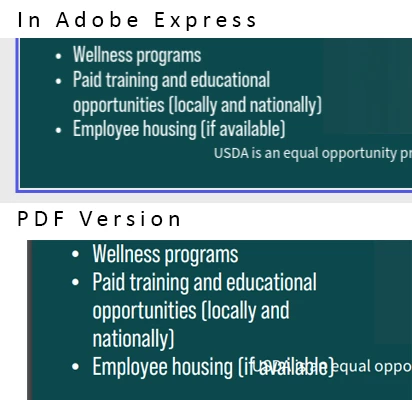
I've downloaded a number of my designs to PDF for print and the files do not appear the same as my Adobe Express design.
I've closed out the designs, reopened,  redownloaded and still run into the problem. You can see in the example that the text boxes overlap and the text on each line is different. (Look at the difference in the bullet point beginning "Paid training..." for example)

3 replies

Participant
October 24, 2024

Also - if I export to png this doesnt happen - only to PDF

Amitej S
Community Manager
Community Manager
October 25, 2024

Hey @defaultyp32wkqwk5zg, thanks for informing us about this. While we are investigating this issue, if you come across it again, here is a workaround that you can use. 

Download the project in PNG/JPG format.

Open Quick Actions > Convert to PDF.

After uploading the PNG/JPG, you can download the PDF version of the project. 


Participant
October 24, 2024

The file downloads successfully with no error messages. As seen in my example above, the text changes or shifts causing it to overlap the other text box. (you can see from the line that starts "Paid..." it appears that the size changes which shifts everything down???)
I believe when I created this template, I started with and 8 1/2 x 11 inch design board. It doesnt appear to be doing this in the Adobe brochure template though - not sure if custom created sizes is causing the glitch???
I have cleared the cache and it is still happening. I worked around this for the deadline by reducing the text size but still wanted to report this. Thank you.

Tarun Saini
Community Manager
Community Manager
October 23, 2024

Hi 

@defaultyp32wkqwk5zg

,


Thanks for your patience and I’m really sorry to hear about the issues you're facing with downloading PDFs for print in Adobe Express. 


I’d love to help get this resolved for you! To better assist you, could you provide a bit more information on what’s happening? Here are a few questions that might help us get to the root of the issue:

  1. When you try to download the PDF for print, do you receive any error messages or does the file just fail to download?
  2. Have you noticed this issue happening with any specific file size or project type (e.g., larger projects, or projects with certain elements)?
  3. Could you confirm if you’re using the latest version of Adobe Express and your browser?
  4. If you’ve tried any troubleshooting steps on your end already, I’d love to know what you’ve done so far. For example, have you tried clearing your browser cache or using a different browser?


Regards,

Tarun