


Participant
July 8, 2025

Bug in Adobe Express AI remove tool

  • July 8, 2025
  • 7 replies
  • 9038 views

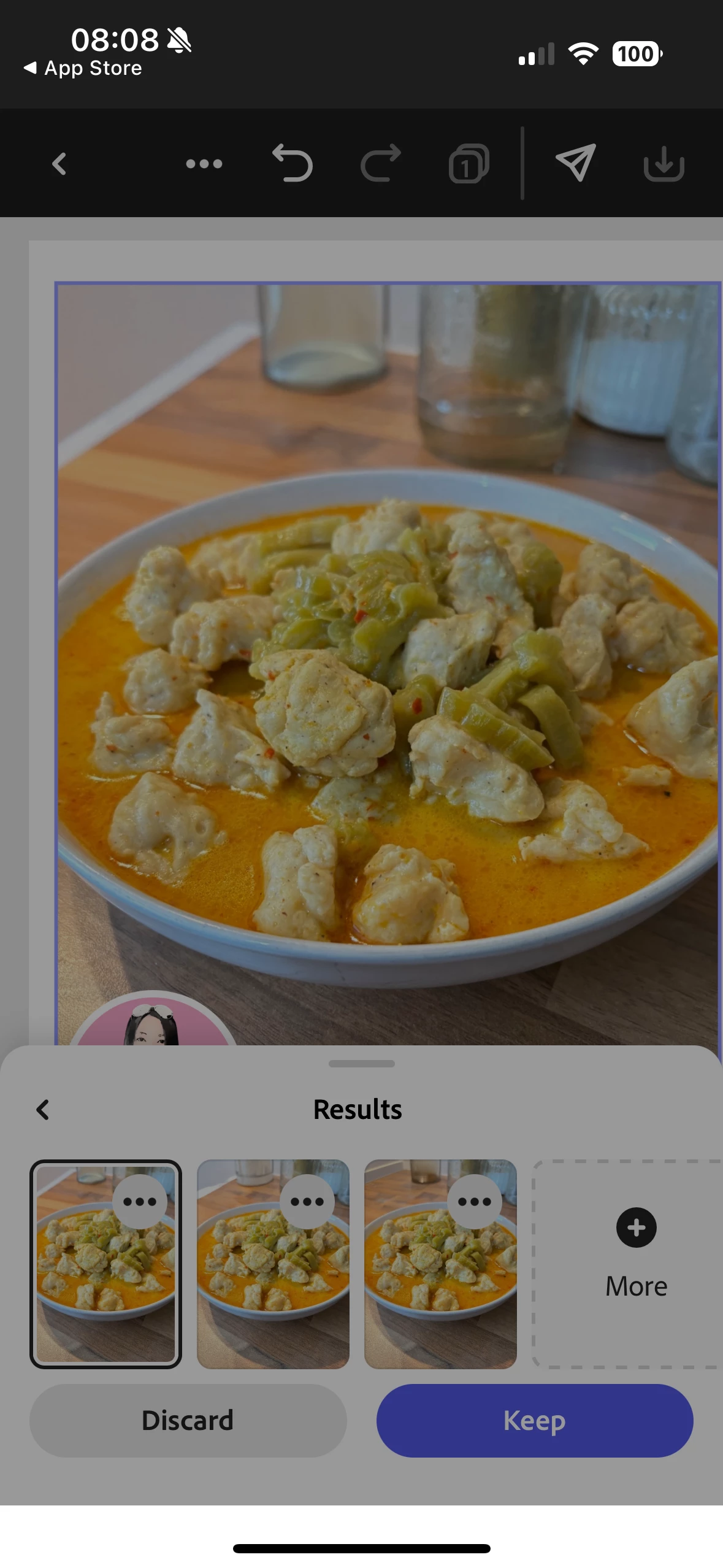
I have recently been experiencing issues/bugs with abobe express, when I am removing parts of the image wi the the ai remove tool I'm most of the results work great but it's making the whole image really pixelated and a bit blurry while some results the image is normal.

Also, when I try to discard edits the app freezes see screenshot, I then have to force quit the app.

im using iPhone 16, I have tried deleting app and reinstalling it to no avail.
 

7 replies

Participating Frequently
September 29, 2025

If your image becomes pixelated or blurry after using the AI Remove tool in Adobe Express, and the app freezes when discarding edits: 

Quick Fix: Update Adobe Express and your iPhone’s iOS. Clear cache/data (if available in iPhone Settings > Adobe Express).

Avoid large-area removals—try small, focused edits instead.

Reinstall the app (already done, but retry after new updates).

Meanwhile, for smart and creative visual generation, you can try Brat Generator — a fast and AI-powered tool for image enhancement and content creation.

Learn more about how Brat Generator can simplify your design workflow using AI.

Participant
September 25, 2025

Also, now when I try the remove tool and I get the 3 options it intermittently crashes and image goes blank and you have to reimport the image and edit it again.

Tarun Saini
Community Manager
Community Manager
September 25, 2025

Hi @Andrew227070729ib1,


Welcome to the community! We're sorry to hear about this. Can you please share the screen recording of the issue you're seeing with the crash?


We're here to help, just need some info.


Regards,

Tarun


Participant
September 25, 2025

I think its to do with iphone 16 as it worked fine on iPhone 12 and the app is up to date.

Kind regards,

Andrew Hague
UX Developer

{Mod Note- Personal information has been removed by the Moderator}

Please note, if I’m emailing you outside of office hours it’s because it’s convenient for me. I don’t expect a response out of hours.

Part of the Banner Group
Registered in England, Reg No 07464584

[cidimage003.png@01D78D0A.333A5810] [cidimage004.png@01D78D0A.333A5810]

NOTICE: This e-mail and any attachments are intended only for the individual or company to which it is addressed and may contain information which is privileged, confidential and prohibited from disclosure or unauthorised use under applicable law. If you are not the intended recipient of this e-mail, you are hereby notified that any use, dissemination, or copying of this e-mail or the information contained in this e-mail is strictly limited by the sender. Whilst we run antivirus software on all internet e-mails we are not liable for any loss or damage. The recipient is advised to run their own antivirus software.

If you have received this transmission in error, please return the material received and delete all copies from your system.


Confidentiality Notice: This email and any attachments may contain confidential or legally privileged information intended solely for the recipient. If you are not the intended recipient, please notify the sender immediately and delete this email. Any unauthorised use, disclosure, or distribution is prohibited.

Security & Monitoring: At Banner Ltd, we take communication security seriously and reserve the right to monitor email exchanges in line with company policies. The opinions expressed in this message belong to the sender and may not represent the official stance of Banner Ltd unless stated otherwise.

Legal Disclaimer: Banner Ltd does not accept responsibility for any errors, omissions, or consequences resulting from reliance on the information contained in this email. While every effort is made to ensure accuracy, we cannot guarantee that this email is free from errors, malware, or unauthorized alterations.

Sustainability Reminder: Please consider the environment before printing this email.

Disclaimer

The information contained in this communication from the sender is confidential. It is intended solely for use by the recipient and others authorized to receive it. If you are not the recipient, you are hereby notified that any disclosure, copying, distribution or taking action in relation of the contents of this information is strictly prohibited and may be unlawful.

This email has been scanned for viruses and malware, and may have been automatically archived by Mimecast Ltd, an innovator in Software as a Service (SaaS) for business. Providing a safer and more useful place for your human generated data. Specializing in; Security, archiving and compliance. To find out more visit the Mimecast website.

Participating Frequently
September 25, 2025

The best solution is to update Adobe Express to the latest version, as bugs like pixelation and freezing are often fixed in updates. If the issue continues, report it directly to Adobe support with your device details and screenshots. Meanwhile, try editing smaller areas at a time to reduce pixelation and avoid app crashes.

Participant
July 8, 2025

I tried what you suggested, but the App is still crashing/freezing even after offloading it reinstalling it and even deleting it and reinstalling it and restarting the device. Also, it works fine in the browser it just seams to be an issue with the app.

chaimaa.7
Community Manager
Community Manager
July 8, 2025

Hi @Andrew227070729ib1. Thanks again for the update and for trying all the troubleshooting steps on your end. Since the issue is still occurring despite your efforts, I’ll go ahead and escalate this to our product team for further investigation. 

For more personalized, real-time assistance, we also recommend reaching out directly to Adobe Support here: https://adobe.ly/44SNTwc.

I’ll keep you posted with any updates from our side as well. In the meantime, feel free to continue using the browser version at https://adobe.ly/3Ggi8nD as a workaround. We're here to help!


Thanks,

Chaimaa

Participant
July 8, 2025

Hi Tarun, thanks for your reply. I'm not using a browser; I'm using the Adobe Express App on iOS 18.5, iPhone 16.

chaimaa.7
Community Manager
Community Manager
July 8, 2025

Hi @Andrew227070729ib1, thank you for the details, we’re sorry you’re experiencing these issues. The pixelation after using the AI Remove tool and the app freezing are not expected behaviors. Our team is currently investigating this, but in the meantime, we recommend trying the following: offload the app by going to your iPhone settings > General > iPhone Storage > Adobe Express > Offload App, then reinstall it. As a precaution, if you're working on important projects, you can also sign in at https://adobe.ly/402Ch7m to make sure your work is synced to the cloud. Also, ensure your iOS is fully up to date and close other heavy apps running in the background while editing.

Please let us know if the issue persists, we're here to help!


Best,

Chaimaa

Tarun Saini
Community Manager
Community Manager
July 8, 2025

Hi @Andrew227070729ib1,


Welcome to the community! We're sorry to hear about the difficulties. Did you try using the other suggested browsers (Safari, Microsoft Edge, and Google Chrome) or incognito mode to see if it makes a difference? 


Also, try clearing the browser's cache and cookies, and restarting the browser and try again. For more information on how to clear cache and cookies, check this link- https://adobe.ly/4a5ipUF and how to use incognito mode- https://adobe.ly/4a2UzZV 


Let us know if that helps.


Regards,

Tarun