enter 001
Participant
July 19, 2026

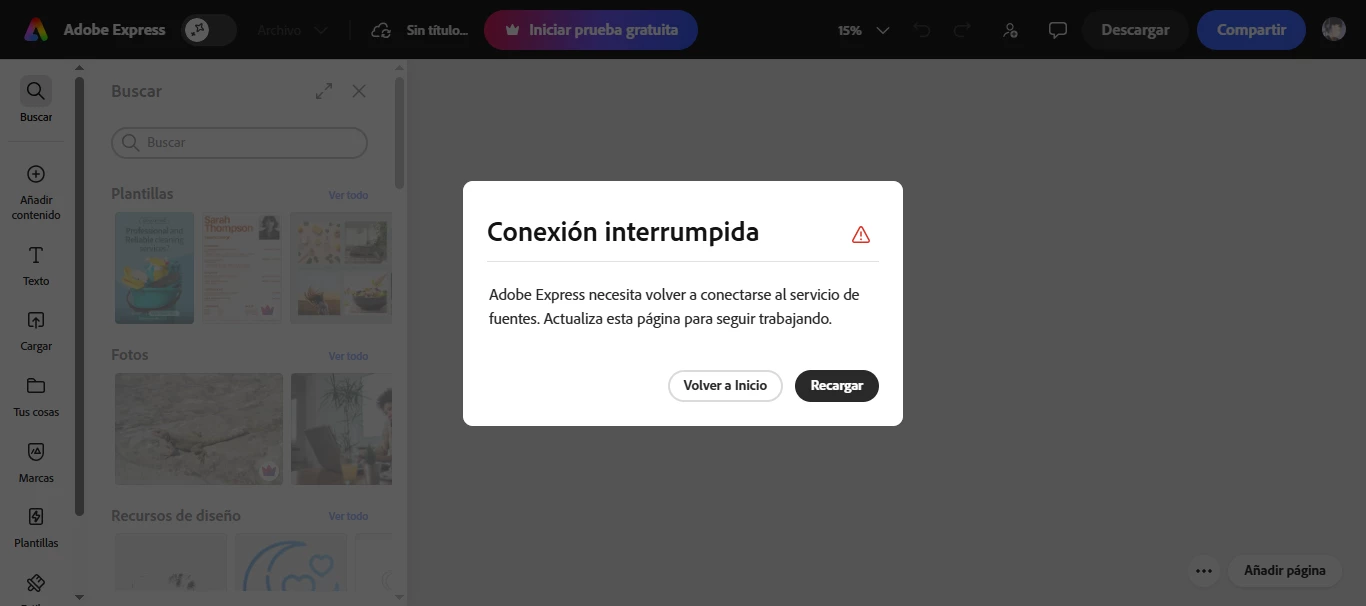
Cada vez que abro un proyecto o creo uno nuevo , en la version web; me sale la ventana emergente "Conexion Interrumpida" la cual no me deja trabajar en nada

  • July 19, 2026
  • 1 reply
  • 27 views

Detalles :

  • Issue summary: Ventana Emergente que bloquea toda accion
  • Product & version: Adobe Express (web app)
  • Platform: Chrome Windows 10
  • Steps to reproduce: Abres un archivo nuevo o un archivo anterior y te sale “Conexion Interrupida-en ventana emergente”
  • Expected result: Debería dejarme editar o crear nuevos proyectos
  • Actual result: La ventana emergente bloquea toda interaccion
  • Attachments :


    1 reply

    Amitej S
    Community Manager
    Community Manager
    July 20, 2026

    Hi ​@enter 001

    The Connection Interrupted message usually indicates that Adobe Express is unable to maintain a stable connection to its cloud services. This is often caused by a browser extension, VPN, firewall, antivirus software, or network settings interrupting the connection.

    Could you try the following:

    • Open Adobe Express in a private/Incognito browsing window with all extensions disabled.
    • If you're connected to a VPN, disconnect it and test again.
    • If you have antivirus or firewall software running, temporarily disable it or make sure Adobe services aren't being blocked.

    Also, let us know if you're connected to a home or workplace network or if there were any system, or network changes. 

    These details will help us better understand the issue and investigate it further.

    enter 001
    enter 001Author
    Participant
    July 20, 2026

    Incognito mode still shows the  same income, Not using any VPN . Antivirus or firewall seem to make no effect active or inactive , im working at home .

    Amitej S
    Community Manager
    Community Manager
    July 20, 2026

    Thanks for confirming@enter 001!

    We’d need the HAR file containing logs of your network requests and responses between your web browser and the Adobe Express website.. 

    You can refer to the following for fetching the HAR file:

    Once you have these files, try uploading them to a cloud storage service and sharing the link with us for investigation.