Participant
June 2, 2025

checkboxes and icons not rendering correctly

  • June 2, 2025
  • 1 reply
  • 122 views

Hi there,


I'm evaluating Adobe Express for my company and I'm having an issue with our PDFs (which are made using Adobe InDesign) whereby the icons and the checkboxes don't render properly when the file is opened using Adobe Express. Here:
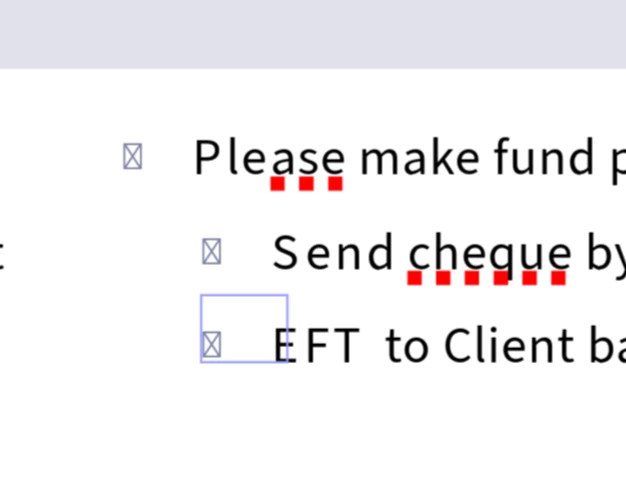
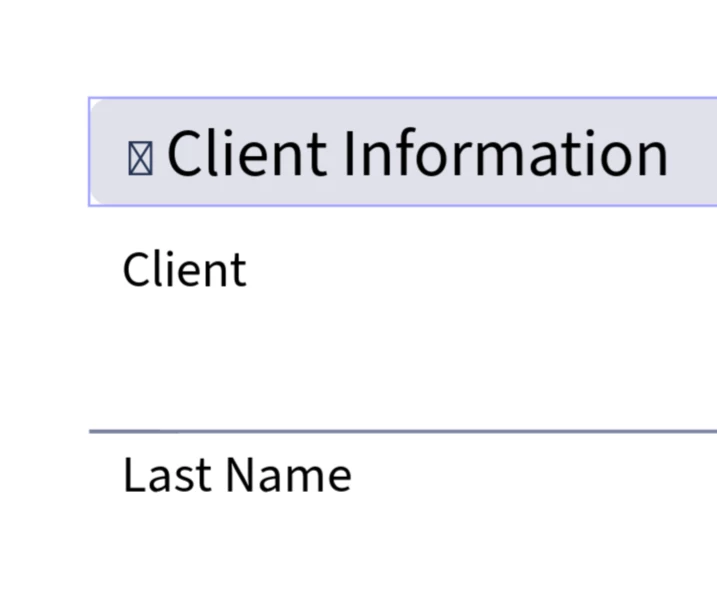
They work as expected in Acrobat Pro for reference:
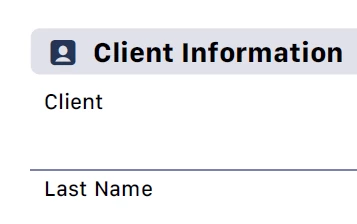
 

Please advise if this can be fixed on the adobe express's end or not.


Best,

Mel

1 reply

chaimaa.7
Community Manager
Community Manager
June 2, 2025

Hi @Mel33613667qy0n, and thank you for reaching out.

The issue you're seeing typically results from how certain PDF elements created in Adobe InDesign are interpreted. In particular, the use of symbolic fonts for icons or checkboxes can cause display issues when the file is opened in Adobe Express, which doesn't fully support all interactive or font-based elements in PDFs. To ensure proper rendering, we recommend converting icons and checkboxes to vector shapes in InDesign and exporting the PDF using "High Quality Print" settings with all fonts embedded. Avoid using interactive form fields unless specifically needed. While Adobe Express is not yet fully compatible with all advanced PDF structures, we’ve passed your feedback to our product team. For now, flattening or vectorizing these elements before import is the best way to ensure consistent results. 


Thanks,

Chaimaa