
Participant
July 2, 2026

color picker is crashing the browser

  • July 2, 2026
  • 1 reply
  • 122 views

Every time I try to use the color picker while editing anything in new Express web, the browser crashes badly, forcing me to restart the browser (!!!)

Using Chrome up to date, windows 11, no plugins installed in chrome profile, logged in as Pro user.
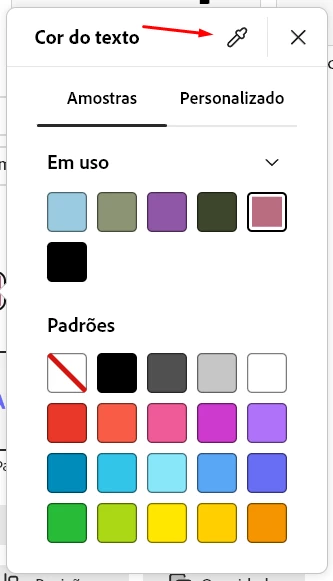


PS: For the ones who doesn't know how to restart Chrome, open a new window and type in the address chrome://restart
 

    1 reply

    Amitej S
    Community Manager
    Community Manager
    July 3, 2026

    Hi ​@webmaster, thanks for posting it here. 

    This can sometimes be related to the browser's rendering settings. Could you try resetting Hardware Acceleration in Chrome (chrome://settings/system), then relaunch the browser and test the workflow again?

    You could also try:

    • Resetting Chrome to its default settings.
    • Opening Adobe Express in an Incognito window.
    • Testing the same workflow in another supported browser, such as Edge or Firefox.

    If the issue persists, could you share:

    • Your Chrome version.
    • Whether the crash happens in every project or only a specific one.
    • Whether it occurs only when using the eyedropper or with the color picker in general.

    A screen recording of the behavior would also be helpful. Once we have these details, we'll be able to investigate further.


    Best!

    tssb111
    Participant
    July 5, 2026

    I am using Edge, I did all the above as well. I reset Hardware acceleration. It was already on. I have cleared cache and cookies, temp files. rebooted, updated drivers, all of it. it is happening to all of us all of the sudden on many different browsers.

    thank you for your attention to this. I pay for a lot of Adobe products and I am now unable to deliver my work. This isn’t just an inconvenience, it’s my work tool. No delivery, no money… no food. help us out please.