


Participant
May 8, 2026

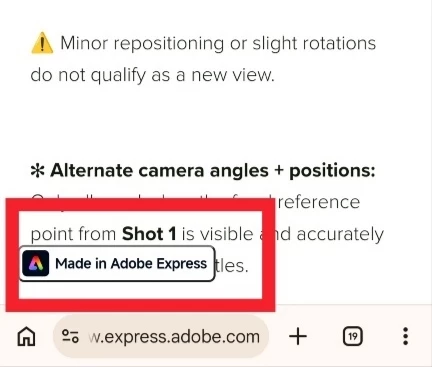
Content in express webpage mobile obstructed by "Made in Adobe express"

  • May 8, 2026
  • 1 reply
  • 10 views

I just got this contributor mission, opening it on mobile, and some of the information in the lowest part of the page is obstructed by the "Made in Adobe Express" floating button, and scrolling doesn't reveal the hidden part. 
 

    1 reply

    Radwan Almsora
    Participating Frequently
    May 10, 2026

    Hello!

    ​Thank you for reporting this. It is definitely frustrating when a UI element designed for branding ends up obstructing critical mission information. This is a known 'overlay' bug where the floating badge does not respect the bottom padding of the webpage on certain mobile browsers.

    ​While I flag this to the web development team to ensure the 'Safe Area' is adjusted in future updates, here are three quick ways to view the hidden content right now:

    1. Landscape Mode: Rotate your phone to landscape (horizontal). This often forces the web elements to recalculate their positions, potentially moving the badge away from the text or giving you more room to scroll past it.
    2. 'Desktop Site' Mode: In your mobile browser (Chrome or Safari), tap the 'AA' or three-dot menu and select 'Request Desktop Website'. This will shrink the layout, usually making the badge smaller and allowing you to see the full text.
    3. Adjust Text Size: In your browser settings, try reducing the 'Text Zoom' to 85% or 90%. This can sometimes push the bottom content just enough to be visible above the badge.

    ​I've shared your screenshot with the team so they can see exactly how it’s blocking the 'Shot 1' reference point. Hopefully, we can get this 'z-index' issue fixed soon!"