



Marine D
Known Participant
October 6, 2024

Font not showing / invisible

  • October 6, 2024
  • 5 replies
  • 443 views

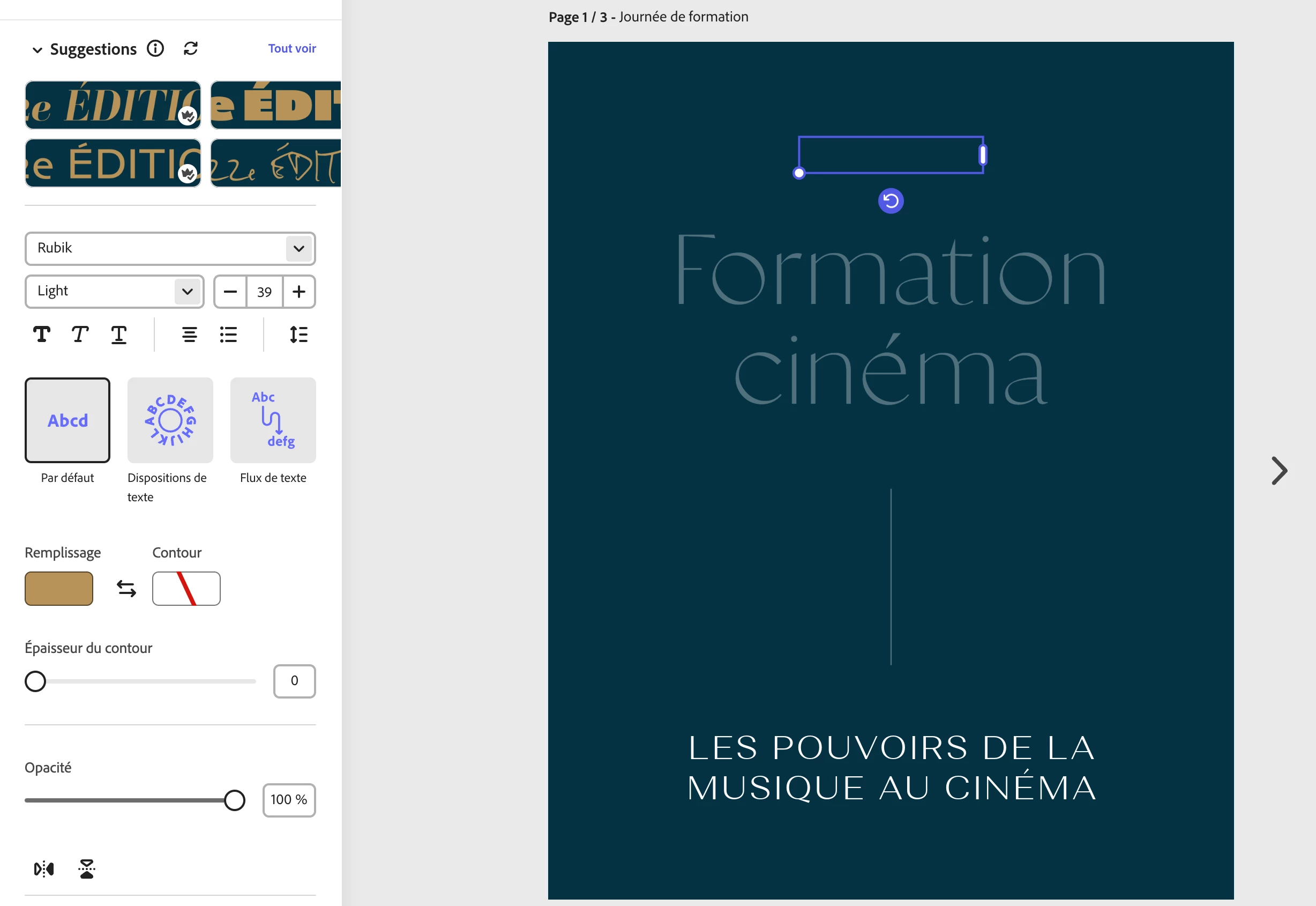
Hi, I'm trying to use the Rubik font on Adobe Express but whenever I add it to my artwork, it is invisible, even when I change the font colour and opacity. The text box is showing but appears empty. I don't have this issue on other fonts. I tried uploading the font manually, but I can't since it's already on Adobe Express directory.


Thanks in advance for the help!
 

5 replies

Participant
October 17, 2024

@Tarun Saini could you kindly also check my project file link below, I sent it a few days ago. I am having a lot of trouble with it. Thank you.

Tarun Saini
Community Manager
Community Manager
October 23, 2024

Thanks for sharing the project URL 

@Marine D


@Review23306114gahw

,


Please provide the edit access to investigate further.


Regards,

Tarun

Marine D
Marine DAuthor
Known Participant
October 16, 2024

Hi @Tarun Saini,


Sorry about that, I thought I did it last time! Here's the updated link to the project: https://new.express.adobe.com/id/urn:aaid:sc:EU:e9c02fb8-e3d1-4d0b-9c39-4150200c823a?invite=true&promoid=Z2G1FQKR&mv=other


Thank you

Marine D
Marine DAuthor
Known Participant
October 10, 2024

Hi, 


Thank you for your quick answer. I have the issue of my 2 projects so I created a new one to test and the issue persists.

My main browser is Arc but following your recommendations, I've just tried on Chrome and Safari and I've emptied my cache but it didn't fix the problem.


Here's a test project where you can see a blank text box in the middle of the page showing the issue: https://new.express.adobe.com/id/urn:aaid:sc:EU:e9c02fb8-e3d1-4d0b-9c39-4150200c823a?invite=true&promoid=Z2G1FQKR&mv=other


Thanks for your help!

Tarun Saini
Community Manager
Community Manager
October 15, 2024

Hi 

@Marine D

,


Thanks for your response. Could you please provide the edit access of the project URL to investigate further?


Regards,

Tarun

Participant
October 9, 2024

Hi,


I'm having the exact same issue, please see screenshot. As you can see on the top left hand side of the selected text box there is a small warning sign, but if I hover or click on it, nothing shows up. I'm using Chrome, but I also tried it on Safari and same issue. I also cleared cache. On my iPhone the app Adobe Express everything is as normal.


Here is the project link:


https://new.express.adobe.com/id/urn:aaid:sc:US:6a64aebd-4480-4098-8d57-c37ed2fefdce?invite=true&promoid=Z2G1FQKR&mv=other

Tarun Saini
Community Manager
Community Manager
October 9, 2024

Hi 

@Marine D

,


We're sorry to hear about this. Please let us know if you're experiencing this issue with all projects or just specific ones. Have you tried using the other suggested browsers (Safari, Microsoft Edge, and Google Chrome) to see if it makes a difference? Also, try clearing the browser's cache and cookies and let us know if that helps.


If the above steps doesn't help, please share your project URL with us to investigate further.


Regards,

Tarun