


Participant
January 29, 2026

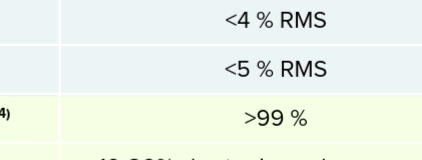
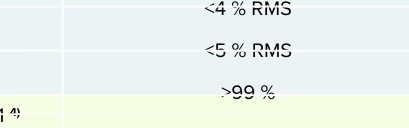
I work with technical tables and during the export to pdf, somehow coloured table lines gets out of the border, part of the text falls outside the defined frames.

  • January 29, 2026
  • 2 replies
  • 49 views

Dear Adobe Express team,

I work with technical data sheet tables and during the export to pdf, somehow coloured table lines gets out of the border, part of the text falls outside the defined frames. Could you please fix this issue? Or tell me how I could avoid of this disruption?
It makes the quality work impossible to finish.
I was chatting with Tarun Saini since December 10th 2025, but the conversation have been lost from the post in the link below as well as from the private message.
Express PDF export skipping live tables and charts | Community


Before the export

After the export: 


    2 replies

    Amitej S
    Community Manager
    Community Manager
    February 16, 2026

    Hi @EeRr, we reached out via community DM to ask for some details about the project that are required to progress further. 

    Please share the information!

    Thanks!   

    Amitej S
    Community Manager
    Community Manager
    January 29, 2026

    Hi ​@EeRr, I’ve shared the exported PDF for your project via email. Can you please check and let us know if it's fine?  
    You can also try exporting as PDF on your end to see if it’s exported with correct formatting.

    EeRrAuthor
    Participant
    January 30, 2026

    Dear Amitej, 

    Still the same. You can check it on 3rd page, at the second table in the middle. 
    This screenshots are from another file but the same project, only worse outcome, so this example is better to show for understanding. 

    Tarun Saini
    Community Manager
    Community Manager
    February 5, 2026

    Hi ​@EeRr,


    Please check your DM. I have sent you a message.


    Regards,

    Tarun