



Participant
September 15, 2023

Missing images from pdf download in Adobe Express

  • September 15, 2023
  • 16 replies
  • 2867 views

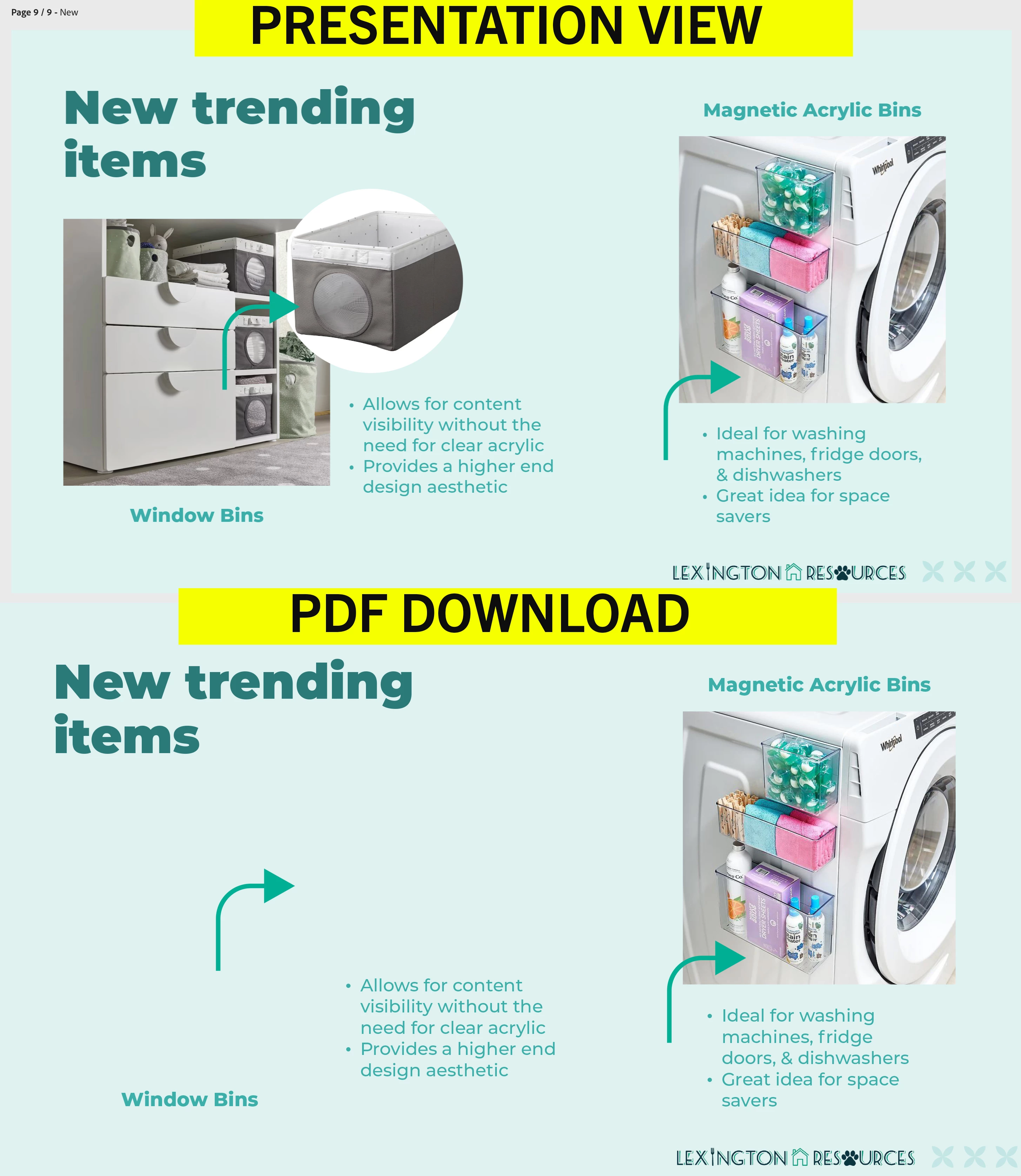
I can't figure out why some of my images are not visible when I download my presentation from Adobe Express? It downloads fine as a video and png. But I need it in pdf format. They are my own images, not licensed stock. How can I fix this?
 

16 replies

Participant
April 2, 2025

April 2025 - Still having the same issue. They are personal photos.

Tarun Saini
Community Manager
Community Manager
April 2, 2025

Hi 

@atlantisnet_com

,

Welcome to the community! We're sorry to hear about this. Could you please let us know which file format you're trying to download? Did you use images from your local drive, or are these images used from the Adobe Express app? Is this happening with all files?


 Did you try using the other suggested browsers (Safari, Microsoft Edge, and Google Chrome) or incognito mode to see if it makes a difference? 


Also, try clearing the browser's cache and cookies, and restarting the browser and try again. For more information on how to clear cache and cookies check this link- https://adobe.ly/4a5ipUF and how to use incognito mode- https://adobe.ly/4a2UzZV 


Let us know how it goes.


Regards,

Tarun


Known Participant
December 10, 2024

December 2024 and it's still doing this. I thought they were fixing this bug. 

Participant
May 2, 2024

I am having the same issue. 


I have uploaded jpeg drawings and wanted to create a portolio to so say and multiple drawings on each page.  Now, none of the images are loading to view, edit or download.  It doesn't matter if it try to download as a png, jpeg or pdf.  Pages are blank.

David__B
Adobe Employee
Adobe Employee
June 18, 2024

Hi @default365534895zuojd


Did you get this to work eventually?


Thanks,
Dave

Participant
February 19, 2024

Good Morning,


The image format is .jpg


There are no errors while downloading


I di download an template and modified it, can’t find the original anymore.. Then I tried to replace the existing photo with an .jpg stored on my PC.

All seemed fine until I tried to download it to an .PDF


Later i completely deleted it and tried adding a new Picture and it did work.


BR

Jürgen

Lyn_D
Inspiring
February 21, 2024

Hallo @JUERGEN35399539jjsh,


Thank you for confirming it started working.


Please feel free to reach out again should you require further help.


^Lyn

Participant
February 12, 2024

Hello, i have the same issue.
Still can't download the PDF File with my photos in it.


BR

Tarun Saini
Community Manager
Community Manager
February 15, 2024

Hi 

@JUERGEN35399539jjsh

,


We're sorry to hear about this. To proceed further, could you please answer some of the questions below-


  1. Can you provide more details about the images that are not visible when you download the PDF from Adobe Express?  What is the format of these images?

  2. Have you encountered any error messages or notifications while downloading the PDF format? Understanding any error messages can help pinpoint the issue.

  3. Are the missing images visible within the Adobe Express platform before downloading the PDF?


Try downloading the PDF format using different browsers, and let us know if that helps.


Regards,

Tarun

Lyn_D
Inspiring
December 19, 2023

Hi ginam84532222,


Thank you for your patience, and I'm sorry you're having trouble.

Our engineering team has fixed some bugs since this was reported.

Can you share if this is resolved for you?


I'm here to help and looking forward to hearing from you.


^Lyn