


Participant
April 1, 2025

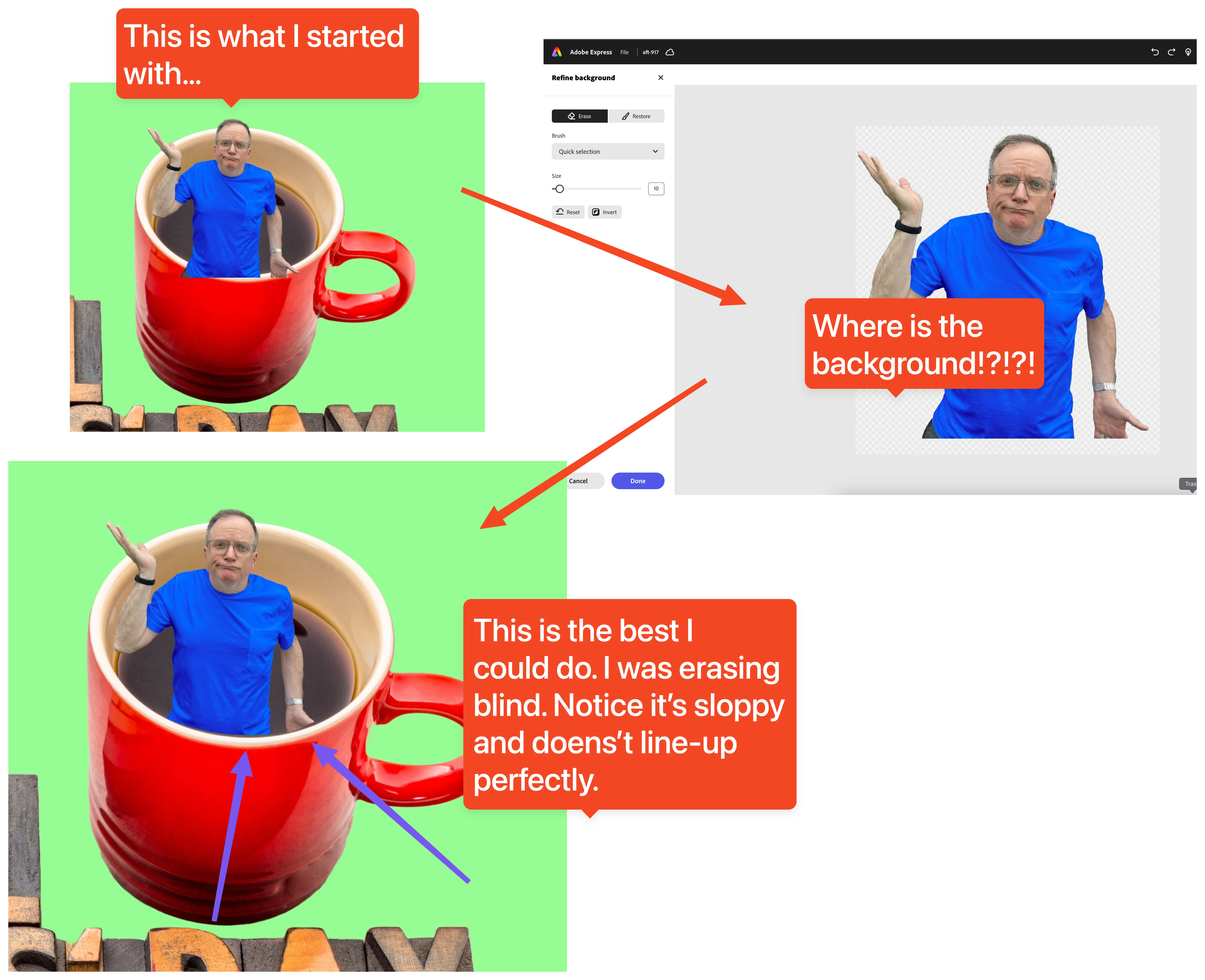
Not funny, Adobe! Erase feature no longer shows the background! WHY!?!?!

  • April 1, 2025
  • 6 replies
  • 421 views

I used the Erase feature with the BRUSH, and the object was isolated without showing the background! Why was the background removed? People need to see the background so they know what to erase. Putting the object on a white background makes erasing parts of an image nearly impossible!

This error must be an April Fools' joke. Please tell me it's a joke. 
6 replies

Adobe Employee
April 1, 2025

This should now be fixed. If you have Express open in a browser tab, please make sure to reload it to pick up the fix.

Again, sorry for the inconvenience.


Abhi G

Participant
April 1, 2025

WORST UPDATE EVER. HORRIBLE!

Known Participant
April 1, 2025

I also found this update to be not only a bad design decision, but also unusable. The eraser tool simply doesn't work at all. I would love to have the background visible again as well. I have a screen recording of it not working, but can't figure out how to upload it here. I have tried other browsers and clearing the cache. It appears to be a design decision plus a bug. Please revert the design to the old design.

Participant
April 1, 2025

As someone who uses adobe express often I find the new eraser update, a tool I use constantly, to be completely unusable. It no longer shows the context around an image I may need to properly erase certain elements from an image. The undo button simply does not work on erasing images anymore. The images, after I manage to erase them, suddenly become invisible and thus unusuable. Please adobe for the amount charged for your products this is a pretty bad change that could have been completely avoided. Please bring back the old eraser.

Adobe Employee
April 1, 2025

Hi @Jonathan35906616lu49 


Sorry for the incovenience. This is a bug and we are actively working on a fix.


Abhi G

Adobe Employee
April 1, 2025

Hi @matthewhaasgeek 


This is a bug and we are working on addressing it ASAP. Thanks for your patience.


Abhi G

Tarun Saini
Community Manager
Community Manager
April 1, 2025

Hi 

@matthewhaasgeek

,

We're sorry to hear about the difficulties. Did you try using the other suggested browsers (Safari, Microsoft Edge, and Google Chrome) or incognito mode to see if it makes a difference? 


Also, try clearing the browser's cache and cookies, and restarting the browser and try again. For more information on how to clear cache and cookies check this link- https://adobe.ly/4a5ipUF and how to use incognito mode- https://adobe.ly/4a2UzZV 


If that doesn't help, can you share your project URL with me via private message with edit access to investigate further?


Regards,

Tarun