



Megan-Medals
Participating Frequently
October 14, 2026
Open for Voting

P: Issue with uploading images

I want to put black backgrounds on images to use on my website. I upload the images into Adobe Express from my computer (normally .jpg files). This has been working fine for a couple of years.

Starting yesterday, I select an image to upload… there’s a very long pause with nothing happening at all, then it goes to the screen which normally displays the image & asks what you want to do with it only it just displays a “spinner” and hangs (also ramps up the browser’s CPU use massively).

Using: Firefox latest release, Windows 10. System restarted several times.
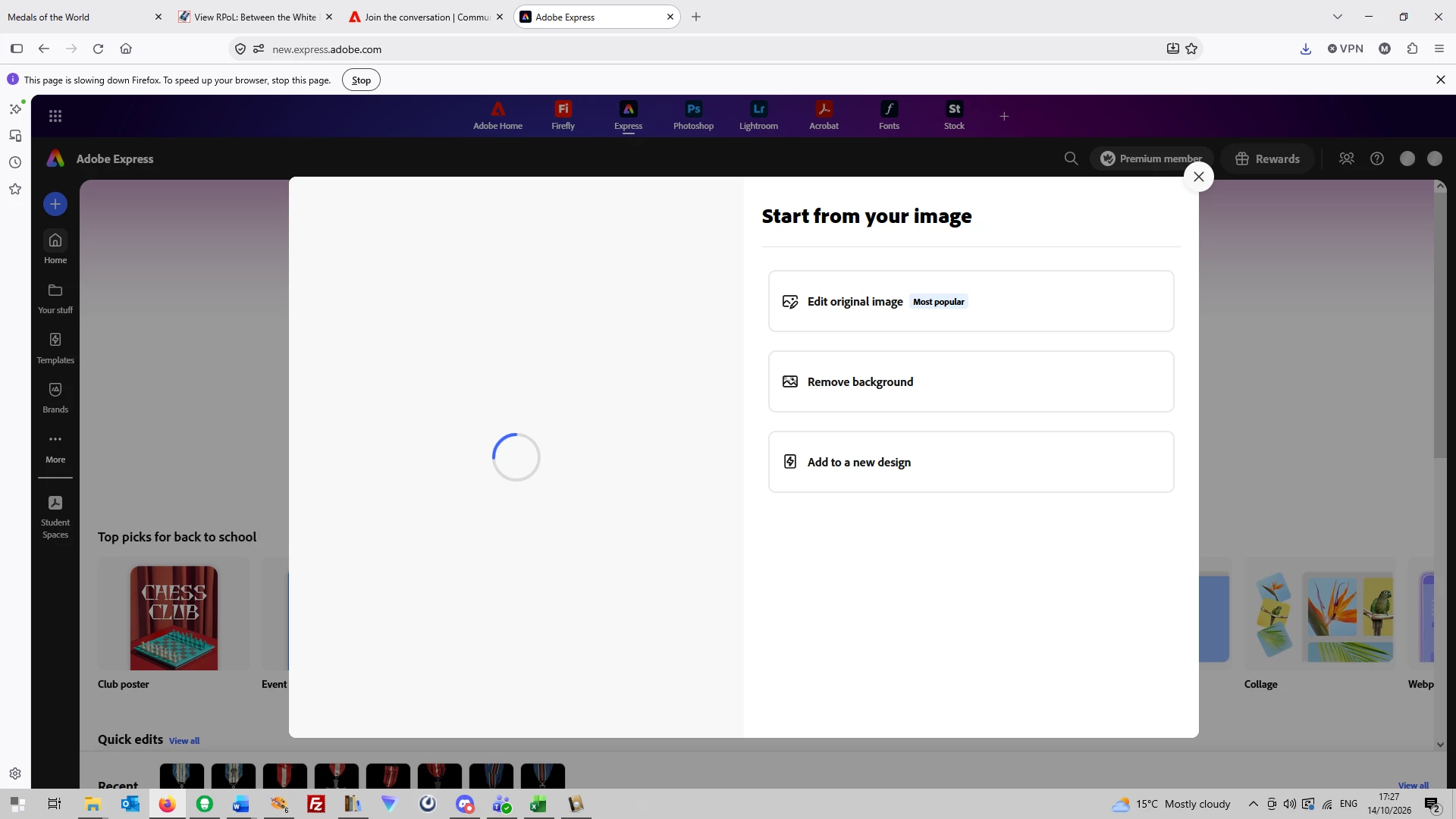
Can you help, please?

    18 replies

    Megan-Medals
    Participating Frequently
    October 16, 2026

    Hi Rose - many thanks to you and the team at Adobe. It’s working again! Back to putting my medal images on black backgrounds!

    As a computer science academic, speedy bug-fixes are appreciated.

    🤓

    Translate
    Megan-Medals
    Participating Frequently
    October 18, 2026

    Oh dear. After working for a couple of days, I came to put another image onto a black background and it seems that the bug is back, with a vengeance. It not only refused to upload the image, it locked up and crashed Firefox completely, and left everything else running so slowly that I had to restart the PC.

    Managed to open the Task Manager, it appeared that Adobe Express had left a couple of processes running on the PC. Is that what was causing the whole machine to become unstable?

    Would appreciate if someone could take a look, thanks.

    Translate
    Rose DV
    Community Manager
    Community Manager
    October 19, 2026

    ​@Megan-Medals - are you still seeing issues today? There were some service disruptions over the weekend but it’s currently all looking resolved so I wanted to check!

    Rose

    Translate
    Rose DV
    Community Manager
    Community Manager
    October 16, 2026

    Hi ​@Francois290810135604 ​@Megan-Medals ​@realistic_customerf3af - would you mind trying one more time for me? The team thinks they identified the underlying issue and shipped a fix, but we would like to confirm!

    Rose

    Translate
    Participant
    October 16, 2026

    Hello. It seems that it is solved. I tried to replace a picture and no issue. Thanks

    Translate
    Participant
    October 15, 2026


    Can’t upload anything for gifs. No loading circle or anything showing up. Keeping vids under 1 minute. Using phone app. WiFi is great. Not sure what the issue is. Can’t get past picking the video I want to use

    Translate
    Rose DV
    Community Manager
    Community Manager
    October 16, 2026

    Hi ​@Soothing_friend39fd - I combined your post with a thread that I suspect is the same issue you’ve been having. Would you mind trying one more time for me? The team thinks they identified the underlying issue and shipped a fix, but we would like to confirm!

    Rose

    Translate
    Participant
    October 15, 2026

    I came on here to report the same issue. Its same on the mobile app. When I try to replace a current image with another, it fails and tells me issue with uploading. It has now been over 72 hours that this issue has persisted. I finally had enough and decided to come report it here.  I already uninstall and reinstalled it. Log out account. Log back in. Etc


    Translate
    Rose DV
    Community Manager
    Community Manager
    October 15, 2026

    Hi ​@realistic_customerf3af,

    Thanks for adding your experience. I've escalated this internally for investigation and are gathering additional examples to help the team identify the cause.

    I understand you've already tried reinstalling the app and signing out and back in, so thank you for confirming those troubleshooting steps didn't resolve the issue.

    If possible, could you let us know:

    • The device model, version, and app version you're using

    I'll share any updates here as soon as I have more information from the team.

    Rose

    Translate
    Participant
    October 16, 2026

    Adobe app got an update today and after updating the app. I can now confirm that the issue have been fully resolved. Thanks Guys

    Translate
    Rose DV
    Community Manager
    Community Manager
    October 14, 2026

    Hi ​@Francois290810135604,

    Thanks for reporting this!

    To help us determine whether this is a project-specific issue or a broader upload problem, could you let us know:

    • Are you using the Adobe Express app on Android or iPhone?

    • Does this happen with all images or only certain files?

    • Are you able to upload the same image successfully in Adobe Express on the web (https://express.adobe.com)?

    • Is this an existing flyer that you're editing, or does the same issue occur in a brand-new project?

    In the meantime, please also try:

    • Updating Adobe Express to the latest version.

    • Switching to a different network connection (Wi‑Fi or mobile data).

    • Fully closing and reopening the app.

    We'll be happy to investigate further once we have a few more details.

    Thanks,
    Rose

    Translate
    Participant
    October 15, 2026

    Issue with all images with Android app. 

    I have solved the issue thanks to web app on my computer but I still have the issue with my phone

    Translate
    Rose DV
    Community Manager
    Community Manager
    October 15, 2026

    Thanks ​@Francois290810135604 - I merged your comments with another thread I’m tracking with similar reports. I am escalating internally and will update here once I know more!

    Rose

    Translate
    Rose DV
    Community Manager
    Community Manager
    October 14, 2026

    Hi ​@Megan-Medals,

    Thanks for reporting this! Since the upload is hanging after file selection and causing high CPU usage in Firefox, I'd first try the standard browser troubleshooting steps Adobe usually recommends for upload issues: clear your browser cache/cookies and test in a private window or another supported browser to see whether the behavior is Firefox-specific.

    Could you let us know:

    • Whether this happens with all JPGs or only specific files

    • Whether drag-and-drop behaves the same way

    • If you're able to upload the same image successfully in another browser (such as Edge or Chrome)

    If the issue started suddenly yesterday after working normally for years, and it reproduces consistently in Firefox with multiple images, that may point to a product issue rather than a file-specific problem. The additional details above will help us investigate further.

    Rose

    Translate
    Megan-Medals
    Participating Frequently
    October 15, 2026

    Thank you for your speedy response (of course, I’d closed down for the night by then!).

    Now that I’m awake again, I have tried:

    Firefox Private window: same effect

    Edge browser (ugh):

    I have tried several different .jpg images.

    I don’t normally use drag’n’drop, but that doesn’t seem to work either.

    Thanks for your help!

    Megan


    Translate
    Rose DV
    Community Manager
    Community Manager
    October 15, 2026

    ​@Megan-Medals - Appreciate you trying! I’ve escalated it since I’ve had a few user reports now on the community and will update this thread as soon as I know more!

    Rose

    Translate
    Participant
    October 14, 2026

    Depuis ce matin, j'essaye de mettre à jour un flyer sur Adobe Express et quelque soit le type d'image, j'ai toujours un problème d'importation du fichier. Toujours le même message d'erreur 

    Translate