

Quads3D
Participant
July 12, 2026

Payment BUG

  • July 12, 2026
  • 1 reply
  • 5 views


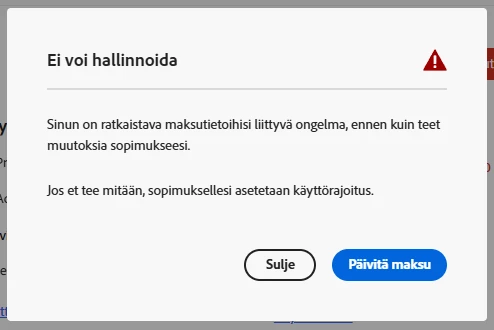
I attempted to update my contracts so Adobe stops trying to pull money from my account but that screen is blocked by this screen. It can’t be right. I’m not updating payments I’m updating that Adobe stops trying to pull cash from my account since I am not using Adobe Express in my workflows. 

Please fix this. That’s not how this should work. Thanks.

Let me know when this issue is fixed.


Sincerely,

  1. R.

Creative Director, Quads3

Finland

    1 reply

    Amitej S
    Community Manager
    Community Manager
    July 13, 2026

    Hi ​@Quads3D,Thank you for reporting this.

    You may want to clear the cache and cookies, try a different browser, and temporarily disable any ad blockers or browser extensions, as these can interfere with Adobe's account management pages. 

    Then try accessing the Adobe account :

    1. Go to account.adobe.com/plans
    2. Locate your Adobe Express plan
    3. Click "Manage Plan" → then select "Cancel Plan"

    If the payment modal appears again, try opening this page in an incognito/private browser window as this can bypass cached states that trigger the payment update screen.


    If the issue persists, Adobe Support can cancel the plan on your behalf. You can reach them here: helpx.adobe.com/contact.html


    Let us know this resolve the issue, or if you need further assistance.

    Best!