Participant
August 17, 2023

Projects didn't migrate correctly

  • August 17, 2023
  • 7 replies
  • 484 views

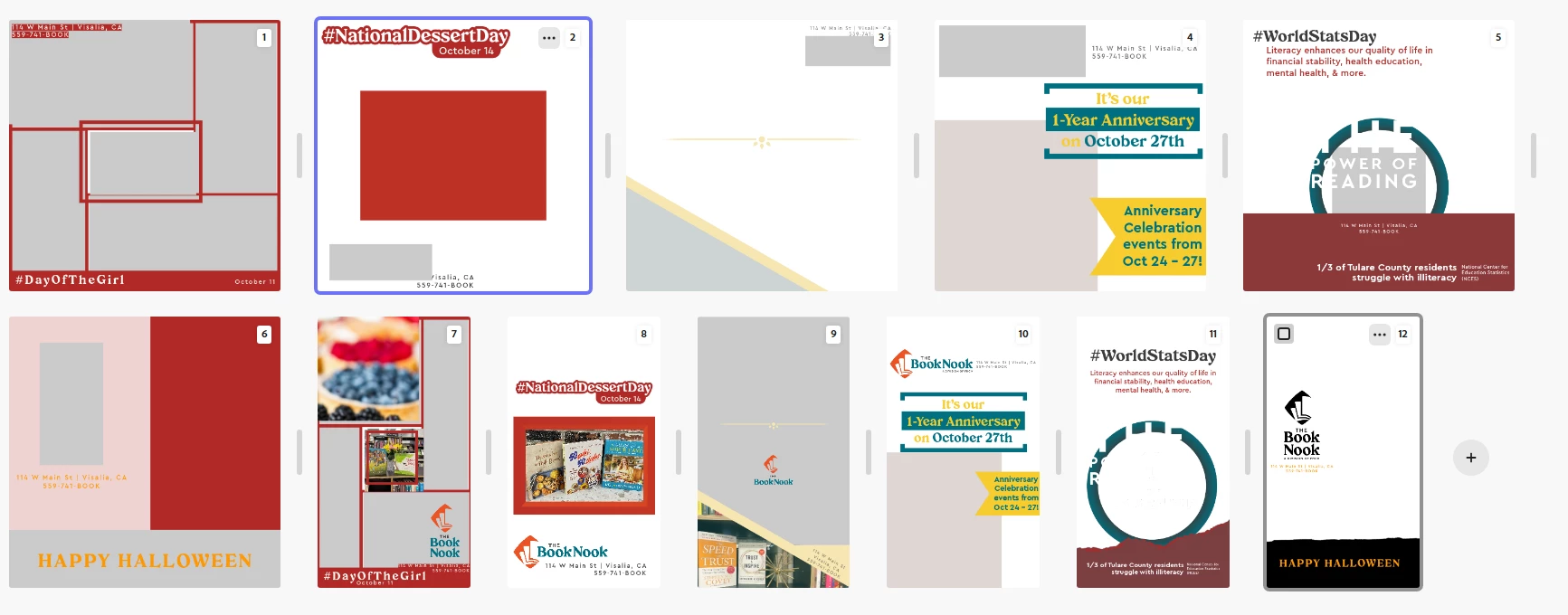
I have 8 different projects and all of them now look like this thanks to the update. 

7 replies

David__B
Adobe Employee
Adobe Employee
August 31, 2023

Hi @Melissa30006915meti 


I'm not sure what to expect regarding timing for getting this addressed but I've asked our developers and will let you know what they say.

Participant
August 31, 2023

Thank you for your response. Is there any ETA on the fix? I realize we can't always have expectations with things, but I need to know if it's just a few days wait then I can wait but if I need to recreate them all for resizing purposes I should get started ASAP. Thank you

David__B
Adobe Employee
Adobe Employee
August 30, 2023

Hi @Melissa30006915meti 


I heard back from our developers. They determined that your projects use a grid feature which there is a known issue that they're working on. Once this is fixed you will be able to edit these projects again.

David__B
Adobe Employee
Adobe Employee
August 18, 2023

Thank you for detailed explanation to go along with the screen shot. I'll pass on the information to our developers. Sorry to hear about your difficulties with support. I may reach out to you privately to share the project too if that is possible.

Participant
August 18, 2023

On another note, in a previous interaction with support I was able to share a project with the support agent and they looked at it with me. When I reached out to support this time, they asked to remote into my corporate computer which I could not legally allow. I offered to share a project and they didn't take me up on it. They could have looked at the projects themselves. 

Participant
August 18, 2023

I've explained it to chat support to no avail. 

  • a picture in a different page was moved and embedded into another but is immovable, like it's stuck and locked and can't be edited
  • whole images are removed and blank but can't be edited
  • text is distorted 
  • portions of images are irregularly cropped and can't be edited 


It's consistently distorted all of my projects that got migrated and no they were not created on mobile so I have no other way of editing them. 


I can download the originals which is okay, but I needed to duplicate and resize for other platforms and that has caused me to basically start from scratch for all 70+ images. 

David__B
Adobe Employee
Adobe Employee
August 18, 2023

Hi @Melissa30006915meti 


Thank you for reporting the issue. Just for clarification could you explain more about the issue with the converted files. Are they missing layers or flattened? Is there missing content? Did existing content get moved around? I want to report the issue to our developers but need additional info to describe the issue and go along with the screen shot. 


Thanks,

Dave