
Participant
August 21, 2023

Remove Audio Link

  • August 21, 2023
  • 4 replies
  • 4114 views

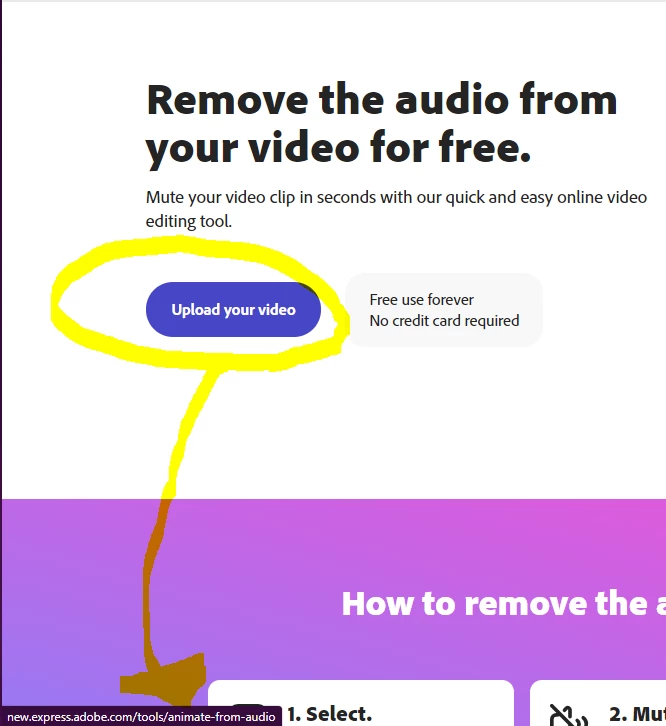
I use this link [https://www.adobe.com/express/feature/video/remove-audio] to remove audio from my videos, but the 'Upload Your Video' Buttons on both the top and the bottom of the screen lead to this link instead [http://new.express.adobe.com/tools/animate-from-audio]. 


When I try to upload the vidoes using Adobe - Creative Cloud, it only mutes the audio, it does not remove it from the mp4. Is there anyway this can be fixed?


I've attached an image to show the link that appears when you hover the mouse over the button:


4 replies

dijuryAuthor
Participant
August 24, 2023

@Corina Murgila Thank you for looking into this. By chance will this link be fixed anytime soon? The other features don't remove the audio the same way this link does. 

dijuryAuthor
Participant
August 22, 2023

I did try the Trim Video, muted and remove audio, but when I play back the videos on our TV is stills says audio isn't supported. When I use the link to remove the audio, I'm not exactly sure what it does to the file, but I don't get that error message on the TV when I play it. The properties of the file still say its' an MP4, so the magic this link works is exactly what I need for my videos. 🙂

Srujani Kamineni
Community Manager
Community Manager
August 21, 2023

Hi @dijury ! Thank you for posting this. We have a Trim video feature that allows you to trim and mute the video. We do not yet have a way to "extract" the audio out of the video file in Express - which seems to be what you are looking for. 
You could use Adobe Podcast to do this, and especially if you have a speaking audio you culd upload it to remove any background noise. Please let us know how it goes!

Corina Murgila
Adobe Employee
Adobe Employee
August 21, 2023

@dijury  thanks for reaching out! We'll look into it!