


Participant
December 18, 2025

Shortcut menu on text covers the rotation button

  • December 18, 2025
  • 2 replies
  • 343 views

Steps to replicate: 

1. Insert text with "Add your text" button

2. Observe that the shortcut menu (with rewrite-link-trash) covers the rotate button
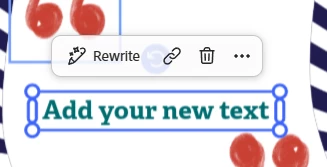
Stephanie2501394010om_0-1766035350142.png

The rotation is inaccessible here, only rotation of the entire text in increments of 90 degrees from the lefthand edit menu

2 replies

January 17, 2026

@Amitej S  - This new menu bar is poorly placed, users should be given the ability to drag it off the screen to the side or to reorintate it to a side menu. I can see in your screenshots you are at 17% on a desktop browser, most users would be working anywhere from 30 - 50% on a desktop or laptop browser and when needed for fine work will zoom in to 100%+ for detail work and alignment of objects. 


Do the same test again and increase the zoom within Adobe Express from 17% to greater the 50% and you will see how annying the menu bar positioning is.

Amitej S
Community Manager
Community Manager
December 18, 2025

Hi @Stephanie2501394010om, Welcome to our Express community! Thanks for reaching out! 

Can you confirm if you're working on the mobile app or the desktop browser version? When I tested it on the desktop browser version, for multiple instances, the shortcut menu (with rewrite-link-trash) remains fixed at the top of the editor, and the options to change size and orientation (rotate) appear on the selected text/object. 


Let me know if you get the same if you try working on incognito/private browsing mode too!