


Participant
April 14, 2025

Tamil font issue with pdf download in adobe express

  • April 14, 2025
  • 10 replies
  • 1447 views

Hi,


While downloading a file as image with tamil font in adobe express, it is getting downloaded successfully with same tamil font. But while downloading same file as PDF, the tamil font is getting collapsed as shown in the attached files. Please look into this bug and rectify on priority.
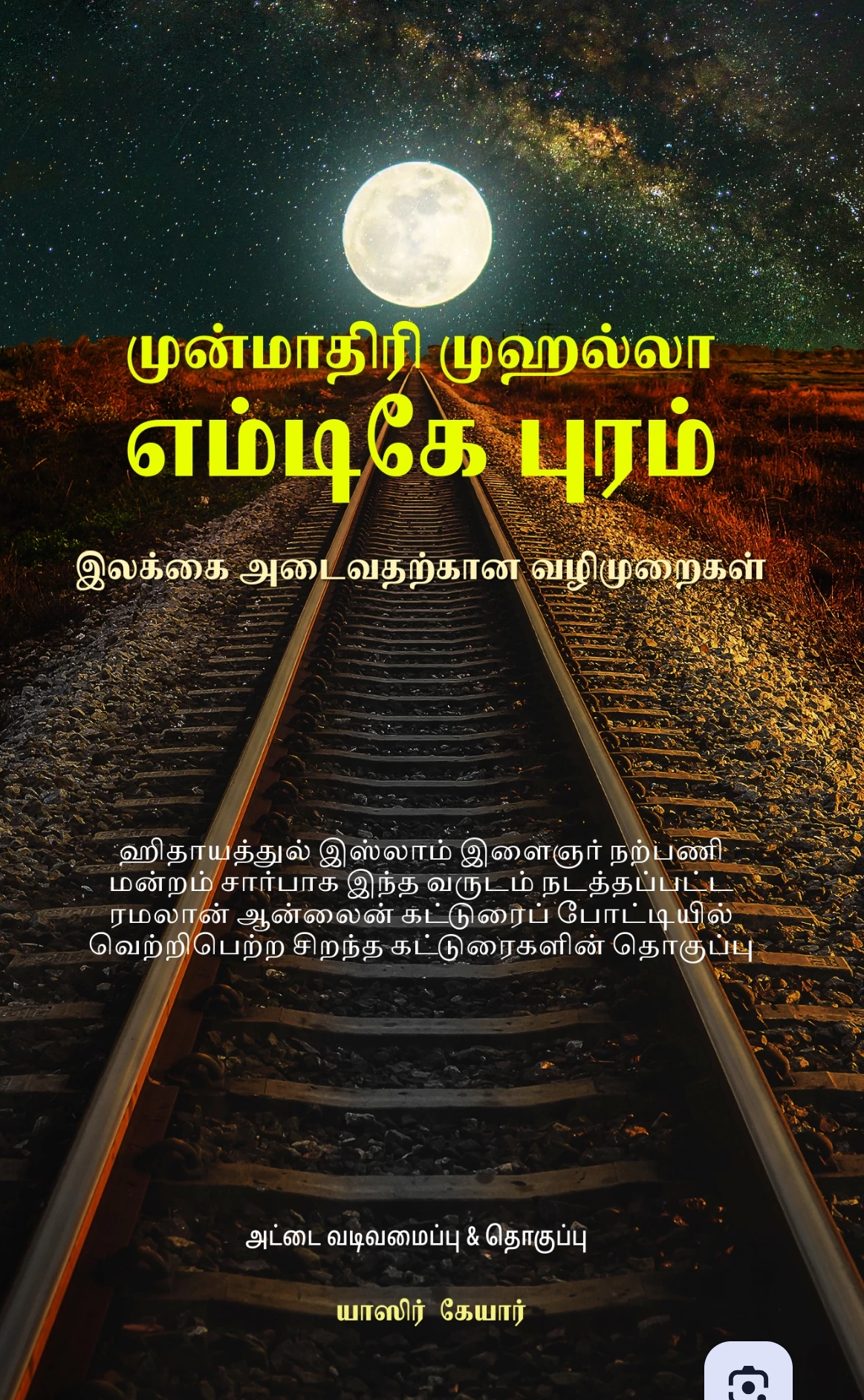
 

 Image file - it is perfect
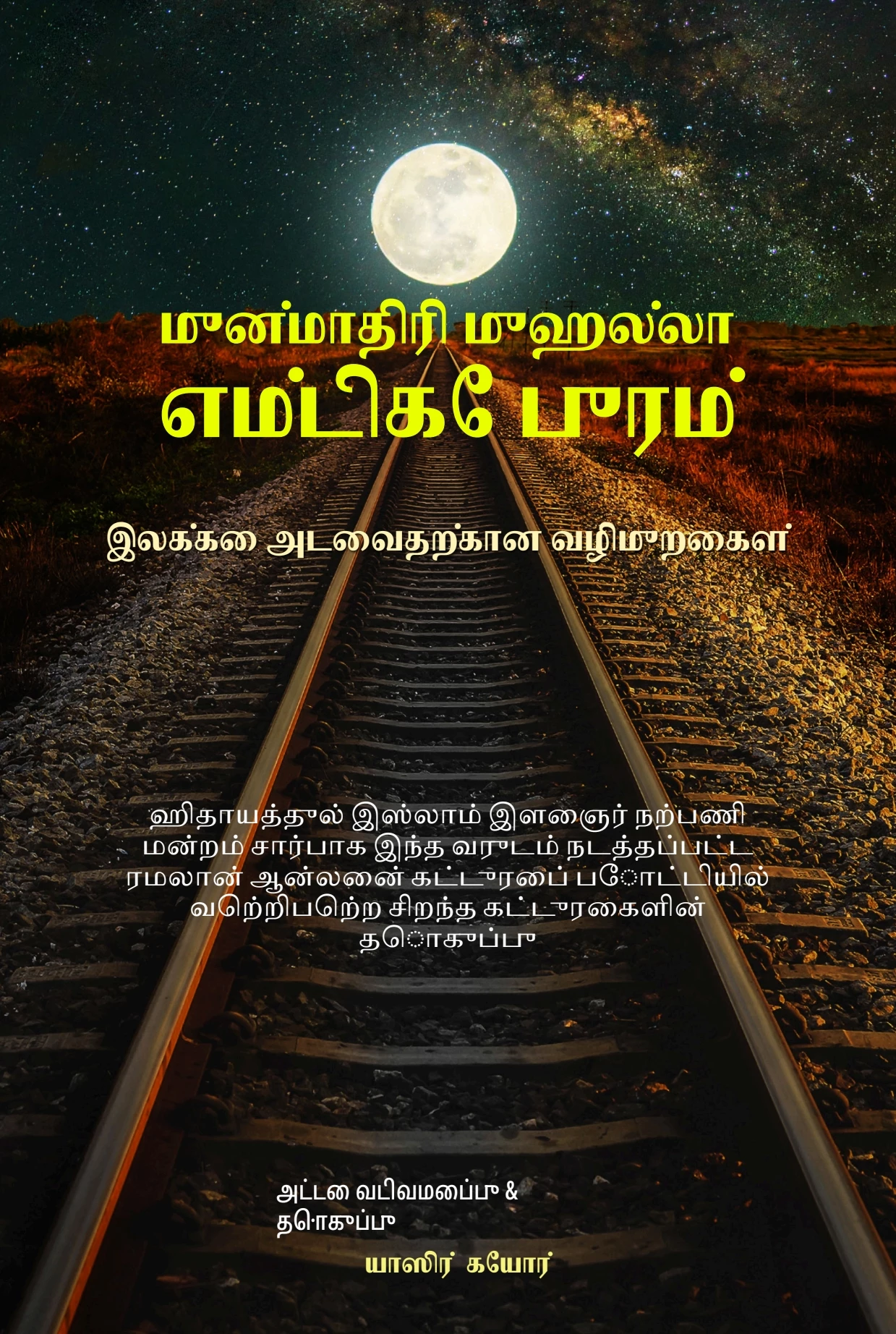
 

 Screenshot of PDF file - it is not correct, the font is collapsed.


Please compare the fonts in two images. There is lot of differences. Please rectify.


Thanks & Regards

Muhammad YaSiR

Email: yasir.kr@gmail.com

Mobile: +918870594792

10 replies

Community Manager
September 24, 2025

Hi @Karthikkumar,


Thanks for elaborating and sharing more details. I have sent you a DM can you please check your private messages on your community account ?


Thanks


^MM

Participating Frequently
September 24, 2025

 above is png file with correct font downloaded

 above is screen shot of pdf file downloaded with distorted fonts

Community Manager
September 24, 2025

Hi @Karthikkumar,


I’m sorry for the trouble with the Tamil font in PDF export. I’ve shared this case with our engineering team for investigation. In the meantime, try downloading as a PNG and converting to PDF via Quick Actions. Could you also share the project file (with edit access) so we can pass it along to the team?


^MM

Participant
June 17, 2025

Hi,

Even i am facing the same issue.Is there a solution for this?


Thanks

Evangelin

Amitej S
Community Manager
Community Manager
June 17, 2025

Hi @evangelin_2611, this is a known issue, and our team will work on resolving this. Until then, I'd recommend that you export the project as a PNG/JPG and then use Convert to PDF quick action as a workaround. 


Hope this helps you with your task until the fix is released. 


Thanks!

Amitej

Participant
June 17, 2025

Is there any solution for the tamil font issue??

Participating Frequently
May 3, 2025

While exporting a file to pdf which contains tamil unicode fonts rendering is not proper and letters are distorted in adobe express

Amitej S
Community Manager
Community Manager
May 5, 2025

Hey @Karthikkumar, Welcome to our Adobe Express Community! Thanks for sharing this. 


Can you also provide the project URL so we can test it on our end? Does it work fine if you download the project as PNG or JPG and then convert it to PDF using the Adobe Express Quick action Convert to PDF tool? 

Can you provide us with the sample/correct PDF version so we can compare the projects? 

yasir_krAuthor
Participant
April 26, 2025

Hi,


Is there any update on this issue?

Amitej S
Community Manager
Community Manager
April 28, 2025

Hey @yasir_kr, we understand the urgency, but getting this resolved would take time. Providing an exact resolution time will not be possible.


I'd suggest you follow the steps mentioned above to download it as a PNG and then convert it to PDF using the Adobe Express Quick actions. We understand this is a workaround and would be additional work for a multi-page project, but our team is working on this. It is also happening with other scripts, so rest assured, the issue is being worked on, and a fix will be out. Until then, we appreciate your patience and support. 


Thanks! 

yasir_krAuthor
Participant
April 14, 2025

Hi


Ok. I'll do it manually.


Regarding tamil font PDF export issue, when it will be resolved? How many days it will take? 

Community Manager
April 14, 2025

Hi @yasir_kr,


Our engineering team is actively investigating the problem. While we don’t have an exact timeline yet, please be assured that this has been prioritized. We'll share an update as soon as we have more information.


^MM

yasir_krAuthor
Participant
April 14, 2025

Dear @mahmoud_5524


Thanks for a quick reply. Kindly look into this issue and resolve as early as possible. Thanks for temporary solution. But I'm designing an E-book which is more than150 pages and it's very difficult to convert all the pages to PDF and it'll take much time.


An early rectification on this issue will be highly appreciated.


One more question on designing e-book. How to add automatic page numbers to all pages in adobe express? Kindly reply.

Community Manager
April 14, 2025

Hi @yasir_kr,


Thanks for reaching out! Currently, Adobe Express does not support automatic page numbering across multi-page projects like e-books.

However, here's a quick workaround:

  1. Add a text box manually to each page with the desired number.

  2. You can copy and paste the text box across pages and just update the number.

  3. To keep things consistent, use "Duplicate Page" and then edit the number on each one.

We understand this can be time-consuming, and we're continuously working to improve multi-page support. Feel free to share your feedback or feature request via Adobe Express UserVoice — our product team reviews these regularly! 😊


^MM

Community Manager
April 14, 2025

Hi @yasir_kr,


I understand the Tamil font displays correctly when downloaded as an image but collapses in the PDF version. This appears to be a font embedding or rendering issue specific to PDF export. The team is aware of and looking into similar cases.

As a temporary workaround, I recommend:

  • Use the image version if possible for sharing.

  • I suggest downloading the design as a high-quality PNG and converting it to PDF using Adobe Acrobat, which might preserve the font better.

Thanks for your patience — I’ll share any updates as soon as I have them.


^MM