

stuartb54726229
Participant
March 19, 2025

Text not editable

  • March 19, 2025
  • 7 replies
  • 557 views

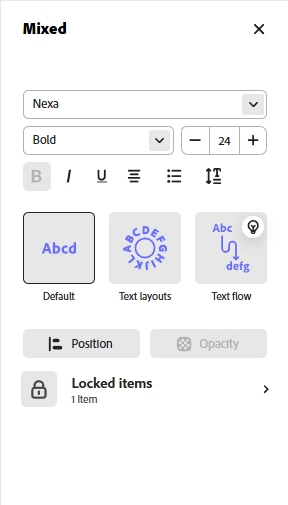
I can only edit what is available on the left panel but cannot rewrite actual text. 

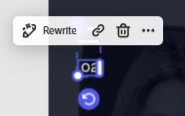
Even "Rewrite" quick action is not helpful because it implies only rewriting with AI


7 replies

Adobe Employee
April 8, 2025

Hi @stuartb54726229 


Thanks for getting back. Yes, this is noted in our Known issues article

https://helpx.adobe.com/express/troubleshoot/known-and-fixed-issues/known-issues.html


We understand this can be incovenient. Fortunately, a workaround is also provided!


Hope this helps

Abhi G

stuartb54726229
Participant
April 8, 2025

I figured the cause of the issue...
Adobe Express doesn't follow the same logic as Photoshop in this context.

I had an image with opacity on top of other layers. Even though I was able to select the layer beneath (with locking the image to avoid selection of the image), I couldn't access text edit mode just with clicks, nor with other proposed options, because they're not available. I can only edit properties available in the side panel.


So, the solution is to bring those text elements to the front.

In the context of Photoshop, I could use the text tool or double-click on the layer from the layers list to access edit mode, regardless of where the layer is...

From the usability perspective, it is unusual, because you can select it, move it around, and edit it using properties in the side menu, but you cannot rewrite because no flow allows it. It gives the impression that it is fully editable, but it's limited...

Adobe Employee
March 22, 2025

@Glenn 8675309 


I was wondering about that since one of the screenshots shows "Locked items (1 item)"

But the other screenshot with the text shows the standard text editing options rather than the lock icon.


That's why I asked @stuartb54726229 for the file. Let's see.


Abhi G

Glenn 8675309
Legend
March 21, 2025

I don't think it's a bug, and it appears simply that you locked that text layer.   

Adobe Employee
March 21, 2025

@stuartb54726229 


I have sent you a private messge to set up file sharing for further investigation.


Abhi G

stuartb54726229
Participant
March 21, 2025

That's correct. When I select a text element and start typing, the characters don’t appear. It seems that the text is not in editing mode; it is only selected, and I cannot enter edit mode. This issue does not occur with all text elements, only some of them. This problem happens across different files...

Community Manager
March 21, 2025

Hi @stuartb54726229,


Thanks for confirming. Some text elements may not be fully recognized as editable. A few things to check:

  • Try "Edit Text" instead of selecting the element – Double-click inside the text box or use the text editing toolbar.

  • Check if the text is outlined – If it was converted to shapes, it won’t be editable.

  • Test on a different file – If this happens across multiple files, it may be a broader issue.

  • Try duplicating the element – Sometimes, copying the text box and pasting it again allows editing.

I hope this helps, if not, please let me know.


Best regrds


^MM

Adobe Employee
March 19, 2025

Hi @stuartb54726229 


Sorry to hear you are running into this issue. To confirm, when you type, no characters show up?

Is the text in editing mode (by double clicking inside the text object): an "I" cursor should be blinking.


Finally, does this happen on a specific file or all of them?


Thanks

Abhi G
