


mila_8998
Participant
June 8, 2026

The download does not match the created graphic

  • June 8, 2026
  • 2 replies
  • 30 views

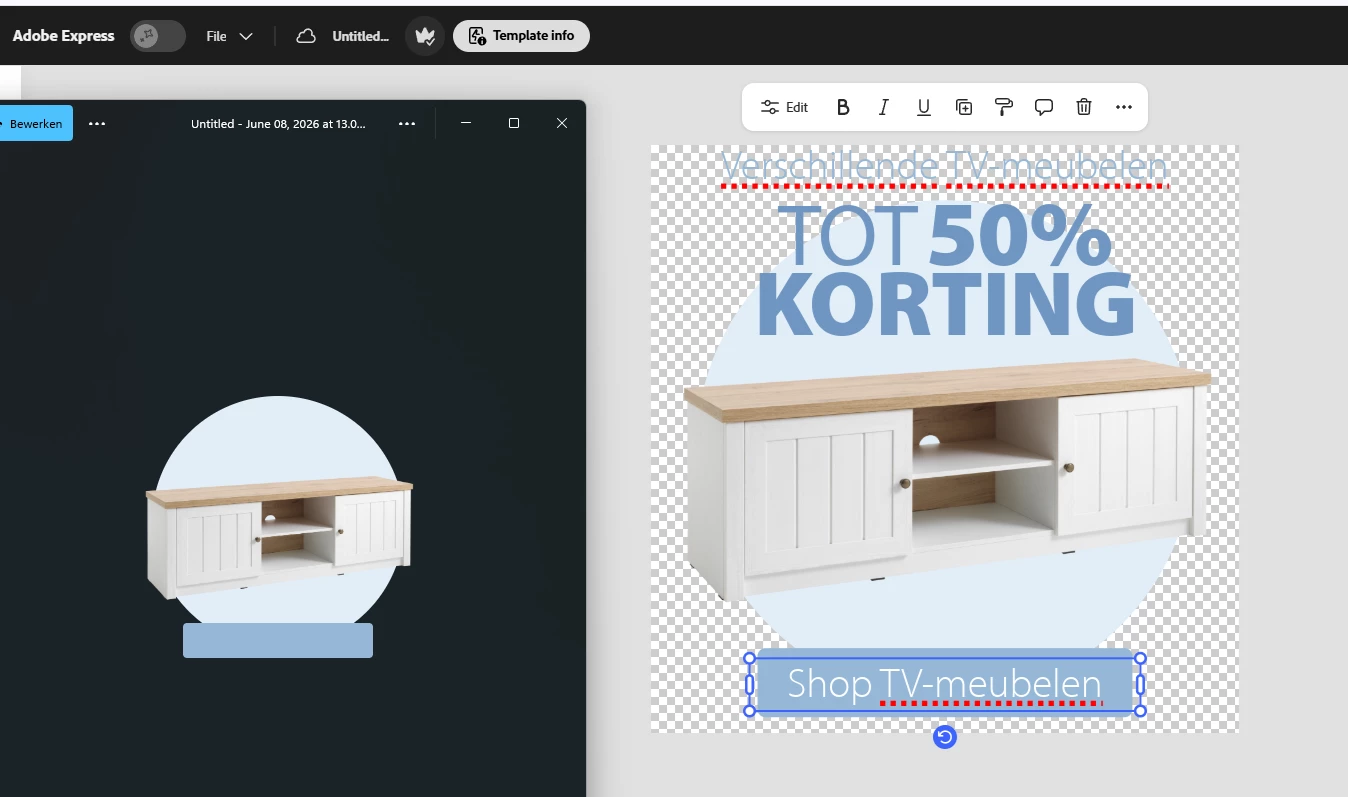
 When I edit an existing graphic and download it after finishing my changes, the downloaded file does not match the latest version. See the attached example: On the right is what I created and downloaded and on the left you see the downloaded version. I am using the web version. This issue seems to appear with video, GIF and PNG downloads.
 

    2 replies

    Adobe Employee
    June 8, 2026

    Hi ​@mila_8998 


    We have just deployed a fix for this. Could you please try again? If you have Express already open in a browser tab, please refresh it to pick up the fix. 

    Thanks

    Abhi G

    Amitej S
    Community Manager
    Community Manager
    June 8, 2026

    Hi ​@mila_8998, thanks for reporting this. This is definitely an unexpected experience. It shouldn't be happening.


    If the downloaded file isn't reflecting the latest edits you've made in the editor, there may be a rendering or caching issue affecting the export.

    Here are some troubleshooting steps you should try once:

    • Save the project, refresh the page, and then download again.
    • Try duplicating the project and downloading the copy, as this can sometimes refresh the project's render state.
    • If you're downloading as PNG, try testing with JPG (or vice versa) to see if the behavior is format-specific.
    • Clear your browser cache and reload the editor.

    If the issue persists, please share a screen recording of the workflow so we can take a closer look and investigate further.

    Thanks!