


Participant
October 31, 2025

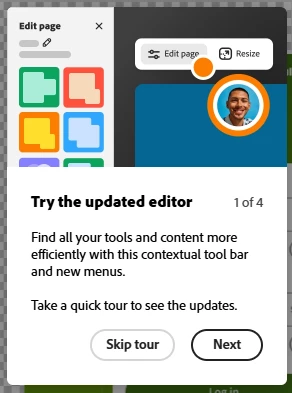
Try the Updated Editor Tour Keeps Popping Up

  • October 31, 2025
  • 3 replies
  • 82 views

Everytime I log into Adobe Express and open a project the Try the Updated Editor Tour popup appears even after selecting skip tour or completing the tour. It will disappear for then but if I load a project again or complete an action such as remove a background from an image it appears again. 


Environment Info

  • Platform: Web

  • Browser: Chrome, Edge are the browsers I tried.

  • OS: Windows


Screenshots or Video (If Possible)


When Did It Start?

I just gained access to Adobe Express 10/30/25 and it has been occurring since.


Steps to Reproduce 

I dont know that its necessarily reproducable since it occurs when i simply open a project or complete an action such as remove an image background.

3 replies

Participant
November 10, 2025

I appreciate the help!

Participant
November 3, 2025

Thank you for the response. I have tried both Chrome and Edge, which are the only two available on my work computer and I am not able to download other browsers. I already had cleared the cache and cookies with no change. 

I did try incognito mode just now but that does nothing to help either. I also notice it tries to get me to complete the initial survey as well that asks how many employees are in my company but then get an error when I try to complete it. 

Tarun Saini
Community Manager
Community Manager
November 3, 2025

Thanks for sharing the information @frank_1289,


I have escalated the case to our product team. Once I hear any information from them, I'll keep you posted.


Regards,

Tarun

Tarun Saini
Community Manager
Community Manager
October 31, 2025

Hi @frank_1289,


We're sorry to hear about the difficulties. Did you try using the other suggested browsers (Safari, Microsoft Edge, and Google Chrome) or incognito mode to see if it makes a difference? 


Also, try clearing the browser's cache and cookies, and restarting the browser and try again. For more information on how to clear cache and cookies check this link- https://adobe.ly/4a5ipUF and how to use incognito mode- https://adobe.ly/4a2UzZV 


Let us know if that helps.


Regards,

Tarun