


Participant
January 14, 2025

URGENT!! Locked:Allow text Replace - tool not working on template

  • January 14, 2025
  • 3 replies
  • 375 views

I've created a template and have marked the features indicated below as "Locked: Allow text replace".
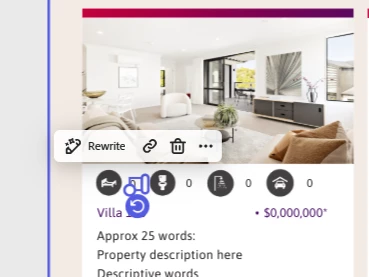
 

When I share the template with others,  the 'Locked:Allow text replace' unlocks and if I go in to lock it again, other text numbers become unlocked. How can I prevent this from happening? Please urgently help as this is for work!

Here is the link:


https://new.express.adobe.com/id/urn:aaid:sc:AP:44e39c44-698f-52af-9079-15c742c820e4?invite=true&promoid=Z2G1FQKR&mv=other


Thanks

3 replies

Participant
January 22, 2025

Hi there

Answers to your questions:


1. How are you creating the template?
By copying and changing the name of the artwork. Here is a link to all artwork templates saved that our marketing team use:
https://new.express.adobe.com/your-stuff/projects/urn:aaid:sc:AP:89d7d3f2-7964-43a5-b989-62482d0b6e15?promoid=FMHMZ4HK&mv=other&openFrom=copy-link
2. Is the Lock: Allow replace setting being unlocked automatically or is the issue that other users are able to unlock?
It unlocks automatically for me and those that have access to the artwork via share.

Thank you

Michelle Stanyon
Direct Marketing Specialist
{Mod Note: Personal information removed by Moderator}

[Logo]<>
[Logo]<>
[Logo]<>
[Logo]<>
The information transmitted by this email is intended only for the person or entity to which it is addressed and must not be used or disclosed by that person or entity other than for the purposes for which it was supplied. This email may contain proprietary, business-confidential, and/or privileged information. If you are not the intended recipient of this message, be aware that any use, review, retransmission, distribution, reproduction or any action taken in reliance upon this message is strictly prohibited. If you received this in error, please contact the sender and delete the material from all computers.

Andrew_Gutierrez
Adobe Employee
Adobe Employee
January 22, 2025

@michelle_0847 I just requested access to the file so we can debug further. A couple additional questions: 
1. How are you creating the template? 
2. Is the Lock: Allow replace setting being unlocked automatically or is the issue that other users are able to unlock? 

Tarun Saini
Community Manager
Community Manager
January 15, 2025

Hi 

@michelle_0847

,

Welcome to the community! I would like to inform you that I was able to reproduce the issue and escalate it to our product team. Once I hear anything from them, I will keep you posted.


Regards,

Tarun