


Participant
September 7, 2025

Material settings are not showing up, only AdobeStandardMaterial is showing up

  • September 7, 2025
  • 3 replies
  • 288 views

I was trying to change my tessalation settings on my project, only to discover that I have no materials anymore, just the basic AdobeStandardMaterial and literally nothing else. I cannot find ANY information anywhere for this issue, I uninstalled and reinstalled the program, opened a new project, reset the settings, and tried to find the material library location on my disk, but I cannot find any information on it anywhere
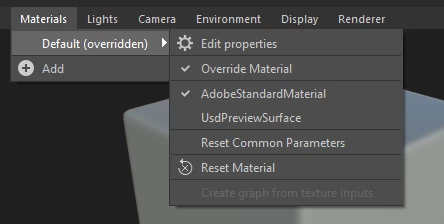
 

3 replies

Cyril Dellenbach
Community Manager
Community Manager
September 8, 2025

Hello @jinofskih73885639,


I understand the frustration, but we changed some parameters setup a little bit with the new Renderer. Technically speaking, it made more sense to move the Tesselation property in Renderer settings

Renderer > Edit Settings > Render Settings > Tessellation factor

https://helpx.adobe.com/substance-3d-designer/technical-issues/3d-view-issues.html#cannot-find-tessellation


To be fully honest, I'm also a bit frustrated by this change (even if it technically makes sense), but there are discussions on the topic to have a smoother Height value/Tesselation experience in Designer.


Best regards,


Cyril Dellenbach (Micro) | QA Support Artist | Adobe
Adobe Employee
September 8, 2025

Hey, 

The tesselation settings are now in the renderer menu, but if you want to access other shaders, you need to switch back to OpenGL.

Participant
September 8, 2025

I just want tessalation settings, that's literally it


why is Adobe like this