


PJAmaro
Participant
April 1, 2024

Send to Substance Designer greyed out

  • April 1, 2024
  • 2 replies
  • 357 views

I want to make some changes to a material I got from the Substance 3d Assets Librarym, but I only have the option to import it to painter and not designer. It instead says that sending to this app is not available yet.
Furthermore If i download it and open it in designer there is a lock symbol on the graph and I can neither see or change it.
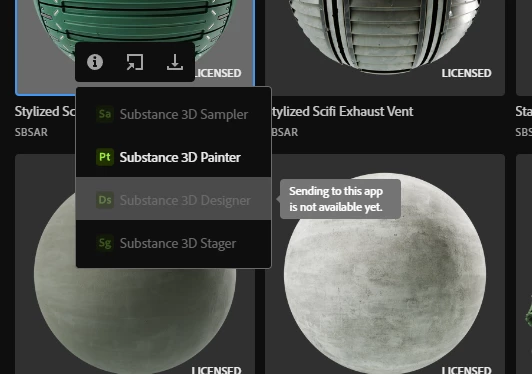

The following may be relevant:
Both applications are installed to same directory.
Substance designer was given a fresh re-install and this did not fix the issue.
These applications are all installed and managed via adobe CC.
I also can not send it designer through substance painter.

2 replies

davescm
Community Expert
Community Expert
April 1, 2024

Check the asset on the Substance web page, rather than in the CC desktop application (to do that just click on the link in the desktop app for 'More Substance 3D Assets' - '3D Assets'.

Many materials are available in both SBSAR and SBS format (including that shown in your screenshot.

If your material is available in both formats then just click on the down arrow next to the blue download button, change the format to SBS and download it to your local library location.


You can then open the graph in Substance Designer.


Dave

PJAmaro
PJAmaroAuthor
Participant
April 1, 2024

I have been speaking with Adobe help and it looks like the send to substance designer is completely pointless and will always be greyed out. This is massively disappointing as prior to the adobe acquisition you could manipulate these files. So often the substance painter materials are just a little off from what I want and now to get what I want I have to completely make the material from scratch.