


Audio fade bug (with workaround solution)
Hello and happy New Year,
This is a strange one. I am running into the following repeatable problem with…
- Premiere on iPhone v 25.12.0 (22) 18 Dec 2025,
- on an iPhone 15 Pro running iOS 26.1,
- creating a video with 3 source videos from the camera roll
When I added a 1.2-second audio fade out to the very end of the video, the audio for the entire last clip no longer played, that is, until the very start of the fade-out, at which point only the fade-out played—meaning that there was only 1.2 seconds of fading audio for the final clip.
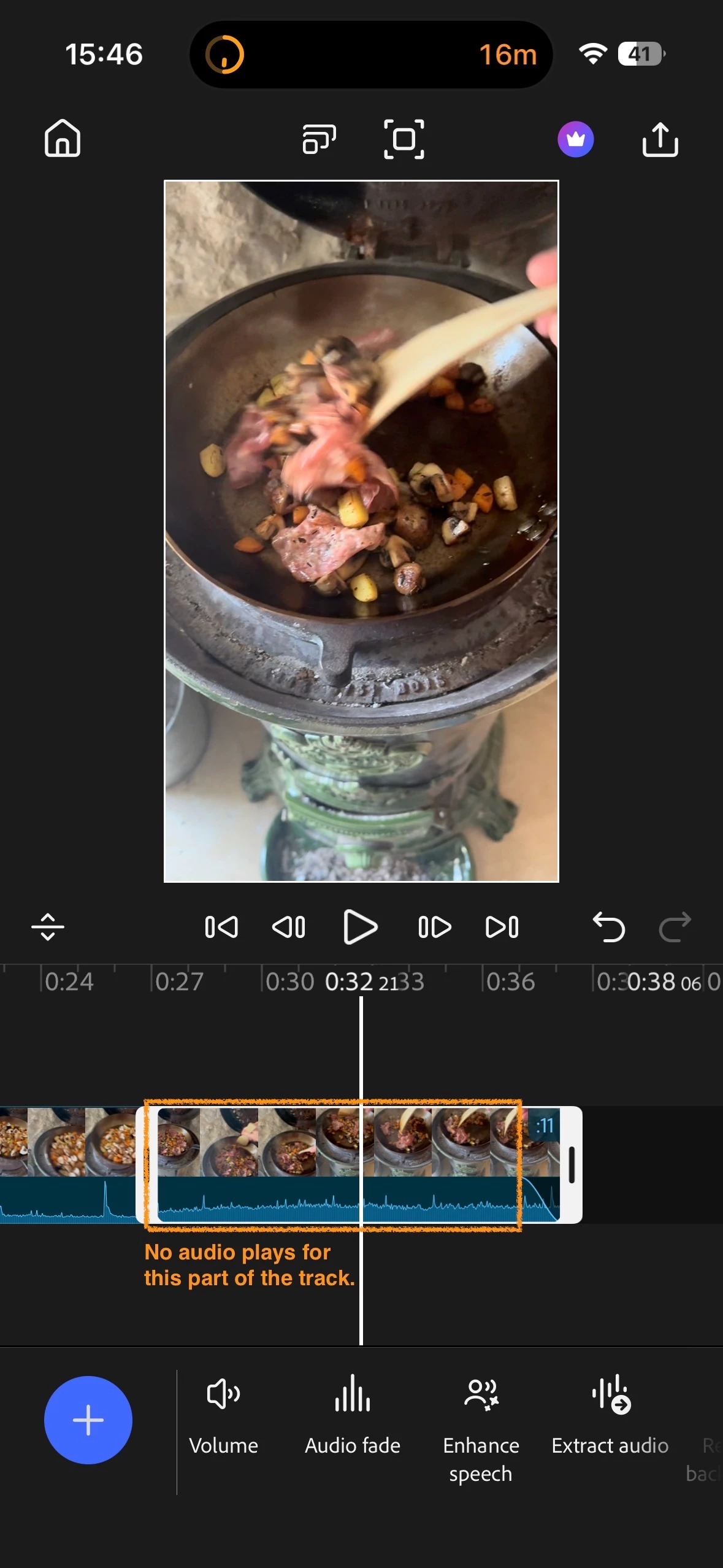
I tried changing the length of the clip, which made no difference. I tried adding a fade-in to the same clip, which caused the app to crash and that file to become corrupted. Now, if I try to open it, Premiere crashes immediately.
I tried creating a fresh video with only the third clip to see if I could reproduce the problem, and I could not. I tried again with two different clips, and the problem did not occur.
I tried creating the entire video again with the original three clips and following the same steps:
- Added the three clips from the iPhone camera roll
- Trimmed the end of clip 1
- Added a dissolve transition between clips 1 and 2
- Trimmed the end of clip 2
- Added a dissolve transition between clips 2 and 3
- Trimmed the end of clip 3
- Added a fade out outro transition at the end of clip 3
- Added the audio fade out
- Played the video; again, only the final 1.2 seconds of audio played for that third clip
So it's repeatable, but with these three files.
The workaround fix is to change the order of the clips, moving the last clip with the audio fade out before the second clip, and then moving it back again. After that, the audio for the third clip plays as expected.
I'm happy to send the files if it helps solve anything.
Cheers,
Eric
 AdChoices