


Participant
February 28, 2023

AME Update issue

  • February 28, 2023
  • 4 replies
  • 196 views

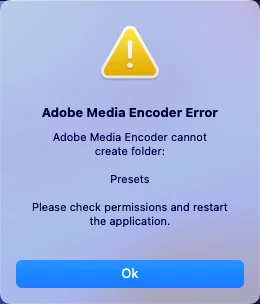
After updating Media Encoder I am unable to launch the App beyond the Error Message: "Adobe Media Encoder cannot create folder: Presets. Please check permissions and restart the application."

I have already tried creating a Presets folder in User/Adobe/Adobe Media Encoder/23.2/Presets but still get the same error.

I am on Mac OS 13.2.1 - it was running perfectly well until I updated the app. I have restarted, I have restarted in Safe Mode - which fixed the launch issue with the updated Premier - all to no avail.

Could really use some assistance.


Same issue with Premiere Pro - all other updates zero issues
4 replies

Participant
March 1, 2023

Yes, this is what I see in Ventura 13.2.1 and this is the Files & Folders management window - you can see that AME has "Full Disc Access". This has only been an issue since the latest CC download of AME 23.2.1 (Build 2) - was working fine prior to that

Adobe Employee
March 1, 2023

This does not look right. I see this in macOS 13.2 Ventura (German):


Look for "Files & Folders", not "Disk Access".

It is important that you grant access to the "Documents" folder on first launch as all user preferences will be stored there! You will be asked by macOS.

Participant
February 28, 2023

Thanks for the reply - I'm using Ventura - Sys Prefs look a whole lot different these days. All of my Adobe Apps have "Full Disc Access" as well as access to DropBox. Only Media Encoder gives me any issues

ChWard
Community Manager
Community Manager
February 28, 2023

Could you check in the system preferences if the AME has permission to write/read in these folders?