Known Participant
June 17, 2025

Broken timecode when selected several videos

  • June 17, 2025
  • 3 replies
  • 218 views

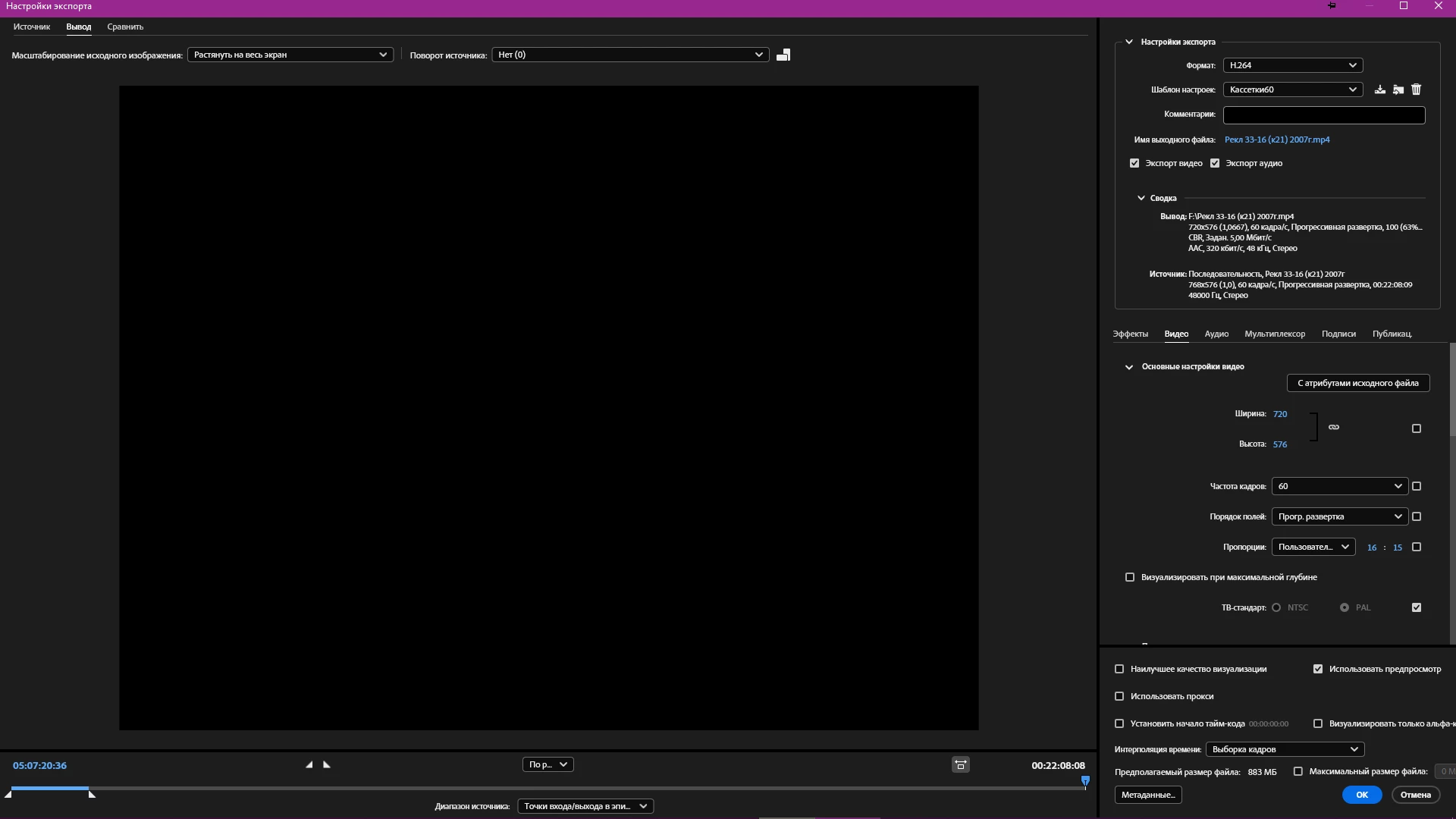
If you select several video sources in the program queue and click on change preset settings, a window opens where the timecode is broken at the bottom. The timecode of the longest file is shown, although this was not the case in the 2017 version.

Logically, the timecode of the video I clicked on should be shown, even though several are selected.

Current version is 25.1.

Windows 10 22H2 19045.3570.
3 replies

Known Participant
June 24, 2025

In version 25.3, when selecting several items in the list and clicking on the preset name, the same video opens, even if you select different ones. In addition, the inscription at the bottom does not fit in the frame size in Russian.

Known Participant
June 24, 2025

Only in preview. If you select several elements of different duration, then the final timecode in the preview window will be from the largest element. If 1 element is 3 hours long, and the second one is 5, then 2 hours at the end there will be a black screen, this does not affect the rendering.

EckiAME
Community Manager
Community Manager
June 24, 2025

Please note that if you have multiple items selected the export settings will be applied to all of them. Does the issue only occur in the previews or also in the rendered files? Did you also try in newer versions (25,3, Beta)?