



Media Encoder slower when in background
Hi. I'm not sure if it’s a Windows bug or the Media Encoder is the culprit, nonetheless, I ask Adobe to investigate this issue.
This problem had been there for several years in both Premiere Pro and Media Encoder, but some time ago it was fixed for Premiere and is still in ME. Here’s a screenshot to illustrate it:
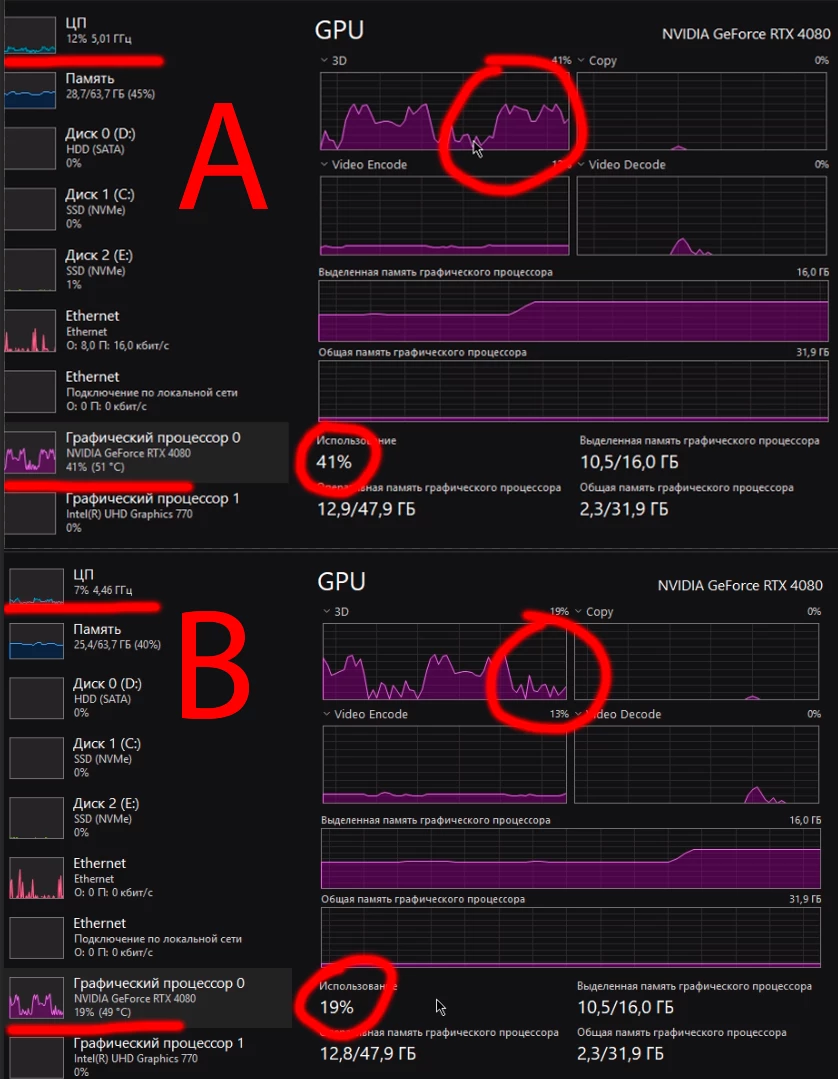
Picture A shows my PC load - both for CPU and GPU - when ME window is active. The program is either maximized or just is not overlapped by any other program window.
Picture B shows a drop in performance as if ME is going asleep. This happens if I minimize ME or open my browser to read an article, watch a move, browse the socials or news, or I may open some book locally on my PC, or go se how my folders are organized - anything that switches the focus off ME main window.
I have a good PC so it’s out of question that such a simple task as opening the browser may lower the performance so much.
And it goes without saying that when the second case happens ME render time become much MUCH longer. We may speak about several minutes versus several hours.
Some additional data:
- 14700K, 4080, 64 Gb of DDR5, fast SSDs
- Happens in ME only. Shutter Encoder, HandBreak, Davinci Resolve, AE, PR - nothing acts like this when in case B.
- Win11, 24h2, Balanced power mode. Max Power does not change the situation. Still not sure if it’s a Win or Me issue. Cannot check it in other Windows or Mac.
 AdChoices