



Metadata & Timecode Burn-In renders not correctly in MediaEncoder
Hi there,
I experience a strange bug in Media Encoder. The SEQ TC is not showing correctly when i send the export to MediaEncoder. Instead of "SEQ TC: 10:00:00:00", which is shown in Premiere Pro and the Export Window in Premiere Pro, in MediaEncoder it is shown as "SEQ TC:#{nbsp}10:00:00:00.
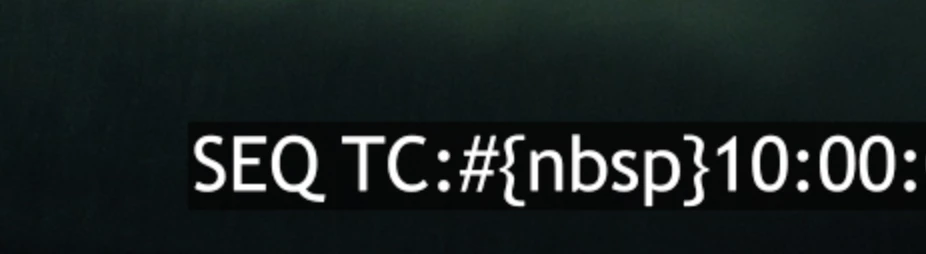
I use the newest Premiere Pro 24.1 and Media Encoder 24.1.1.
I use the effect Metadata & Timecode Burn-In on a Adjustmentlayer (Metadata: Sequence Timecode, Metadata Label: checked, Field Symbol: unchecked, Format: SMPTE, Time Display: Source Frame Rate)
If i uncheck the Metadata Label it turns out fine. I think the space between the label and the actual timecode is not rendered correctly (nbsp = no break space). Exported directly in Premiere Pro everything is fine. Also tried switching from hardware to software in mediaencoder, same issue.
This is really annoying, when we are mastering and have to export like 60 Timelines at once. You cant export each timeline sperately in Premiere Pro. This is a huge drawback for us, so we are already looking into another NLE for mastering if this is not fixed soon.
Hope someone can help me?
Best Daniel
 AdChoices