


No Audio when exporting to Media Encoder
After Effects v23.0
Media Encoder v23.0
Windows 10
64GB Ram
Video Card: Nvidia GTX 1080
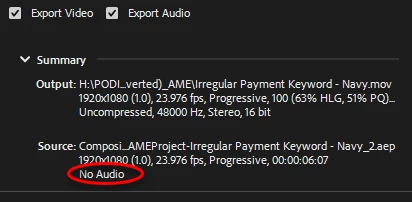
In AE I have an animation I'm exporting, it has a wav file. A normal boring 16bit 44.1KHz audio file. I can play it back just fine in AE, I can hear it, and it will even render out fine with out using the Render Queue. Using the exact same settings to render it in Media Encoder and it refuses to output audio. If I look at source settings it refuses to see that any audio exists. It randomly works, having done NOTHING differently. It can be 2pm and ME will render audio, if it's 4pm and a dog barks, it will stop working. I want to use Media Encoder so I can queue work. I've read 1000000 posts about this, none of them appear to have my issue where the source shows no audio. I've also had a tech get into my computer and wipe out everything, reset the universe and it worked fine for 1 day. Then it rained outside and now it doesn't. It would be nice if I didn't have to get a tech to make this work everytime.
 AdChoices