


Participant
November 19, 2025

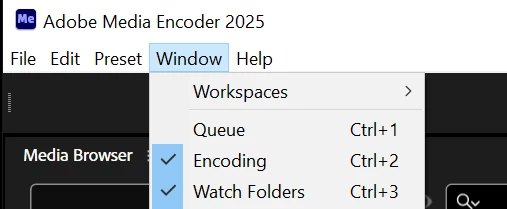
Queue window not showing up in Adobe Media Encoder 25.6 workspace

  • November 19, 2025
  • 3 replies
  • 33 views

This seems to be a bug in the latest version of Media Encoder (25.6) No matter what I do, whether it's deleting the preferences folder(s) or reverting the workspace and even try and toggle it with the keyboard shortcut Ctrl-1, the Queue window will not show up. I rolled back to base version 25 and the Queue window has returned, so this is particularly odd. Think it's a bug.


3 replies

ChWard
Community Manager
Community Manager
November 21, 2025

You can hold the shift key mofifier and then either click on the AME icon in the taskbar, the .exe or click open in the CCD app. I just tested on my Win11 machine and it works. I will ask for someone to double check on Win10 though.

Participant
November 21, 2025

That looks like a really useful options menu. I actually saw some information on this earlier, but was unable to get this menu to launch. I'm running Window 10. Do I hold shift when I click the shortcut in the start menu, or while in Creative Cloud launcher itself? Shift didnt seem to work for either. which is why I ask!


Thanks for the reply.


ChWard
Community Manager
Community Manager
November 19, 2025

Hmm that's strange. Could you launch the app while holding the shift key? You can then reset app preferences. cache, etc. Wonder if the panel shows up then.