Luis Azcona
Inspiring
November 8, 2023

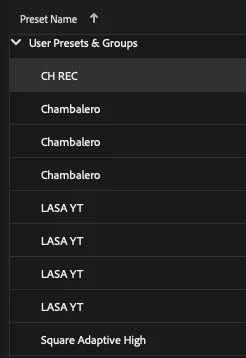
Saved Presets Keep Duplicating! -

  • November 8, 2023
  • 5 replies
  • 314 views

Either I'm missing something or AME is just super messed up lately. I have a different thread about how I can't automatically use "Entire Sequence" as a source range when I use a shortcut to send a sequence from Premiere to AME, and now this!

I just wanted to save a new preset, but it keeps on duplicating my old ones, and when I delete the copies, the remaining preset ERRORS when I use it.

Bro, AME is very frustrating since the past 2 updates!

5 replies

Adobe Employee
November 15, 2023

Or OneNote. It is totally possible that you User/Documents/Adobe/Adobe Media Encoder … is managed/touched by another software that might interfere.

Luis Azcona
Inspiring
November 15, 2023

I am not sure, do you suspect that this might be the issue? I will check it out.

Adobe Employee
November 13, 2023

I am very sorry for your issues.


I just verified and created a new Export Preset in the latest official release Adobe Media Encoder 24.0.3.2 on macOS 14 (M1 MacBook Pro 16", 2021). I was not able to reproduce your issue. Do you have any Cloud Syncing turned on?

Luis Azcona
Inspiring
November 9, 2023

I'm on Macbook M1, Ventura 13.3.1(a), and yes, my AME is 24.0.2
Bro please help. Days are less pleasant when workflow is clogged.

Adobe Employee
November 9, 2023

I am very sorry for your issues. Which OS are you on? Is this AME 24.0.2?