



ESSTLL3
Inspiring
June 28, 2023

Weird color when exporting on ME

  • June 28, 2023
  • 10 replies
  • 582 views

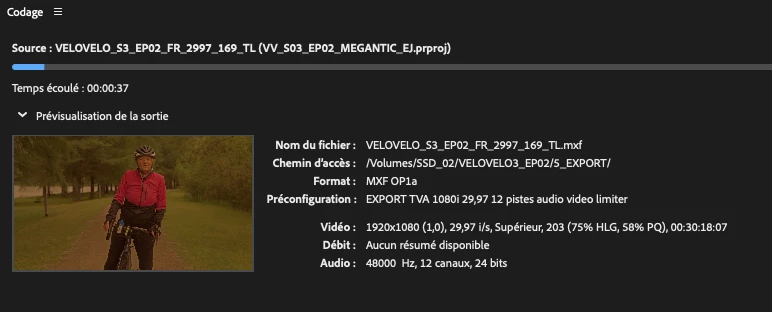
My export comes with weird color : yellow/unsaturated when exporting on Media Encoder (see pictures to compare) Even with different settings (had to export projects H.264 and MFX). When I render directly on Premiere it is fine. Someone could help me with that?

 

10 replies

EckiAME
Community Manager
Community Manager
August 21, 2023

Thanks for the update, Estelle. I am happy that it works for you again!

ESSTLL3
ESSTLL3Author
Inspiring
August 10, 2023

***UPDATE : Since I unchecked the "Import sequences natively" box in AME settings, it works fine. It takes a little more time tho to export tho.

Adobe Employee
July 5, 2023

I will have the Color guys have a look at your ptoject. I am not an expert here. I just observed that it looked "more normal" without the input LUT in Premiere Pro.

ESSTLL3
ESSTLL3Author
Inspiring
July 4, 2023

Thanks for your answer. Yes I have a LUT, and I need it for the color correcting cause I made the ajustments with that. So I should disable the LUT for rendering with AME? My color correction would stay the same on the exported video? Thats weird because it worked perfectly before.


Also, now it seems to works normally for most of my exports since I disabled the "Import sequences natively" checkbox, but it's a little bit longer to load the sequence on AME and render.

Adobe Employee
July 4, 2023

Thanks for the project and media. Is it intentional that you have an input LUT applied? If you turn that off, things look more normal to me.

ESSTLL3
ESSTLL3Author
Inspiring
June 28, 2023

yes I can try

Adobe Employee
June 28, 2023

Would you be able and willing to share the project and media for investigating? I can private message you the instructions in this forum.

ESSTLL3
ESSTLL3Author
Inspiring
June 28, 2023

The box "Import sequences natively" is already checked. I havent changed the color management, it seems to be all in Rec709 as usual. But maybe something changed with the update? The problem came from nowhere, last week it was fine...

Adobe Employee
June 28, 2023

Are you using any kind of color management in Premiere Pro? Does toggling "Import sequences natively" in AME change anything?

ESSTLL3
ESSTLL3Author
Inspiring
June 28, 2023

Precisions : I'm on the most recent versions of both softwares and IOS (Macbook pro 2021 M1 32Go RAM). The pictures and graphic elements' colors are fine, it is only the footage parts that are exported with weird colors.