Participant
June 2, 2023

Audition does not show markers in Markers Panel

  • June 2, 2023
  • 14 replies
  • 3117 views

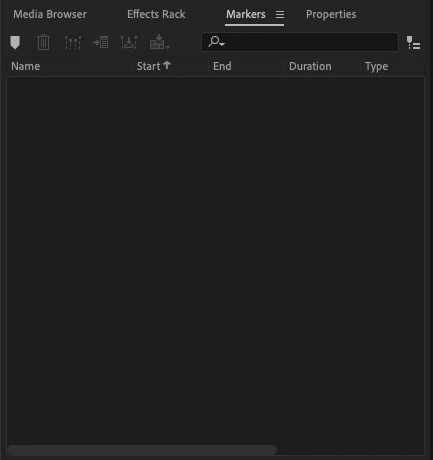
Issue: Audition does not show any markers in the Markers Panel when adding markers to a multitrack session.

  • Audition Version: 23.3.0.55
  • OS Version: macOS Monterey 12.1


Steps to Reproduce:

  1.  Create a new multitrack session and add audio file to a track
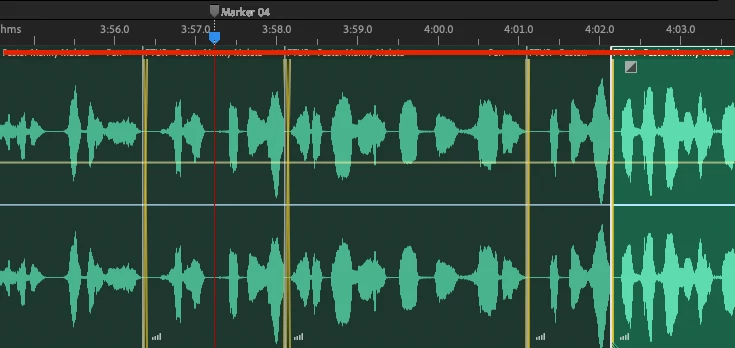
  2.  Add markers to any point in the timeline and Press M to add a marker.


Expected Result: Audition should list the marker in the Markers Panel where you can edit its position (and end, if ranged marker) and change its type.


Actual Result: Audition creates a marker but not list it in the Markers Panel, even after restarting the application.

14 replies

Adobe Employee
August 2, 2023

@Celestial_self0D44 Audition supports two types of markes - "Session Marker" and "Clip Marker". When a clip is selected then Marker Panel shows "Clip Marker" for the selected slip. If clip does not contain any marker, panel would be empty. When none of the clip is selected, Marker Panel would show Session marker.
I think in your case clip was selected and Marker panel was empty as you have applied session marker(not clip marker)

Participating Frequently
July 6, 2023

I have the same issue. I think trying to tell them is a waste of time though. Thye just don't care about bugs. I think their attitude is that the user will deal with whatever they produce. I have been chasing a bug for years now with using automation and a plug-in and they still won't adress it and responding to me is zero unless I am on social media. Then it's thank you and we are looking into it.
Sorry to sound negative but these big companies are eliminating customer service. They just don't care.

So I have been dealing with the Markers issue for quite some time as well. I'm always hesitant to update because so many times the update brings some other issue I have to deal with.

Celestial_self0D44
Participating Frequently
June 28, 2023

To replicate the error, use the Move Tool to click on a clip within a track. The Marker list disappears. Click in empty space after the clips or in another track, or click the heading of an empty track, the Marker list reappears.

Will
Celestial_self0D44
Participating Frequently
June 28, 2023

I found a way to work around this... if you click in the blank space to the right of the recorded clips on a track, the marker list reappears, at least most of the time.

Will